
Google Map Pack: How to Get Into the Top Three
Learn how the Google Map Pack picks its three local businesses, what relevance, distance and prominence mean, and what owners can change this week.
Table of Contents
- 1Introduction
- 2Why Three Map Slots Decide Who Gets the Call
- 3What the Customer Sees First
- 4Run Your Baseline Check Today
- 5The Three Factors Google Uses to Pick Your Spot
- 6What You Can and Cannot Change
- 7A Concrete Example
- 8Profile Details That Shift Your Placement
- 9Keep Expectations Straight
- 10Reviews, Trust and the Rules That Keep Them Safe
- 11What Breaking the Rules Costs
- 12A Safe Routine That Fits Daily Work
- 13How to Check Your Position from Several Neighborhoods
- 14Keep a Log You Will Actually Use
- 15Common Reasons You Are Missing the Top Three
- 16How to Act on the Pattern
- 17What to Do About Suspicious Competitor Reviews
- 18A Documented Response, Step by Step
- 19Multi-Location and Service-Area Businesses
- 20Run a Profile Audit This Week
Introduction
You are open, your staff are ready, and your phone stays quiet. A customer two streets away searches on Google Maps, taps one of three businesses, and calls them instead. That isn't bad luck. It's how local search works when your listing doesn't show in the top three. The fix isn't a one-time setup. It's a weekly routine built around your Google Business Profile, honest review requests, and checks from the neighborhoods you serve.
Why Three Map Slots Decide Who Gets the Call
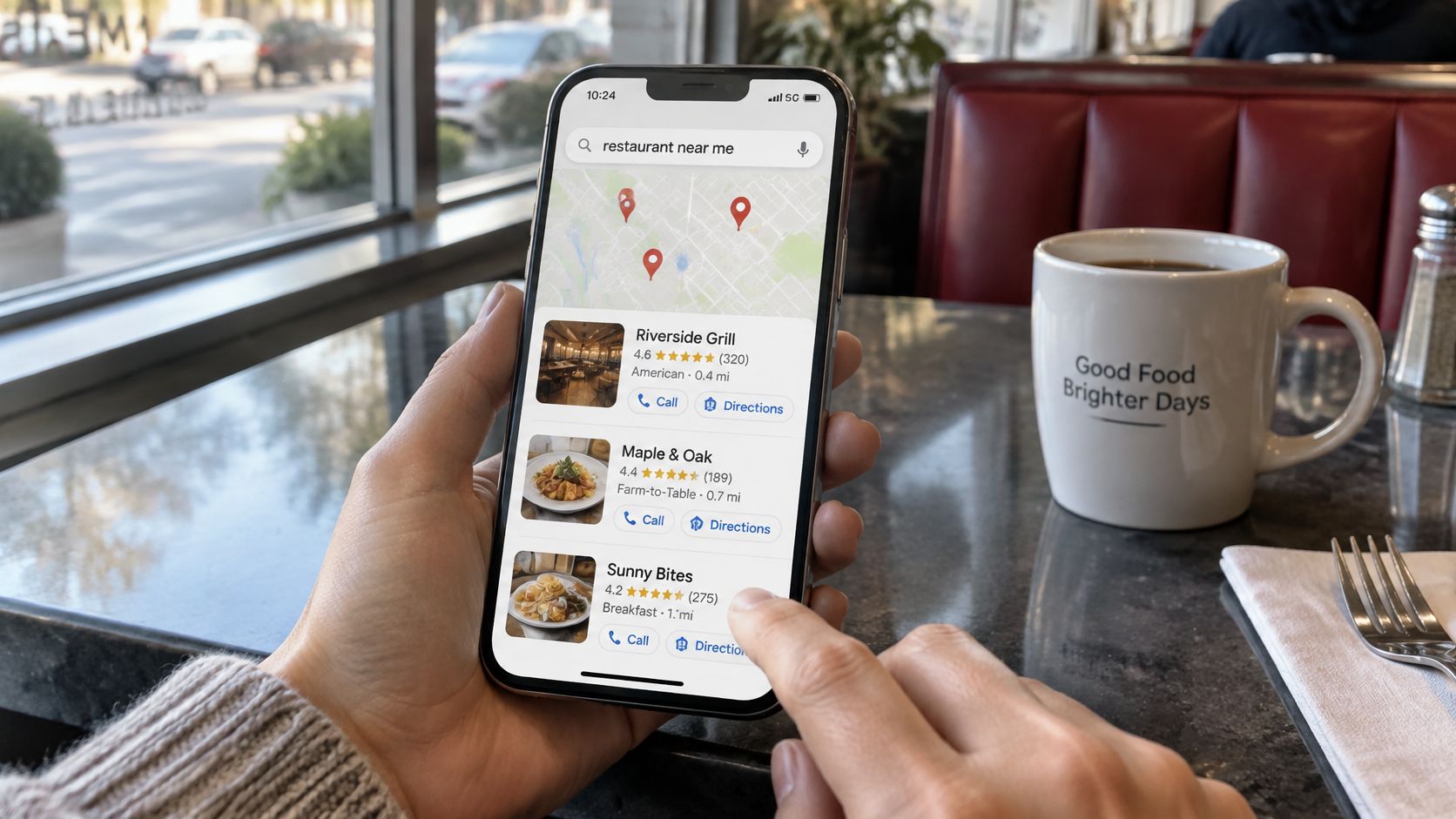
A diner types "restaurant near me" on a phone. Google shows a map and three businesses under it. That block is the Google Map Pack, also called the local pack or map results. It sits above the longer list of local results.
Each of the three listings gives the customer enough to act without opening a website. They see your name, category, star rating, review count, and hours. They also get buttons to call, get directions, or visit your site. For someone who is hungry, in pain, or looking for a room tonight, that's usually enough to choose.
What the Customer Sees First
Say you run a salon. A person searches for a haircut nearby and compares three salons side by side. One shows open hours and a clear service list. One has more reviews. The third has no photo of the shopfront. The customer doesn't study your website first. She picks from what's on that screen.
The same pattern holds for a clinic or a hotel. If you're not in the three, you are in the longer list below, and many searchers never get there. You're not competing with every business in town at that moment. You're competing for three slots for that search, from that spot, at that time.
In 2025, 44% of local searchers clicked Local Pack or Map Pack results, according to RedLocalSEO data cited by Monday Digital. Treat that as a description of one set of searches, not a promise for your street. It still shows why owners watch these slots so closely. A large share of attention lands in a very small block.
If you want to understand what profile data sits behind those listings, local SEO scraping insights from WebscrapingHQ can help you see how competitors present categories and details. Use it to spot gaps in your own listing, not to copy claims you can't back up. Your profile has to match what you actually offer.
Three slots is not a ranking report. It's a shortlist customers use to call, visit, or book.
Run Your Baseline Check Today
Do one test before you change anything. Open a private window on your phone. Search your main service plus your town, for example "Thai restaurant Austin" or "dentist near me" from your shop. Write down the three businesses shown, in order.
Note whether you're one of them, and note each competitor's review count and primary category. That short note is your baseline. Without it, you won't know whether later changes helped, hurt, or made no difference.
The Three Factors Google Uses to Pick Your Spot
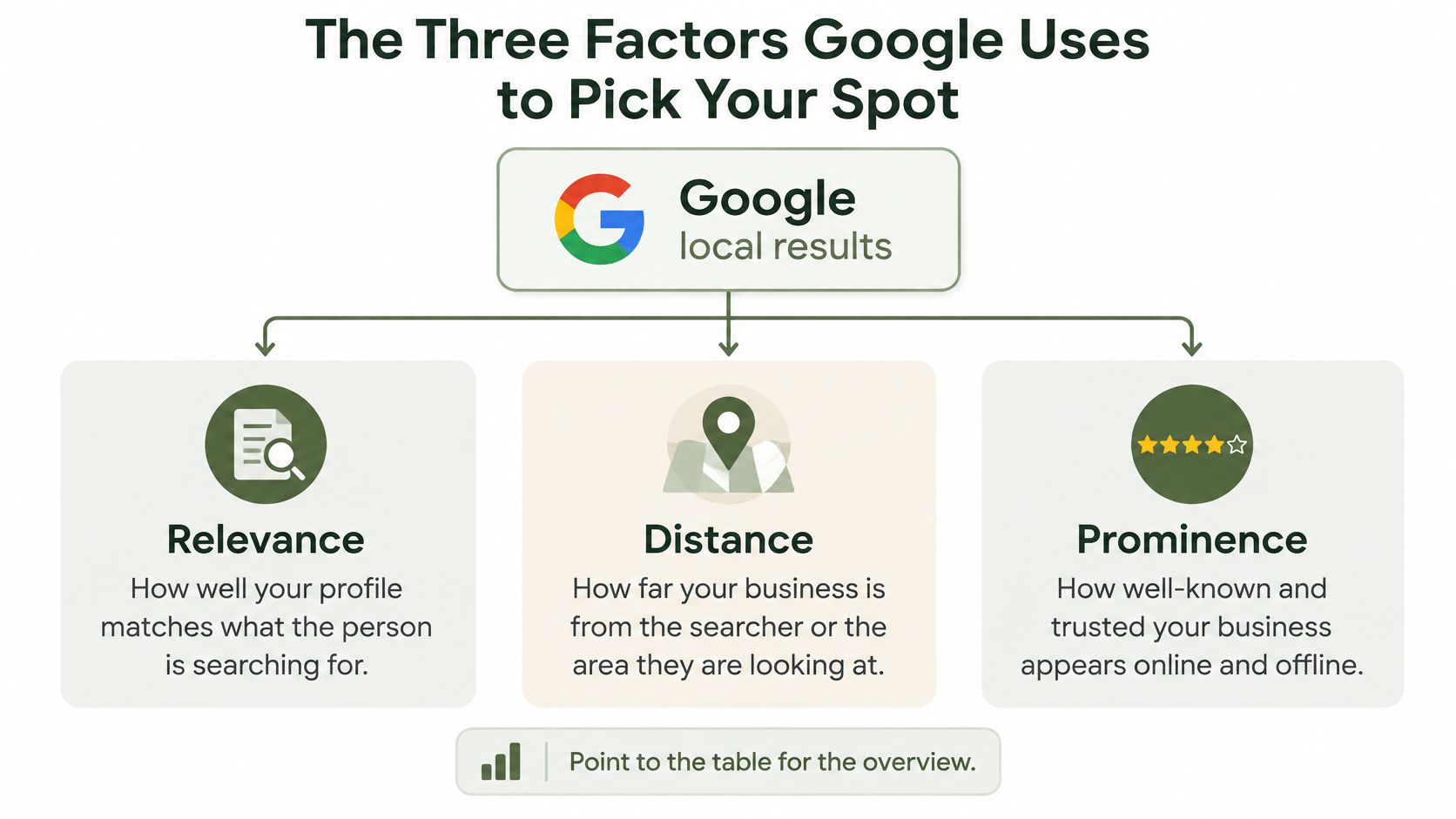
Google says local results are based primarily on relevance, distance, and prominence, according to Google's guide to local ranking. Relevance means how closely your Google Business Profile matches the search. Distance measures how far your business is from the searcher or the location named in the search. Prominence reflects how well known the business is, using information such as links, articles, directories, and other signals across the web.
That same guide also states that review count and review score factor into local search ranking, and that more reviews and positive ratings can improve local ranking. Those are documented ranking factors. You can state that plainly to your team. You can't promise a spot from them, because Google weighs them with the other factors for each search.
What You Can and Cannot Change
Distance is the hard limit. If someone searches from the other side of the city, a closer match has an advantage you can't edit away. Don't spend this week trying to trick location. You can't move your building, and a false address creates bigger problems than a missing slot.
Relevance is where most owners have unfinished work. Categories, services, hours, and your description tell Google what you do, so complete and accurate details help it match you to the right searches. A vague profile forces Google to guess, and it will pick a clearer competitor instead.
Prominence builds slowly. Directory listings, local articles, links from real local sites, and offline recognition all add up over time. You influence it, but you don't control the pace. That is why a business that has been listed consistently for years can be hard to pass in a month.
| Factor | What Google checks | What you can change |
|---|---|---|
| Relevance | How closely your profile matches the search, including categories, services and description | Yes, by keeping details accurate and specific |
| Distance | How far your business is from the searcher or the place named in the search | No, you cannot move your building |
| Prominence | How well known the business is across links, articles, directories and offline mentions | Partly, through citations, press and directory listings over time |
| Review count and review score | The number and average rating of your Google reviews | Yes, through a steady routine of genuine review requests |
Relevance
Distance
Prominence
Review count and review score
A Concrete Example
Say a suburban clinic lists only "clinic" as its category and one line about general care. A nearby clinic lists physiotherapy, sports injury treatment, and back pain services with clear names. When someone searches for back pain help, the second profile matches the words and intent more closely. Distance still counts, but relevance gives Google a reason to consider the specific clinic.
I would start by writing one honest line for your business. Which factor is weakest right now? If your services are thin, relevance is the job. If competitors have far more reviews, your review routine is the job. If nobody outside your street knows you, prominence is the longer project. That choice keeps you from fixing everything at once and finishing nothing.
Profile Details That Shift Your Placement
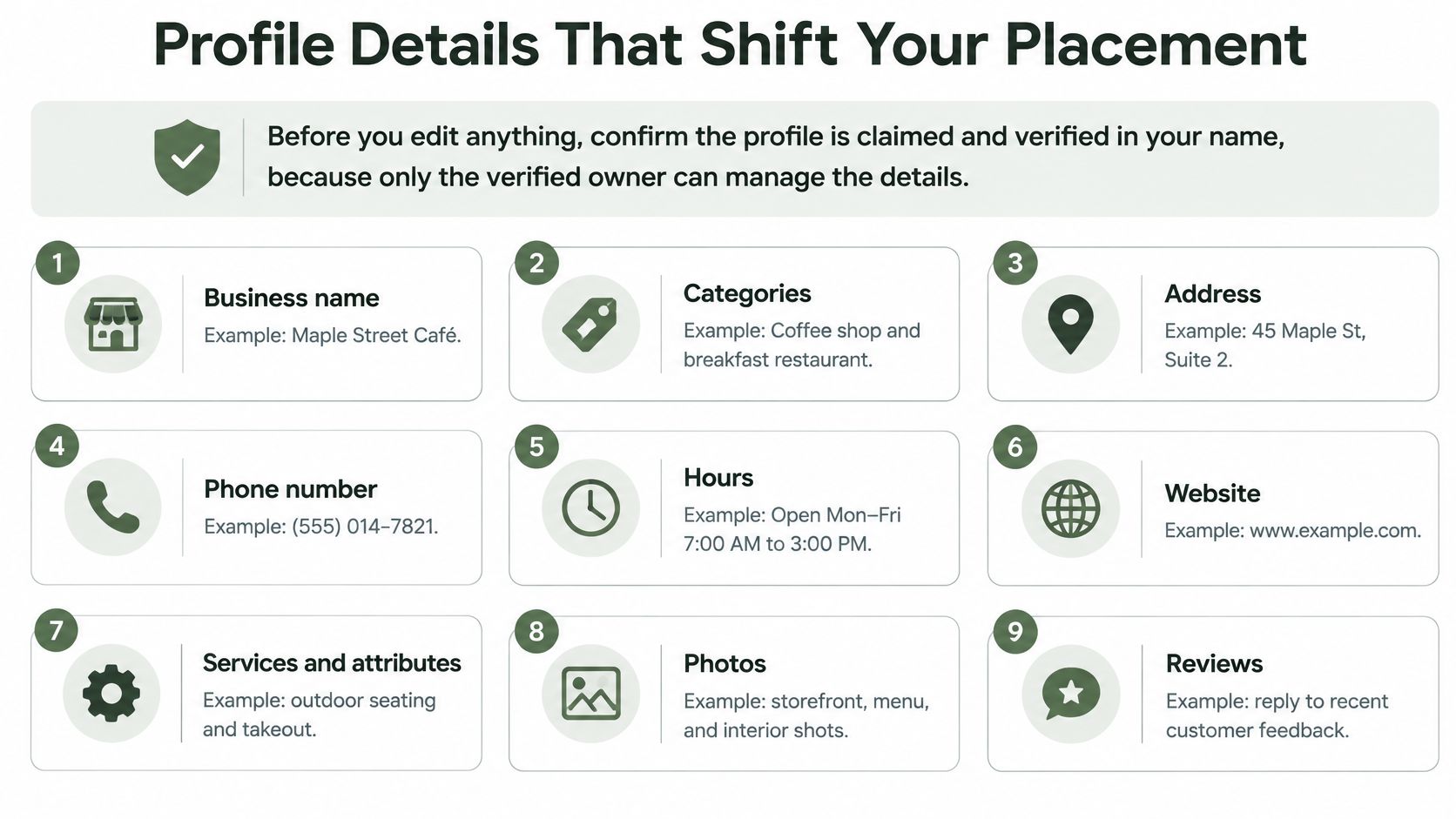
Before you edit anything, confirm the profile is claimed and verified in your name. Only the verified owner can manage these fields properly, and staff turnover often leaves access with a former employee or agency. Sort ownership first. Every later fix depends on it.
Work through the fields in this order. It puts the strongest matching signals first and leaves seasonal updates for last.
For a fuller walk through how category choices work, read the guide to choosing Google Business Profile categories before you add or remove anything. Categories are worth getting right once, because churning them every week makes your own results harder to read. You won't know which change moved anything if you change five fields a day.
Owners who want outside help comparing approaches can review Google Business Profile optimization strategies and then check every suggestion against what your business does. Outside advice is only useful if the fields still describe your real services. A Thai restaurant that lists "Thai restaurant," takeout, lunch service, and vegan options matches more honest searches than one that lists only "Restaurant." The detail is true, and customers can act on it.
- Primary category: Pick the closest match for your main business, such as "Hair salon" instead of a broad word like "Beauty." This is the label Google leans on most when it decides what you are.
- Secondary categories: Add only services you provide under the same roof. A dental practice might add cosmetic dentistry if it does that work. Don't add a category to chase a search you can't serve.
- Services: List each service by the name customers use, with a short description and a price if you publish one. "Men's haircut," "root canal," and "water heater repair" beat "services" every time.
- Hours: Set regular hours, then holiday hours and special hours for closures or events. Wrong hours cost trust fast, because a customer who drives to a closed door rarely gives you a second chance.
- Business description: Name your services, your neighborhood, and the languages your staff speak. Write it for a person choosing between three options, not as a list of keywords.
- Attributes: Mark what applies, such as wheelchair access, outdoor seating, reservations, or takeout. Customers filter on these details, and missing attributes can remove you from a shortlist you never see.
- Photos: Add the outside, the inside, the team at work, and the menu or treatment room. Refresh them each season. A photo of an old storefront or last year's menu confuses people on arrival.
- Google Posts: Use posts for announcements, seasonal offers, and event notices. They keep current information visible on Search and Maps.
Keep Expectations Straight
Posting activity is not a confirmed ranking factor. Treat posts as a way to help customers decide, keep information current, and show the business is active. Don't post daily in the hope that frequency alone moves you into the Google Map Pack. Accurate categories and services deserve your time first.
Monthly habit: Complete the fields once, then review them on the first Monday of each month and fix only what has changed.
Reviews, Trust and the Rules That Keep Them Safe
Reviews do two jobs. Review count and review score are documented local ranking factors, and reviews also shape whether a customer trusts you enough to call. A strong rating with no recent activity looks stale. A steady flow of genuine reviews shows the business is serving people now.
The rule that governs all of it is simple. Reviews must reflect genuine, unbiased experiences. According to Google's fake engagement policy, Google prohibits paying for reviews, offering discounts or free goods for reviews, asking customers to remove negative reviews, and selectively requesting only positive reviews. You also must not discourage negative reviews or pressure customers to include specific wording, name an employee, or leave a particular rating.
What Breaking the Rules Costs
Enforcement can hit the whole profile, not just one review. Google says fake engagement violations can lead to temporarily blocking new reviews, temporarily unpublishing existing ratings, and displaying a warning that fake reviews were removed. That warning is visible to the same customers you were trying to impress.
This is why "more reviews, faster" is a risky plan. A sudden burst, repeated wording, or a campaign built on incentives can create a policy problem that lasts longer than the short lift you hoped for. Slower and clean beats fast and risky.
| Practice | Allowed | Reason |
|---|---|---|
| Invite every customer after a visit | Yes | Requests must reach all customers, not only the happy ones |
| Offer a discount or free item for a review | No | Google prohibits paying for or rewarding reviews |
| Ask only the customers you expect to rate you highly | No | Selective requests are prohibited |
| Ask a customer to remove a negative review | No | Google prohibits asking customers to remove reviews |
| Coach customers on wording or the rating they give | No | Reviews must reflect a genuine, unbiased experience |
| QR code on the counter or receipt for all customers | Yes | Every customer gets the same equal option |
| Many reviews arriving in one day | Risky | Sudden bursts can trigger fake-engagement checks |
Invite every customer after a visit
Offer a discount or free item for a review
Ask only the customers you expect to rate you highly
Ask a customer to remove a negative review
Coach customers on wording or the rating they give
QR code on the counter or receipt for all customers
Many reviews arriving in one day
A Safe Routine That Fits Daily Work
Ask every customer the same way after each visit. Use a text, an email, or a card or QR code at the counter. Keep the wording neutral and let the customer choose what to write and what rating to give.
Say you run a hotel. Send the same checkout message to every guest, in the guest's language, with no discount attached. Say you run a contractor business. Send the same request after final payment on every job, whether the job felt easy or difficult. Consistency is what keeps the process fair and defensible.
Responding to reviews helps trust and shows you read feedback. It is not a confirmed cause of ranking, so reply to serve the reader, not as a ranking trick. A short, specific reply to a complaint tells the next customer how you handle problems, which matters even when the rating itself does not move.
If you want more detail on the ranking side, the overview of how Google reviews influence local SEO separates documented factors from trust effects. Keep that distinction in your staff training. Nobody on your team should promise that replies or review text will move your position.
Before any new campaign, ask one question. Would this request reach every customer, or only the ones I expect to be happy? If it's the second answer, stop and rebuild the process.
How to Check Your Position from Several Neighborhoods
Your position isn't one number. A clinic can sit in the top three near its building and be absent two streets away. Distance changes with the searcher, so a single check from your own desk tells you very little.
Use this routine once a week. It takes a phone, a private browser window, and a simple log.
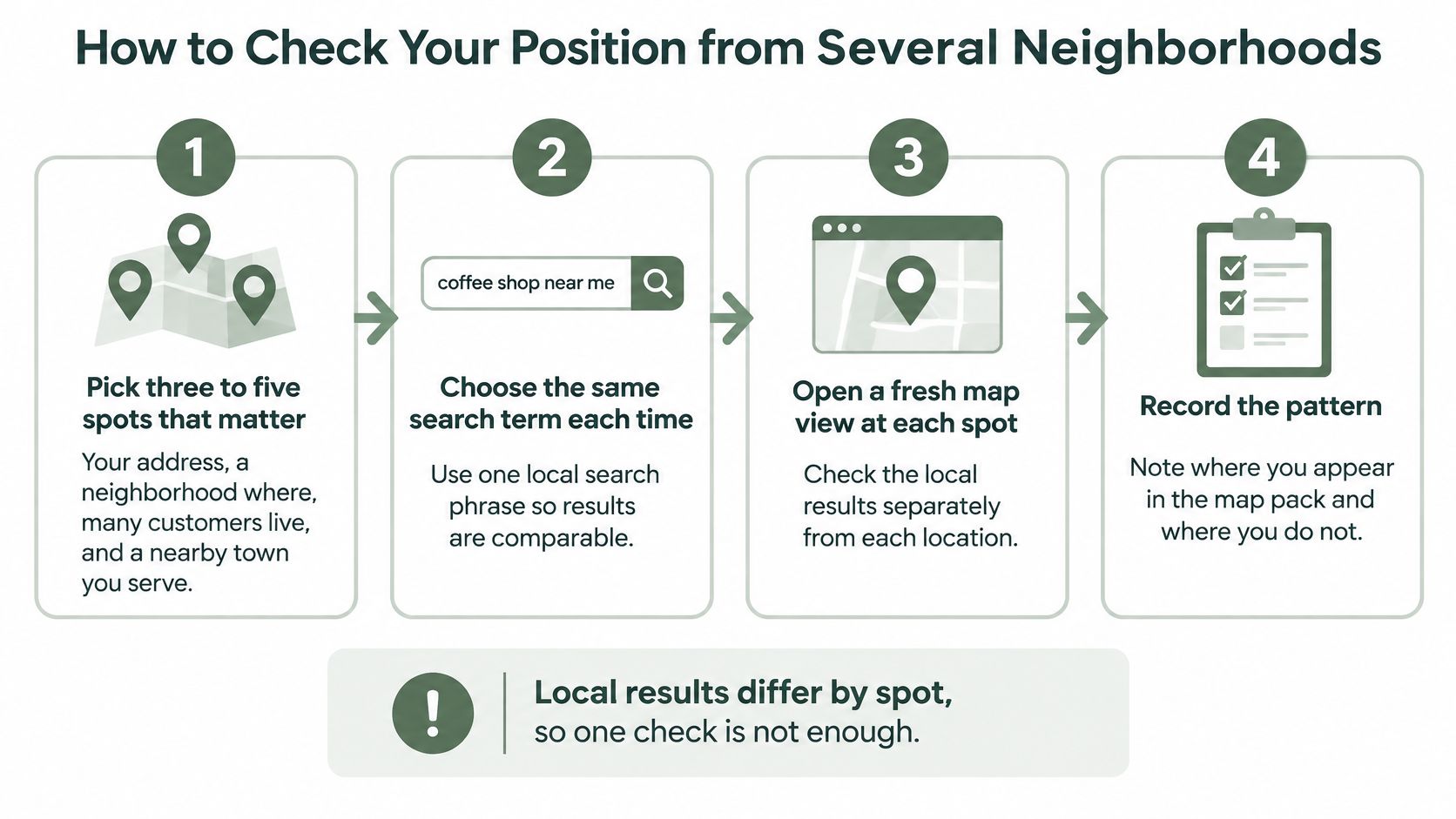
- Pick three to five spots that matter. Use your address, a neighborhood where many customers live, and a nearby town you serve. Local results differ by spot, so one check is not enough.
- Choose the search terms customers use. Test "dentist near me" and "dentist" plus the neighborhood name. Use the same terms every week so the results stay comparable.
- Search in a private window on a phone. Confirm the map is centered on the spot you're testing before you read the results. A cached location from your last search will skew the check.
- Record the three businesses shown. Write the order exactly as displayed and note whether you're one of them. Screenshots help when you compare weeks later.
- Note the gap, not just your place. If you appear, record your position. Also record the closest competitor's category and review count. That tells you whether the gap looks like relevance, reviews, or distance.
- Repeat at the same time each week. Run it weekly for four weeks before you judge a change. Results shift by time, searcher, and competitor activity.
Keep a Log You Will Actually Use
A spreadsheet is enough. Use five columns.
Owners who test many spots by hand often look at local search ranking software to organize the same checks. A tool only helps if you keep the searches and spots consistent. Changing terms every week gives you more data and less meaning.
Position is local. Check where your customers stand, not where your desk sits.
Read the pattern before you act. Missing in one neighborhood where you're farther away is a different problem from missing everywhere, including outside your own door. The first may be a distance limit you have to work around with relevance and prominence. The second usually points to a profile or review gap you can fix. Your log keeps you from treating both problems the same way.
- Date: The day and time you ran the check.
- Spot: The neighborhood or town you centered the map on.
- Search: The exact words you typed.
- Top three: The three businesses in order.
- Your result: Your position, or "not shown" if you're absent.
Common Reasons You Are Missing the Top Three
Start with the symptom you can see. Owners often jump to reviews because stars are visible, but a missing slot can come from narrow services, old hours, or a simple distance limit. Match the symptom to the likely cause before you spend money or staff time.
| Symptom | Likely cause | First fix |
|---|---|---|
| Missing for broad searches such as 'dentist near me' | Categories or services too narrow | Add the secondary categories and service names you truly offer |
| Showing near home but not in the next town | Distance and prominence limit reach | Build listings and mentions in that town, and accept the distance limit |
| Competitor ahead after steady review growth | Review count gap | Start a consistent request routine for every customer |
| Profile shows old holiday or special hours | Hours not updated | Update regular, holiday and special hours this week |
| Competitor jumped after a burst of new reviews | Possible fake reviews | Document the pattern and report it under policy, as the next section explains |
| Rating dropped after one bad week | Normal variation with few reviews | Respond to the reviews and keep asking every customer |
Missing for broad searches such as 'dentist near me'
Showing near home but not in the next town
Competitor ahead after steady review growth
Profile shows old holiday or special hours
Competitor jumped after a burst of new reviews
Rating dropped after one bad week
How to Act on the Pattern
If you're missing for broad searches, check categories and services first. A salon that offers balayage, kids' cuts, and wedding styling but lists none of them is asking Google to match searches it never claimed. Add what you do, remove what you stopped doing, and then wait long enough to read the result.
If you show near home but not in the next town, don't try to bend your address. Build accurate listings and local mentions in that town and accept that closer businesses keep an edge there. Your effort is better spent winning the neighborhoods where distance is already in your favor.
A review count gap needs patience, not a push. Say a salon in a growing suburb lost ground after a competitor added services and kept earning steady reviews. The right order is to fix the service list first, then run the same honest request routine after every appointment. Trying to close a gap built over months in one weekend invites the risky patterns covered earlier.
Old holiday hours are the cheapest fix on the table. Update them the same day you spot them. A rating dip after one bad week usually reflects small numbers, so reply with care, fix the operational cause, and keep asking every customer. One difficult week should not trigger a new discount, a new script, or pressure on unhappy customers to change a review.
Order of work: Fix hours and categories first because they take a day, then run reviews and citations because they take months.
What to Do About Suspicious Competitor Reviews
The most common mistake is reporting every review you dislike. An unfair opinion from a real customer is painful, but it isn't automatically a policy violation. Reporting honest complaints wastes your time and weakens your record when you later report a real problem.
Separate two things first. A real customer can be angry, mistaken about details, or harsher than you think is fair. That is still an opinion from an experience. A policy problem involves fake engagement, incentives, or misleading content that does not reflect a genuine, unbiased experience. Your report has to show the second thing, not the first.
A Documented Response, Step by Step
Say a clinic sees five one-star reviews in one week from accounts with no other activity, all using similar phrases about a service the clinic doesn't offer. That is a pattern worth documenting. Compare it with one detailed one-star review naming a real appointment time and a real staff interaction. The second review may be unfair in tone, but it reads like a genuine visit and should get a calm reply, not a fake review report.
Enforcement can affect an entire profile, which is why the calm route protects you. Public arguments under reviews, mass reporting without evidence, and counter campaigns make your business look like part of the disorder. Clear screenshots, dates, and a narrow report make you look like an operator who checked the facts.
Report the pattern, not the feeling.
- Save evidence before anything changes. Screenshot each review with its date, reviewer name, and full text. Save the profile details you can see. If reviews disappear, your record still shows what happened and when.
- Look for a pattern across reviews. Note many reviews in the same week, similar wording, accounts with no other visible history, or claims from people who never visited. One odd review is weak evidence. A coordinated pattern is stronger.
- Decide if it breaks policy. Ask whether the review could be a real visit you handled badly. If yes, handle it as service feedback. If the pattern points to fake engagement, move to reporting.
- Report only the relevant category. Use Google's report option and match the claim to the policy issue you documented. Don't add extra claims about motive or identity that you can't prove.
- Do not retaliate with your own burst. A sudden push for reviews, an incentive, or coaching happy customers can create a second policy problem on your profile. Keep your normal request routine running for every customer.
- Keep a record of the outcome. Log what you reported, the date, the category you chose, and what Google did. If the pattern repeats, your history shows it is not a one-off complaint.
Multi-Location and Service-Area Businesses
Each location needs its own Google Business Profile with its own address, hours, categories, photos, and review routine. Don't copy one site's details onto another. Duplicate details confuse customers and don't help either location match its own neighborhood searches.
Service-area businesses, such as plumbers, electricians, and mobile salons, can hide the street address if customers don't visit them. Set service areas only to towns you cover. A contractor with a yard in one town should show that address only if customers visit the yard, then list the towns its crews serve.
A hotel group with four properties keeps four profiles and four logs. For practical structure across sites, Boocoo's multi-location SEO advice is useful reading before you standardize templates. Run the neighborhood check near each site, because distance works per location. One location, one profile, one log.
Run a Profile Audit This Week
Start with one check and one fix. The free Google Business Profile scan from RecensioAI shows your score, who ranks above you nearby, and how many reviews you need to pass them, in 60 seconds. It also flags weak spots such as missing categories, services, or hours. Treat it as a list to verify in your profile, not a grade to chase.
Take the first weak spot and fix it before Friday. Follow the field order that puts category and services before photos and posts. Then run the neighborhood check with the same searches and spots, and write the result in your log. That entry is your baseline for the next four weeks.
If your review count trails the businesses above you, start a request routine that reaches every customer with no incentive attached. Connecting the Google Business Profile once makes reviews come in automatically, so you can watch new feedback in one place instead of checking manually. Keep the week simple. One fix a day, one log entry, and no category changes without a reason. Run the scan today and write down the first weak spot it names.
---
If keeping categories, hours, review requests, replies, and neighborhood checks running every week is more than your team can carry, RecensioAI B.V. can run that routine for your Google Business Profile and reviews in one place. Start with the free scan to see your score, nearby competitors, and first weak spot, then fix that item this week.
Frequently asked questions
You might also like
Handpicked articles for you
Hotel Review Management: Automate Post-Stay Requests with Apaleo, Mews and Your PMS
A practical guide to turning hotel checkouts into timely review requests, with Apaleo live, Mews early access and flexible PMS alternatives.
Why the Business Around the Corner Beats You on Google: What 21,373 Profiles Reveal
We compared 21,373 Google Business Profiles with their three strongest nearby competitors. The gap is smaller than most owners think, but it has two sides: rating and volume.
Treatwell Review Management for Salons: One Reputation View Alongside Google
Bring your public Treatwell rating and recent reviews into RecensioAI, then combine salon signals with Google for faster, better decisions.