
Fake Google Review Removal: An Operator Guide
Learn the exact fake Google review removal process. Identify policy violations, document evidence, flag spam, and protect your local map results.
Table of Contents
- 1Introduction
- 2The Reality of Fake Reviews on Google Maps
- 3Identifying Reviews That Violate Policy
- 4The categories that matter
- 5The negative review that should stay
- 6Building Your Evidence Case File
- 7Capture the review as it appears
- 8Build a timeline for patterns
- 9Flagging and Escalating to Google Support
- 10Match the reason to the evidence
- 11Responding When Removal Fails
- 12Diluting Spam with Genuine Review Volume
Introduction
You open Google Maps before the lunch rush and see a one-star review for your restaurant from someone nobody recognizes. A clinic manager may see the same thing from a person who never had an appointment. A contractor may find several similar reviews posted close together, each describing work the company doesn't provide. The damage is immediate because future customers see those comments beside your name.
Your first instinct is to click Report review. Do that, but don't stop there. Effective fake Google review removal depends on a documented, policy-based case, not on how unfair the review feels. You need to show Google why the content violates a specific rule, preserve the evidence, and follow the escalation path when the first report fails.
The Reality of Fake Reviews on Google Maps
A fake review can look ordinary. It may mention a service, use a familiar name, and contain enough detail to seem credible. That makes the situation especially frustrating for an owner who knows the reviewer never visited, booked an appointment, stayed at the hotel, or hired the company.
Google deals with these disputes at a very large scale. It blocked or removed 292 million policy-violating reviews globally in 2025. Google says its enforcement includes automated spam detection and manual systems, and that removing a review also removes its associated star rating, photos, and videos.
That scale matters to a local operator. Your case isn't an unusual request outside Google's normal work. Review enforcement is part of how Google governs Maps. It also means Google can't remove content because an owner disputes it. The system needs a recognizable policy violation and evidence that supports it.
Practical rule: Treat a suspected attack like an operational incident. Record what happened before emotion turns the timeline into guesswork.
A restaurant may face an isolated fake review from someone who never dined there. A salon may see a former employee post about an internal dispute. A hotel may receive several reviews using similar wording. A franchise may need to coordinate evidence across locations without mixing the cases.
For background on how reviews affect a Google Business Profile and customer trust, see this guide to Google Business Profile reviews. The useful mindset is simple: fake Google review removal is a case-management task. You're not trying to win an argument with the reviewer. You're giving Google a clear reason to apply its own rules.
Identifying Reviews That Violate Policy
A one-star rating isn't proof of a fake review. Nor is an angry tone, an exaggerated complaint, or a review from a customer you remember differently. Google's guidance says businesses can report reviews that violate content rules, not reviews they merely dislike, as explained in its guidance on reporting reviews under Google Business Profile policies.
Start by separating policy evidence from business disagreement. Ask whether the reviewer describes a real interaction with your business. Then check the content itself. The strongest reports connect specific facts to a specific category.
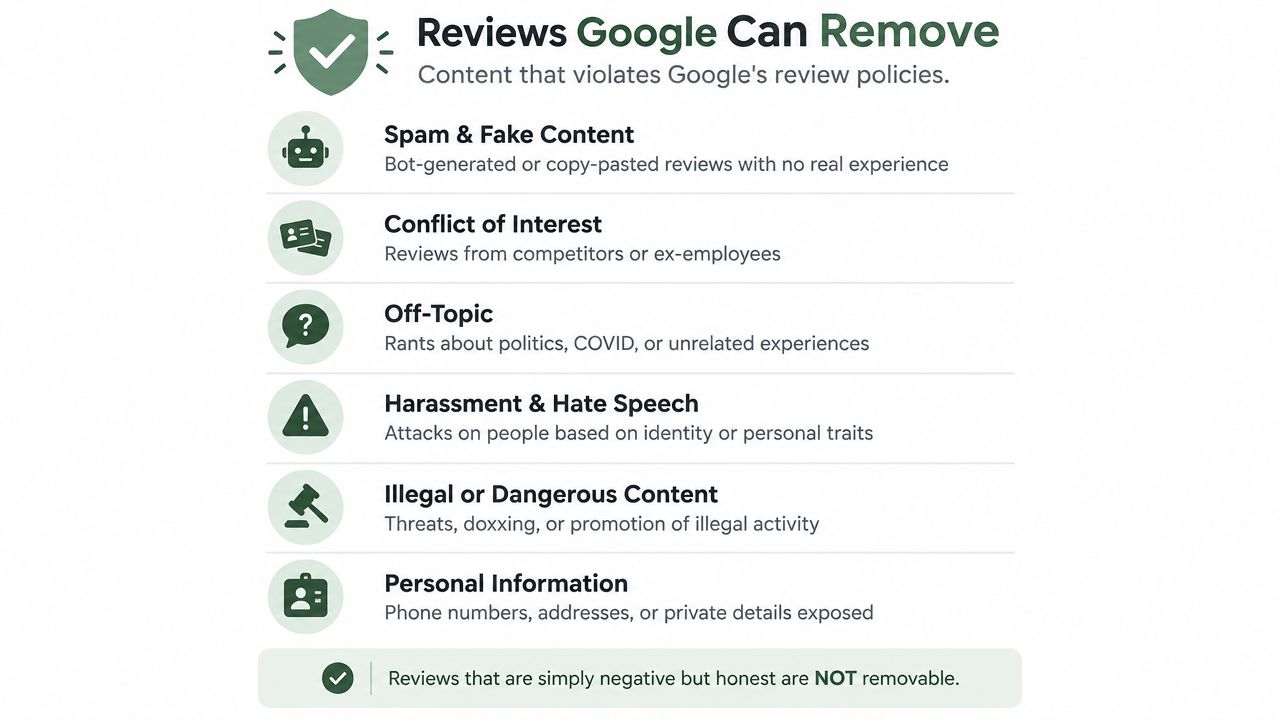
The categories that matter
Spam and fake content can include copied language, bot-generated material, or reviews that don't reflect a genuine experience. Repeated phrases across several accounts can support this theory, but similarity alone isn't conclusive. Save the examples and explain the pattern rather than just calling the reviews fake.
Conflict of interest is relevant when a competitor, former employee, or another interested party posts to damage your business. A public connection between the reviewer and a competing business can be useful evidence. Keep your description factual. Don't accuse someone of fraud unless you can support the statement.
Off-topic content doesn't concern an actual experience with your business. A political rant, a complaint about a city policy, or a comment about an unrelated company doesn't belong on your profile. A genuine customer complaint about slow service is different, even when the complaint is unfair.
Other policy concerns include harassment, hate speech, threats, dangerous or illegal content, and exposed personal information. The review must fit the category you select. Choosing “spam” for every complaint weakens the report because it doesn't show careful analysis.
The negative review that should stay
A customer can have a real but disappointing experience. They may misunderstand a policy, remember an interaction differently, or judge your service harshly. If the review still describes a genuine visit or transaction and doesn't violate Google's rules, removal is unlikely.
Use this quick test:
If the answers point to a real customer experience, shift from removal to response. A calm reply can help future readers understand your position, even when Google leaves the review visible.
- Customer connection: Can you identify a visit, appointment, booking, or service interaction?
- Content relevance: Does the review discuss your business rather than an unrelated issue?
- Policy category: Can you name the rule the review appears to break?
- Supporting evidence: Do you have records, screenshots, or a timeline that support the report?
Building Your Evidence Case File
Don't begin by writing an angry explanation to Google. Begin by creating a case file. Support teams need evidence of coordinated abuse or a clear policy breach, not just a statement that the review is unfair. Google's official process supports reporting through Maps or Search, followed by escalation through Google Business Profile Support when necessary, as described in its review removal instructions for business owners.
Create one folder for the incident. Use a file name that includes the business location and the date you first noticed the problem. Keep the original screenshots unchanged, then create copies if you need to mark them up.
Capture the review as it appears
Take a full screenshot showing the business name, reviewer name, rating, review text, and visible date. If the review includes photos or videos, capture those separately. Record the direct review link if Google provides one, and note whether the content changes later.
Your notes should answer four questions:
Avoid writing “this person is lying” as your main evidence. Write “our booking records contain no appointment matching the name or date described,” if that is what you can verify. Google can assess facts more easily than conclusions.
- What was posted? Copy the relevant wording into your log.
- When did it appear? Record the displayed date and the date you discovered it.
- Why is it suspicious? State the observable fact, such as no matching appointment or a service your business doesn't offer.
- Which rule may apply? Use a precise category, such as off-topic content or conflict of interest.
Build a timeline for patterns
For several reviews, create a simple table in a spreadsheet:
| Field | What to record |
|---|---|
| Review date | The date shown on Google |
| Reviewer name | The public account name |
| Rating | The star rating |
| Exact wording | The relevant text |
| Matching customer record | Whether you found one |
| Similarity | Repeated phrases, claims, or structure |
| Policy category | The best-fitting Google rule |
| Evidence file | The screenshot or related document |
Review date
Reviewer name
Rating
Exact wording
Matching customer record
Similarity
Policy category
Evidence file
Look for a coordinated pattern without overstating it. Reviews appearing close together, using repeated language, or describing nonexistent services may support a spam report. A single odd review is harder to establish as coordinated abuse.
Protect customer privacy while preparing your material. Share only the information Google needs, and keep sensitive records in the private support channel rather than in a public response. Your case should be short enough for a support agent to scan quickly, with the strongest evidence near the top.
What works: a dated timeline, clear screenshots, and one policy explanation per review.
What doesn't: a long emotional message with no supporting detail.
Flagging and Escalating to Google Support
Once your case file is ready, submit the report through your Google Business Profile. The process is specific because Google needs to classify the alleged violation.
Sign in to the account that manages the profile. Open the relevant location, go to the review area, find the review, select the three-dot menu, and choose Report review. Select the reason that best matches the content, then submit the report. You can also report reviews through Google Maps or Google Search.
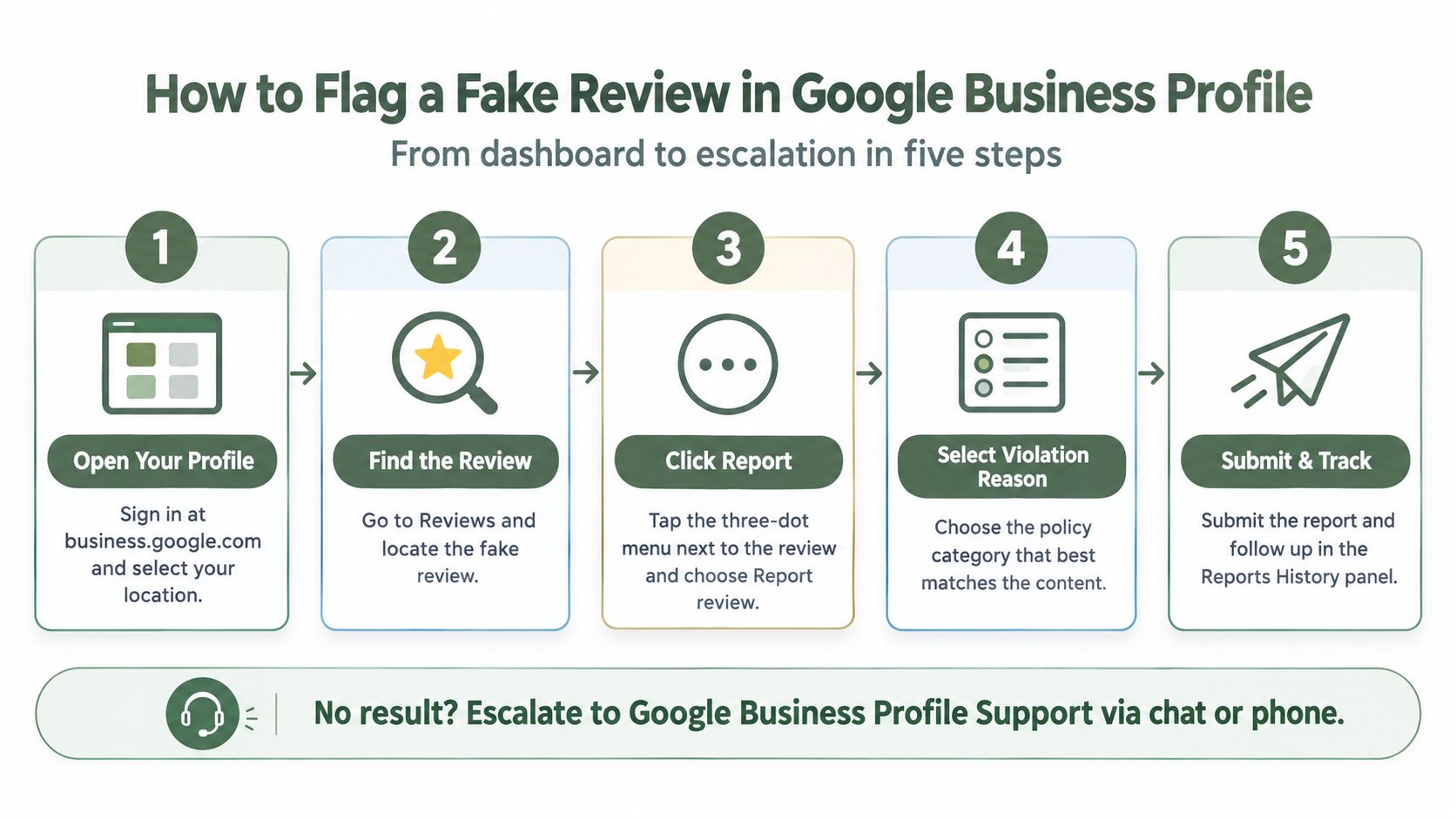
Match the reason to the evidence
Don't select a category because it sounds strongest. Select the one your case file supports. A review from a competitor may be a conflict-of-interest issue. A copied review posted across multiple businesses may be spam. A political statement unrelated to your service may be off-topic.
Report each review on its own merits. If several reviews are connected, explain the relationship in your evidence rather than submitting identical complaints with no context. The goal is to make the reviewer's job straightforward.
If Google doesn't remove the review after several days, escalate through Google Business Profile Support. Include screenshots, your timeline, the review links, the selected policy category, and a concise explanation of the suspected pattern. Google's instructions specifically advise providing screenshots and a timeline when asking support to review the issue.
This is also where disciplined recordkeeping pays off. Save confirmation messages, case numbers, dates, and replies. If support asks for more information, answer the exact question and attach only relevant material. For broader guidance on handling moderation escalations in 2026, focus on keeping each escalation factual, traceable, and easy to review.
The official policy process is worth bookmarking in this guide to when Google will actually remove a review. Don't promise yourself that escalation will succeed. It gives you a stronger path than repeatedly clicking the same report button without adding evidence.
Responding When Removal Fails
Some reviews remain visible because they describe a genuine experience or because the evidence doesn't establish a policy violation. You still have control over the public response. Write for the next customer reading the exchange, not for the reviewer who upset you.
A good response is short, calm, and specific only where you can safely be specific. Don't accuse the reviewer of lying, reveal private information, or argue point by point. A restaurant might write:
“We're sorry to read this. We can't identify the visit described from the information in the review, but we'd welcome the opportunity to understand what happened. Please contact our manager directly.”
That response doesn't concede the claim. It signals that the business is reasonable and open to resolving a real problem.
For clinics, legal practices, and other regulated businesses, be more cautious. Don't confirm or deny that the person is a patient or client. Use a general response such as:
“We take feedback seriously and work to provide respectful, professional service. Please contact our office directly so we can understand your concerns.”
Your reply supports trust and engagement for people reviewing your listing. It also keeps your profile complete and active. Don't claim that responding changes your ranking. Google confirms review count and rating as local ranking factors, but review responses and posting activity aren't confirmed ranking factors.
If the review appears to be part of an active attack, keep the public language restrained. Continue the evidence process privately with Google rather than arguing in the review thread. A professional response can't guarantee removal, but it can prevent your frustration from becoming a second reputation problem.
Diluting Spam with Genuine Review Volume
Removal addresses policy violations. It doesn't replace a steady process for asking real customers for honest feedback. After a completed appointment, a successful project, a hotel stay, or a good meal, send a neutral review request that gives the customer a public Google option.
Don't offer rewards for positive reviews, pressure customers to change ratings, or route unhappy customers away from Google. Present the public Google review option and private feedback option side by side, then let the customer choose. That approach respects the customer and avoids review gating.
Use a QR code at checkout, a link in a follow-up message, or an automated request connected to your booking system. If you need wording ideas, these review survey templates from Formbricks can help you create a clear, neutral request.
Genuine review activity can support trust when people compare businesses in “near me” searches and map results. It doesn't erase a policy violation, and it isn't a substitute for reporting suspicious content. For a broader workflow, see this guide to getting more Google reviews in 2026.
RecensioAI B.V. offers automated review requests, public and private feedback options shown side by side, review replies, and a workflow for documenting suspected fake reviews. It can fit businesses that need one process across restaurants, clinics, salons, hotels, contractors, or multiple locations.
---
RecensioAI B.V. can help you organize review requests, customer feedback, responses, and suspected fake review cases in one workflow. Visit RecensioAI B.V. to review the tools and decide whether they fit your business.
Frequently asked questions
You might also like
Handpicked articles for you
How to Protect Your Google Business Profile: Stop Unwanted Changes and Suspensions
The complete guide to protecting your Google Business Profile: who can change it, why suggested edits lead to suspensions, a security checklist, what to do if your profile is suspended, and how 24/7 monitoring restores your details where Google permits.
White-Label Local SEO Tools for Agencies
What RecensioAI offers agencies: an embeddable white-label Google Business Profile audit that works as a lead magnet on your own site, plus an agency account where you run every client workspace, report, SMS credit and invoice. With pricing, margin and a 30-day rollout.
How to Beat Your Competitors on Google in 2026
The complete playbook to outrank local competitors on Google Maps in 2026: how many reviews you need to overtake the business above you, how to break into the top 3, and how RecensioAI runs the work for you, with real screenshots from the app.