
How to get more Google reviews in 2026: the ultimate guide (15 proven strategies + free tools)
15 proven strategies to get more Google reviews in 2026. Free tools, a step-by-step system and the mistakes that quietly cost you customers.
Table of Contents
- 1Why this guide is different
- 2Why Google reviews matter even more in 2026
- 3What Google actually measures: review velocity
- 4Step 0: Lay the foundation, optimise your Google Business Profile
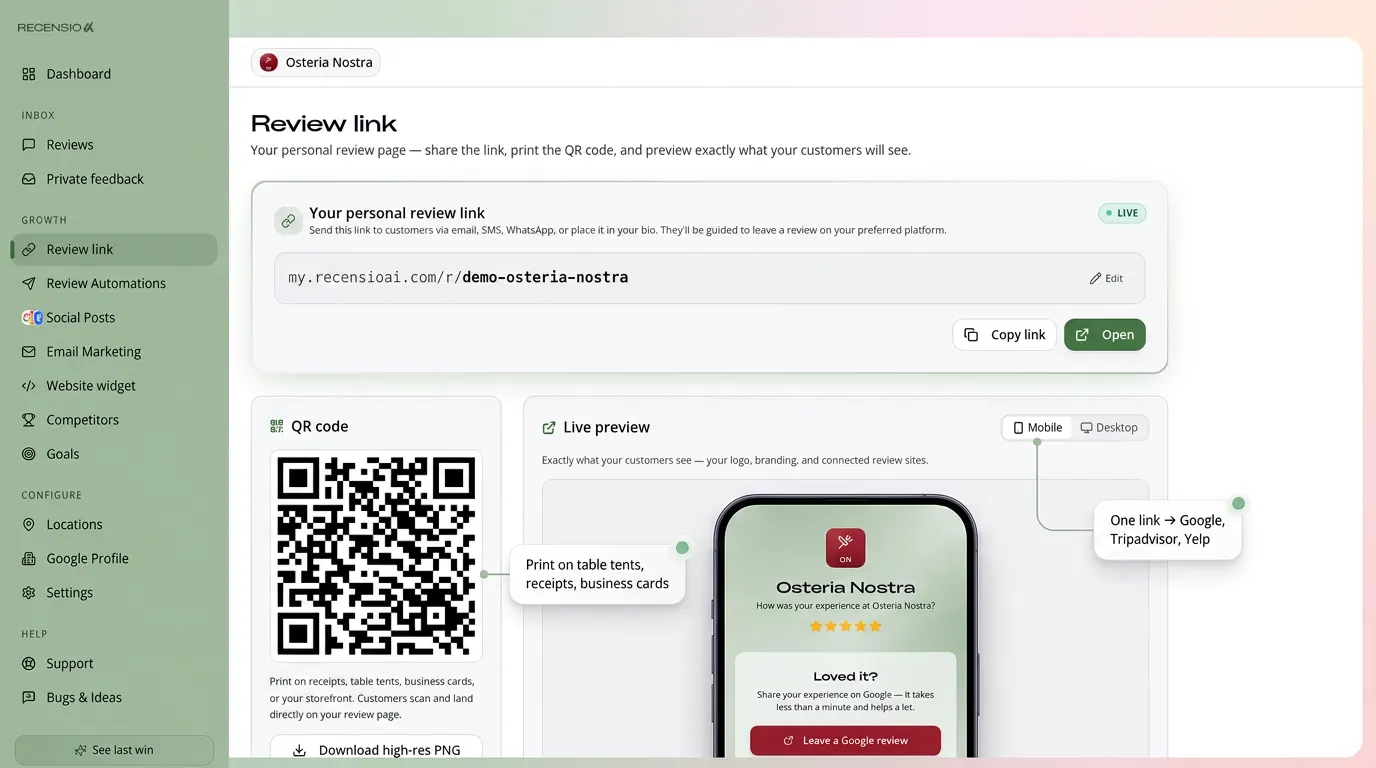
- 5Strategy 1: Create a direct review link and QR code
- 6Strategy 2: Ask at the perfect moment (timing is everything)
- 7Strategy 3: Choose the channel with the highest conversion
- 8What to write: messages you can copy
- 9Strategy 4: Automate your review requests (the game-changer)
- 10Strategy 5: Catch problems privately before they land on Google
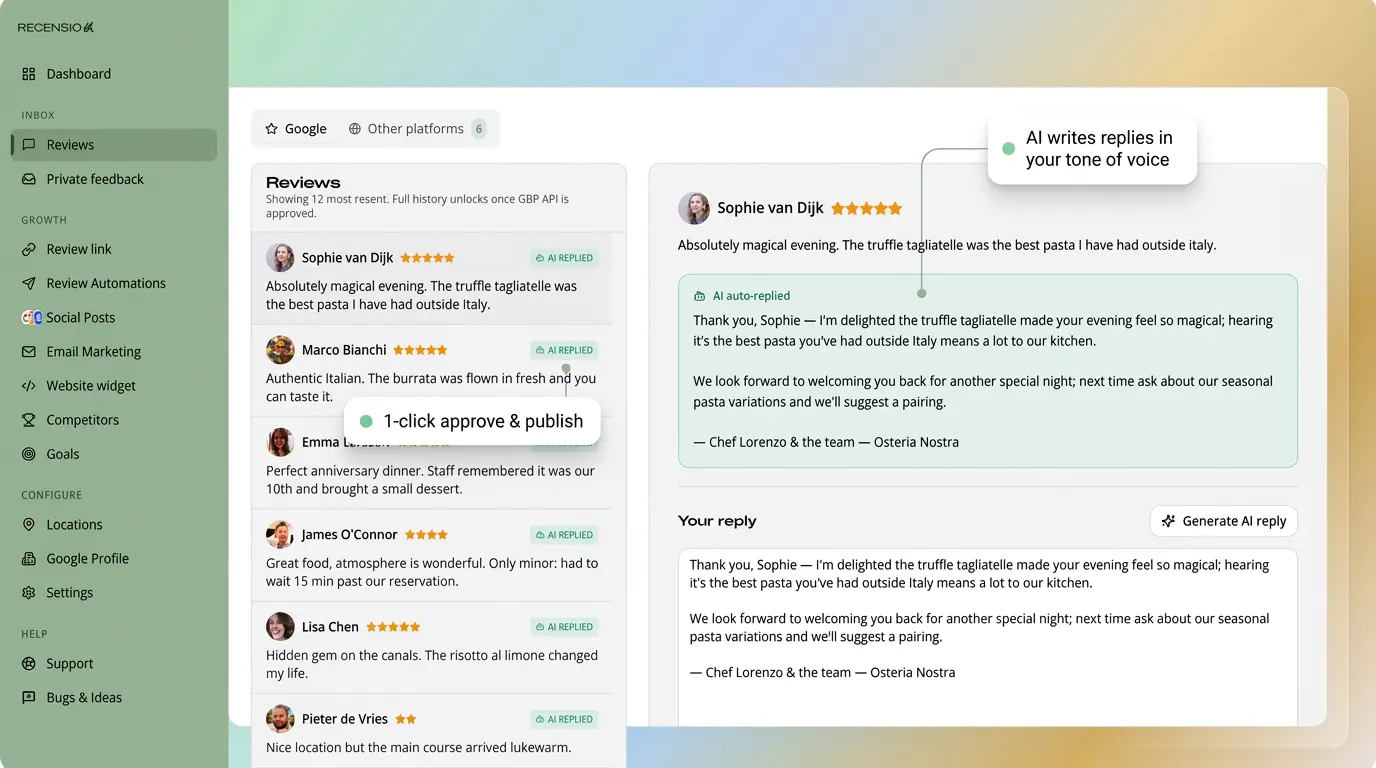
- 11Strategy 6: Reply to every review (and let AI do the heavy lifting)
- 12Strategy 7: Publish Google Posts every week
- 13Strategy 8: Use a QR review stand at physical locations
- 14Strategy 9: Calculate how many reviews you actually need
- 15Strategy 10: Analyse your competitors and find your review gap
- 16Strategy 11: Spread reviews across the platforms that matter
- 17Strategy 12: Protect your profile against fake reviews
- 1813 mistakes to avoid at all costs
- 19AI and GEO: why reviews protect you from becoming invisible
- 20The complete system: from zero to 50+ reviews a month
- 21Measure four numbers, nothing more
- 228 free tools you can use today
- 23Frequently asked questions
- 24Conclusion: 'more reviews' is a system, not a task
Why this guide is different
There are hundreds of articles about getting more Google reviews. Most give you the same five tips: ask for them, send a link, reply to reviews. You already know that.
This guide goes further. It shows you how to build a complete review system that runs on its own, protects you from avoidable negative reviews and structurally improves your local visibility, using free tools you can start with today. Whether you run a restaurant, a construction company, a dental practice or a salon: by the end you will have a concrete plan for the next four weeks.
Why Google reviews matter even more in 2026
Google reviews have always mattered. In 2026 they are decisive, for three reasons.
1. AI answers quote reviews
Google AI Overviews and assistants like ChatGPT, Perplexity and Gemini use reviews as a trust signal. Businesses with many recent, positive reviews get cited more often in AI summaries, even when the searcher never clicks through to a website.
2. The Map Pack dominates local results
For a local search such as 'plumber near me', roughly 42% of all clicks go to the top three results in Google Maps. Reviews are one of the heaviest factors deciding who sits there.
3. Zero-click behaviour keeps growing
More and more people decide without clicking anything. They see your star rating, your review count and your most recent replies, and choose on the spot. No reviews means no trust, which means no customer.
The numbers are consistent:
What happens before anyone calls you
Almost every customer decides inside Google, not on your website. This is what they see and what they decide on. Source: BrightLocal consumer review survey.
read reviews before choosing a local business
the line below which you are seen as risky
of all local clicks go to the Maps top 3
want to see reviews no older than one month
What Google actually measures: review velocity
Almost everyone watches two numbers: how many reviews you have and your star rating. Google watches a third one: the pace. Review velocity is the number of new reviews you collect per month, and it is one of the few signals that cannot be faked.
Think of a shopping street. A shop with someone walking in every day looks alive. A shop with a beautiful window display and nobody inside feels abandoned, even though the display is identical.
What that looks like in numbers:
- Healthy: 4 to 12 new reviews per month, every month - Google and customers see an active business
- Risky: 40 reviews in one week followed by three months of silence, that pattern looks like a campaign and gets judged more strictly
- Invisible: no new review in 90 days, 74% of searchers ignore reviews older than a month
- Practical target: aim for at least one new review per week. That is 52 a year and keeps your profile permanently fresh
- Worked example: serve 80 customers a month and ask all of them by SMS (±30% conversion) and you collect ±24 reviews. Ask only when you remember (±10 customers) and you collect 3
Step 0: Lay the foundation, optimise your Google Business Profile
Before you ask for a single review, your profile has to be ready. An incomplete profile is like a restaurant with a dirty window: people walk past. Google rewards complete profiles with better visibility, and every review you collect works harder when the basics are in place.
Check these points:
- Verification: is your profile verified? Without verification you barely appear in search results
- Categories: choose the right primary category AND add relevant secondary categories
- NAP consistency: name, address and phone number must match exactly on your website, social profiles and directories
- Opening hours: including public holidays and exceptions, wrong hours damage trust and rankings
- Services and products: add every service with a description and a price
- Photos: at least 10 recent, good-quality photos. Profiles with photos get significantly more direction requests
- Description: use relevant keywords naturally in your business description
- Website and service area: correctly set, with a working link to your site
- Use our free Google Business Profile Check to review every point systematically
Foundation check: is your profile ready for reviews?
Tick what is already true. Anything below 100% costs you visibility, no matter how many reviews you collect.
Strategy 1: Create a direct review link and QR code
The first and most important step: remove friction. Customers are happy to leave a review, but not if they have to work out how first. A direct link takes them to the review form in one tap.
How to create a Google review link
1. Open your Google Business Profile
2. Click 'Read reviews' then 'Get more reviews'
3. Copy the link or download the QR code
Or faster: use our free Google Review QR Code Generator to create a professional QR code in your brand colours.
Where to put the link and QR code:
- On your invoices and quotes (a footer line such as 'Happy with us? Let people know')
- In your email signature, subtle but effective, every email becomes an opportunity
- On receipts and order confirmations
- As a sticker on your van, reception desk or counter
- On table cards (hospitality) or in the waiting room (dentist, salon)
- In an SMS or WhatsApp message after an appointment or delivery
- On your business card or flyer
- On a QR stand at the counter, customers scan and review on the spot
Strategy 2: Ask at the perfect moment (timing is everything)
The difference between 5% and 35% conversion on review requests is timing. You do not ask 'whenever you have a moment', you ask at the peak of satisfaction.
The golden rule: ask within two hours of the positive customer moment.
Optimal timing per sector:
- Hospitality: within one hour of the visit, while the experience is fresh. Use a QR code on the bill or a stand near the exit
- Construction, renovation, installation: right after handover, when the customer sees the finished result. A photo of the result plus the review link works extremely well
- Service providers (salon, dentist, physiotherapist): within 30 minutes of the appointment via automated SMS or WhatsApp
- E-commerce: 3 to 5 days after delivery, once the customer has used the product
- B2B services (marketing, IT, consulting): after a clear milestone, a completed project, the first measurable result or a positive quarterly review
- Real estate agents: after the key handover, the most emotional and positive moment in the process
- Garages and automotive: at pickup, when the customer is relieved everything works
The review window closes faster than you think
Same happy customer, same message, only a different moment. This is how much it changes in practice.
Practical rule: ask within two hours of the moment the customer was happy. Automation is the only way to hit that every time.
Strategy 3: Choose the channel with the highest conversion
Not every channel performs the same. The right choice depends on your audience and the type of service.
Average conversion by channel:
- SMS/WhatsApp: 25–35% conversion, personal, immediate, and almost everyone opens the message. Ideal for consumer services
- Email: 10–20% conversion, better for larger projects (B2B, renovation). Combine it with a personal greeting and a specific reference to the work
- QR code on site: 15–25% conversion, works when the customer is physically present and leaves happy. No technical barrier
- QR stand at the counter: 20–30% conversion, sits at eye level at exactly the right moment, and converts better than a QR code on a receipt
- Phone follow-up: 30–40% conversion, labour-intensive but very effective for high-value services (construction, legal, healthcare)
- Paper card: 5–10% conversion, low but cheap and consistent. Good as a supplement, not as your main strategy
- Tip: test two or three channels at the same time and measure which converts best for your specific customers
Which channel actually produces reviews?
Average conversion from request to published review. Pick one main channel and one backup, not everything at once.
What to write: messages you can copy
Most review requests fail on the wording. Too long, too formal, or no clear question. Three rules: keep it under 40 words, mention one concrete detail, and include exactly one link.
SMS/WhatsApp after an appointment or visit
"Hi {first name}, thanks for visiting today! Would you help us with a short review? It takes 30 seconds: {link} - thanks, {your name} at {business}"
Email after a completed project (B2B or construction)
Subject: "Quick question about {project}"
"Hi {first name}, {project} is finished and we are happy with the result. Would you share in two lines how you experienced working with us? It genuinely helps other owners making the same decision: {link}"
Card or QR stand at the counter
"Happy with us? Scan and tell people in 30 seconds. Something wrong? Scan too, then we fix it."
Why this works:
- First name and a detail: personalisation lifts conversion by 40 to 60% compared with a generic template
- A time estimate: '30 seconds' removes the main objection, people assume it takes long
- One link: every extra choice lowers conversion. Never two platforms in the same message
- No rewards: never offer discounts or gifts in exchange for a review. Google forbids it and it can cost you your reviews
- One reminder: send at most one short reminder after three days, then stop
- Nothing to type: with RecensioAI these messages are composed and sent automatically, in the customer's own language
Strategy 4: Automate your review requests (the game-changer)
Asking manually works until you get busy. Then you forget, and your review velocity collapses, exactly the thing Google watches.
Why automation changes the outcome:
- You never forget, not even in your busiest week
- Every customer gets the same professional experience
- You save two to four hours a week on manual follow-up
- Your review velocity stays constant, which Google rewards
How RecensioAI solves it:
RecensioAI sends a feedback request automatically after every customer interaction. The flow is smart: happy customers are guided to Google, while customers with a concern get the chance to reach you privately first. You protect your reputation and collect more positive reviews at the same time.
Start free with RecensioAI, no credit card needed.
Strategy 5: Catch problems privately before they land on Google
This is the strategy that makes the biggest difference and the one most businesses skip. The standard approach sends every customer straight to Google, which means unhappy customers land there too.
The better approach: send everyone to your own branded review page. It shows two equal options, leave a Google review, or share private feedback. The customer chooses. This is fully in line with Google's review policy: nothing is filtered, nobody is blocked, and no one is discouraged from posting an honest review. In practice, customers with a concern often choose the private route, which gives you the chance to fix it before it becomes public.
See how it works in the free reputation scan.
One question, two routes
You ask everyone how it went. Happy customers get the route to Google; customers with a problem reach you first. Everyone always stays free to post wherever they want.
- One tap to the Google form
- Suggestions help them write
- Review appears publicly
- Private feedback form
- Alert reaches you within minutes
- A chance to fix it
Strategy 6: Reply to every review (and let AI do the heavy lifting)
Google confirms that replying to reviews is a positive signal. It shows you value feedback and it improves how your profile is perceived.
Best practices for review replies:
- Reply within 24 hours, speed signals that you care
- Use the customer's name and refer to the specific product or service
- Include relevant keywords naturally (for example 'Thanks for your review of our roofing work in Bristol')
- Keep it authentic, copy-paste replies are recognised and distrusted
- For negative reviews: acknowledge the problem, offer a solution, invite the customer to continue offline. Never share personal details
- Use our free AI Review Reply Generator to write a professional, personalised reply in seconds
- With RecensioAI replies are drafted automatically and published with one click, saving 5 to 10 minutes per review
Strategy 7: Publish Google Posts every week
Google Posts are free mini-adverts on your business profile. They show your profile is active and give Google fresh content to work with.
What to post:
- Offers and seasonal promotions
- New services or products
- Customer results and success stories (with permission)
- Behind-the-scenes content
- Tips and advice from your field
- Events and open days
- Use our free Google Post Generator to create a professional post in two minutes, complete with AI-written copy and a call-to-action button
Strategy 8: Use a QR review stand at physical locations
A QR review stand is a small sign on your counter, table or reception desk carrying your review QR code. The customer scans it with their camera and lands directly on your Google review form.
Why a stand beats a loose sticker:
- It sits at eye level at the exact moment the customer is satisfied
- It works with every modern smartphone, iPhone and Android
- It converts better than a QR code on a receipt (20–30% versus 5–12%)
- It looks deliberate and well cared for, which reflects on your business
- Ideal for restaurants, cafés, shops, salons, dental practices, gyms and hotels
- Pair it with a branded Google review QR code for maximum conversion
Strategy 9: Calculate how many reviews you actually need
Many owners have a goal ('I want a 4.5') but no plan. With our free Review Score Calculator you work out exactly how many 5-star reviews you need to reach your target rating.
Example:
- Current rating: 4.1 with 23 reviews
- Target: 4.5 stars
- 5-star reviews required: 21 extra reviews
- At three reviews a week: target reached in seven weeks
That turns a vague ambition into a number you can plan around.
How many 5-star reviews do you need?
Slide in your current situation and see exactly how many new reviews your goal costs, and how long that takes with and without automation.
Strategy 10: Analyse your competitors and find your review gap
Do you know how many reviews your closest competitor has? Their rating? How many reviews they collect per month? That information decides your strategy.
What you want to know:
- Your competitors' average rating and review count
- Their review velocity (new reviews per month)
- Whether they reply to reviews, and how quickly
- Which searches their profile shows up for
- Use our free competitor analysis tool to compare profiles on Google Maps and calculate your review gap
- With that data you can set a realistic pace: if your competitor collects 5 reviews a month, you need 7 to 10 to close the gap
Strategy 11: Spread reviews across the platforms that matter
Google matters most, but it is not the only platform. Depending on your sector, Trustpilot, Tripadvisor, Booking.com or industry directories can be just as decisive.
By sector:
- Hospitality: Google + Tripadvisor + reservation platforms
- Hotels and B&Bs: Google + Booking.com + Tripadvisor + Airbnb
- E-commerce: Google + Trustpilot + marketplace reviews
- Service providers: Google + Facebook + industry-specific platforms
- Healthcare: Google + national healthcare review sites
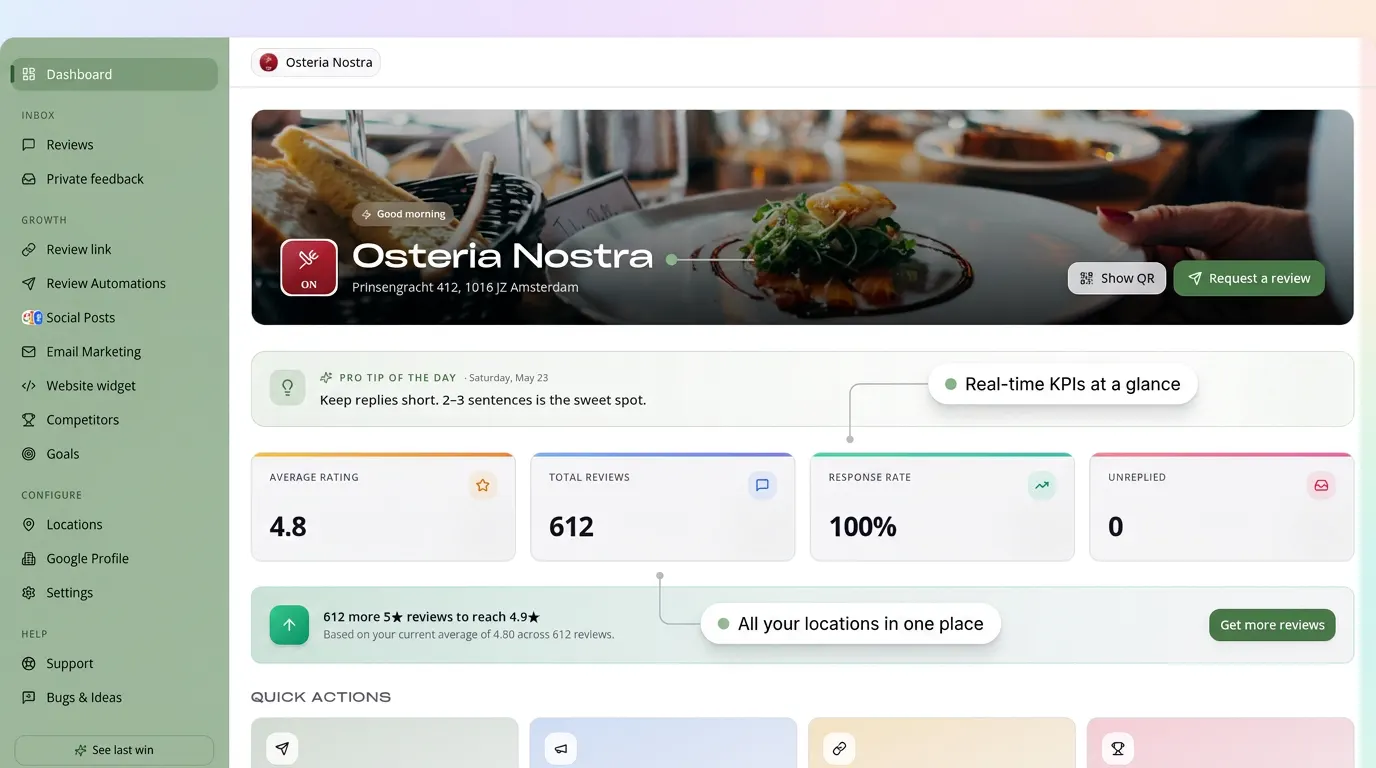
- RecensioAI monitors all your platforms from one dashboard, so you never miss a review. See the features
Strategy 12: Protect your profile against fake reviews
Fake reviews, both fake positives and fake negatives, are a growing problem. Google's detection keeps improving, but removal can still take weeks.
What you can do:
- Monitor your reviews daily, or let RecensioAI do it automatically
- Learn the signs: no profile photo, vague wording, sudden spikes, accounts that only ever leave 1-star reviews
- Report suspicious reviews through your Google Business Profile using 'Flag as inappropriate'
- Follow our free step-by-step guide: report a fake Google review
- Build a buffer: the more genuine reviews you have, the less one fake review moves your rating
- In serious cases, document everything and contact Google Support
13 mistakes to avoid at all costs
Google has become strict. These practices can lead to removed reviews, profile restrictions or a full suspension:
AI and GEO: why reviews protect you from becoming invisible
Search is changing fundamentally. Google AI Overviews, ChatGPT, Perplexity and other assistants increasingly answer directly, without the searcher clicking through. That is zero-click behaviour.
What does that mean for your business?
AI systems lean on three signals when recommending local businesses:
1. Reviews: volume, quality, recency and diversity
2. Structured data: schema markup, NAP consistency, category information
3. Content authority: relevant content on your website that matches the question
Reviews are the easiest of the three to influence, and the most visible inside AI answers. When an assistant summarises 'the best plumber in town', the business with the most recent, positive reviews is almost always in that shortlist.
Read more in our guide to local SEO.
The complete system: from zero to 50+ reviews a month
Here is everything above turned into a plan you can start this week.
Week 1: foundation
- foundation
- Optimise your Google Business Profile with the free check
- Create your review link and QR code with the QR generator
- Place QR stands where customers finish their visit
Week 2: automation
- automation
- Set up automated review requests by SMS, WhatsApp or email
- Activate your own review page, where the customer chooses Google or private feedback
- Turn on AI-drafted replies for incoming reviews
Week 3: acceleration
- acceleration
- Analyse your competitors with the competitor tool
- Set your target rating with the Review Score Calculator
- Start weekly Google Posts with the post generator Week 4 and beyond: consistency
- Check your velocity and rating weekly
- Reply to every review, or let AI draft it
- Adjust your timing and channels based on real conversion data Automated, this system takes less than 15 minutes a week.
Measure four numbers, nothing more
You do not need a wall of charts. Four numbers tell you whether your review system works. Write them down once a month, it takes five minutes.
1. New reviews per month (velocity)
If this number rises, your system works. If it stays flat while you serve more customers, something is leaking in your flow.
2. Conversion on your requests
Reviews divided by requests sent. Below 10%? Your timing or your channel is the problem, not your customers.
3. Average rating and its direction
Not the number itself but the trend. A 4.3 that is climbing is better news than a 4.6 that is slipping.
4. Reply time on reviews
Within 24 hours is the target. This is the number your customers notice most.
Everything beyond these four is noise at the start. Get these right and visibility follows.
8 free tools you can use today
You do not need to pay anything to start. Use our free tools to take action right now:
Frequently asked questions
The questions we get asked most about collecting more Google reviews.
Conclusion: 'more reviews' is a system, not a task
The businesses that grow steadily through Google Maps and local search all have one thing in common: a system. They do not ask for reviews 'now and then', they have a flow that repeats the same steps after every customer.
That system does not have to be complex. You can start this week:
1. Optimise your profile with the free check
2. Create your review link with the QR generator
3. Scan your current reputation with the free reputation scan
4. Start your automated review system with RecensioAI, free for 14 days
Every day you wait, a competitor collects more reviews, climbs a little higher and wins customers who could have been yours.
Questions? Get in touch, we are happy to help you set it up.
Everything in this guide, by hand or on autopilot
You can do every strategy above yourself. The only question is whether you keep doing it every week. Here is the same work, side by side.
Collecting reviews
Replying and reputation
Visibility and growth
You might also like
Handpicked articles for you
Why the Business Around the Corner Beats You on Google: What 21,373 Profiles Reveal
We compared 21,373 Google Business Profiles with their three strongest nearby competitors. The gap is smaller than most owners think, but it has two sides: rating and volume.
How to Protect Your Google Business Profile: Stop Unwanted Changes and Suspensions
The complete guide to protecting your Google Business Profile: who can change it, why suggested edits lead to suspensions, a security checklist, what to do if your profile is suspended, and how 24/7 monitoring restores your details where Google permits.
Free Google Business Profile Audit (2026): the only GMB audit that scores you like Google does
The definitive 2026 guide to auditing your Google Business Profile. Learn exactly what to check, how Google's local ranking actually works, and how to run a free GMB audit in 60 seconds, the most in-depth free audit on the market.