
Multi-Location Reputation Management: A Practical Guide
Learn how multi-location reputation management works, from per-branch review requests and AI replies to KPIs, fake review checks and weekly routines.
Table of Contents
- 1Introduction
- 2Why Your Group Average Hides Your Weakest Location
- 3Per-Location Versus Roll-Up Management Compared
- 4How the rows play out
- 5Where a pure model breaks
- 6How Google Decides Which Locations Get Seen
- 7What a branch can and cannot change
- 8How to Set Up Review Requests for Every Location
- 9Two schedules that break a same-day ask
- 10How to Run AI Reply Workflows Without Losing Your Voice
- 11What stays with a person
- 12Reporting KPIs That Show Which Location Needs Help
- 13How to read a change
- 14Spotting Fake Reviews Without Hiding Real Criticism
- 15Build an evidence file before you appeal
- 16Start Your Review Routine With One Location This Week
- 17The weekly huddle
Introduction
You run more than one site, and the busy ones hide the quiet one. The phones ring downtown. The suburban branch still pays rent, still staffs a shift, and still shows up when someone searches "near me" on Google Maps. Head office looks at one group rating and calls the reviews fine. The customer never sees that number. They see the branch on the map, and that branch's reviews decide the call.
Multi-location reputation management is the weekly habit of keeping each location visible, honest, and answered. A roll-up will not do it.
Why Your Group Average Hides Your Weakest Location
Say a restaurant owner with six locations sees a group rating of 4.6 stars and assumes the reviews are fine. Then the suburban branch manager reports a lower rating and a growing pile of unanswered reviews from the last quarter. The average hid the problem.
In 2025, 98% of U.S. consumers consulted local-business reviews before choosing a business, according to GatherUp's Beyond the Stars study. Each branch has its own customers, its own staff, and its own review record. A healthy group number can sit on top of one location that is slowly losing people who never walk in.
The usual failure is where the work lives. Review work stays at head office, where nobody saw the shift that went wrong. Or it stays with frontline staff who forget to ask after a packed Friday service. Many of these customers search "near me" on Google Maps. The branch they find is the branch that gets the call.
This guide answers three questions:
Write down the review count and the rating for each location over the last 90 days before you read on. Those figures are the baseline every later step uses.
- Who does the work. How you split tasks between the branch and the group.
- What runs every week. How you keep review requests and replies moving when the floor is busy.
- Which numbers you trust. How you read a branch on its own, not inside a roll-up.
Per-Location Versus Roll-Up Management Compared
Seven decisions set whether a weak branch stays hidden. The table shows the per-location approach, the roll-up approach, and the split most groups use in practice.
| Decision | Per-location approach | Roll-up approach | Usual split |
|---|---|---|---|
| Who answers reviews | Branch manager or shift lead | Head office marketing team | Branch replies, head office sets tone and audits |
| Review requests | Each branch's own link or QR code | One template sent from group | Branch link, group-approved template |
| Profile details (hours, services, photos) | Each branch's own Google Business Profile | Brand standards only | Branch owns the data, group audits monthly |
| Targets and reporting | Rating, review count and reply time per branch | Group average and totals | Both, with branch numbers shown first |
| Tone and policy | Local adjustments only | One written standard for all | Group sets the standard, branch adjusts within it |
| Suspected fake reviews | Branch documents and flags locally | Group decides on appeal | Branch documents, group coordinates the appeal |
| Best fit | Branches with different staff, markets or services | Chains with identical menus and service | Most multi-location groups |
Who answers reviews
Review requests
Profile details (hours, services, photos)
Targets and reporting
Tone and policy
Suspected fake reviews
Best fit
How the rows play out
Say a salon group has five branches and one shared price list. That is a hypothetical, not a real business. Each branch manager still sets the stylist schedule and answers the reviews, because the customer named a person at that chair.
Who answers. A shift lead can reply the same day. Head office cannot, because the complaint is about a stylist who already left for the night.
Review requests. Each branch needs its own link. A group template keeps the wording consistent so one branch does not beg and another sounds cold.
Profile details. Hours, photos, and services change at the branch. A monthly group audit catches a listing that still shows last winter's hours.
Targets. A group total looks calm while one salon drops a full star. Put the branch numbers first on every report.
Tone. One written standard stops five different voices. A branch can still name the service the guest really bought.
Suspected fakes. The branch has the appointment book. The group decides whether to appeal, so five managers do not file five conflicting reports.
Best fit. Identical menus can live under a tighter roll-up. Different staff and markets cannot.
Where a pure model breaks
A pure roll-up hides a weak branch behind a strong average. Pure per-location work produces five reply voices and five request scripts. Guests notice. So does anyone comparing your listings.
Say a clinic group where each site has a different specialty. Again, a hypothetical. One site lists pediatric visits, another lists imaging. Those services belong on that branch's Google Business Profile. The reply standard stays the same, because a sharp tone at one site and a warm tone at another makes the brand look careless.
Practical rule: The group owns standards, the reporting format, and policy. The branch owns its profile, its review requests, and its first reply.
How Google Decides Which Locations Get Seen
A customer searching "dentist near me" is a hiring manager with three questions. Does this business fit the job? How far away is it? How well known is it? Google weighs those questions as relevance, distance, and prominence, and says more reviews and positive ratings can help local ranking. Prominence can also depend on links from other websites and on the number of reviews a listing has earned.
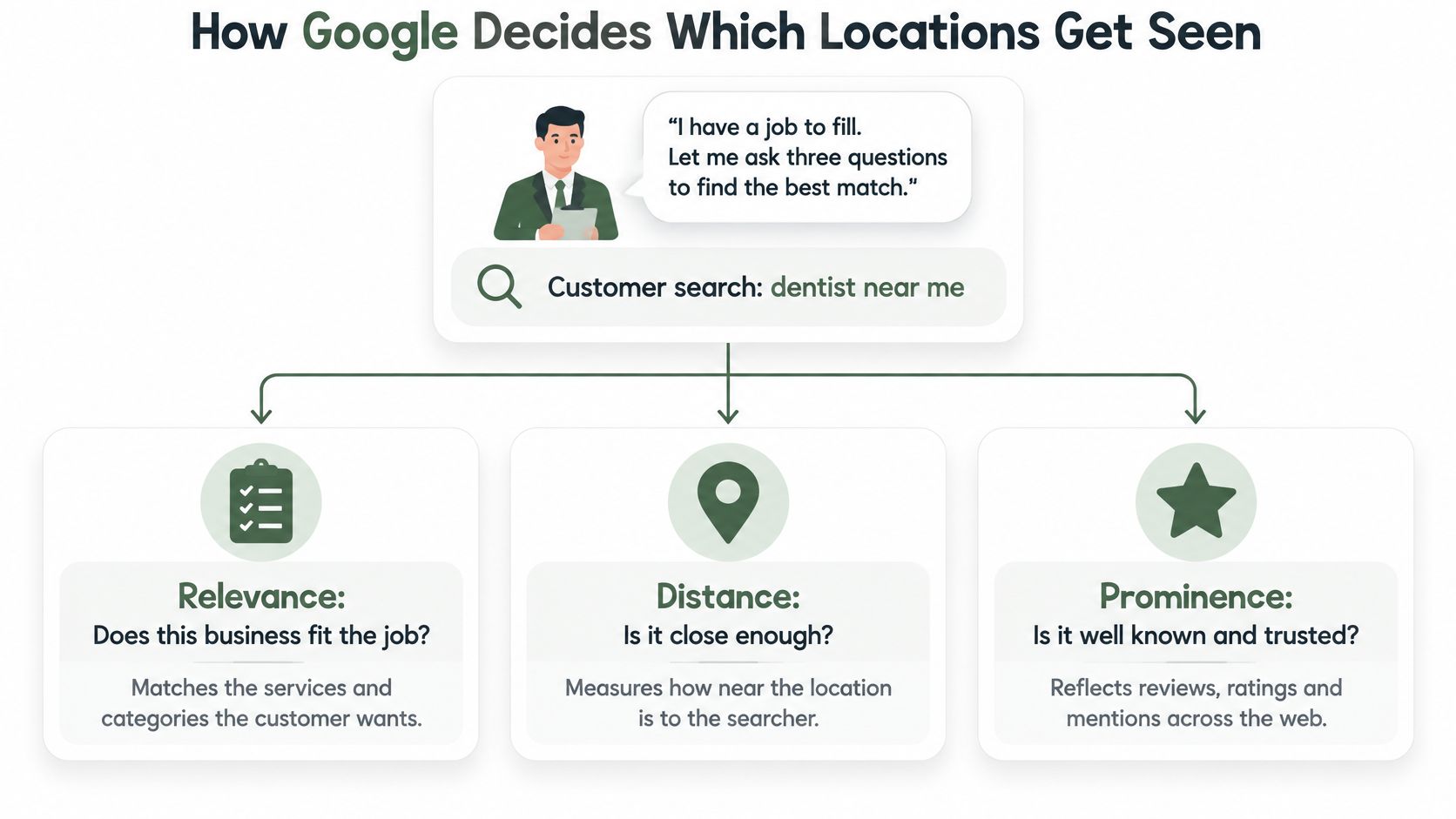
Relevance is how well the Google Business Profile matches the search. Distance is how far the business is from the searcher, or from the place Google estimates when the searcher does not share a location. Prominence is how well known the business is.
What a branch can and cannot change
Distance is the building and the person searching. You cannot move the branch closer to a customer on the other side of town.
Relevance is in your hands at every site: primary category, services, attributes, and hours. A complete profile still will not beat geography. It can match the query the customer typed.
Review count and review rating are the documented parts of prominence you can influence with genuine reviews. Replying to reviews, the wording of those reviews, and posting activity are not confirmed ranking factors. Treat replies as trust and care. Treat posts as a sign the profile is still alive. Neither is a lever you pull to climb the local pack. A fuller walk-through of what shows up in map results sits in this guide to local pack ranking factors.
Say a plumbing franchise, hypothetical, with two suburban branches. One uses a generic primary category and never lists emergency service. The sister branch lists the services people search at 9 p.m. The first branch shows up for fewer local searches. Same brand, same distance band, weaker match. The fix costs the first branch nothing: rename the category accurately and list the emergency work it already does.
That is why the group average misleads you here. Google ranks each listing on its own profile, its own distance, its own prominence. Audit each Google Business Profile separately, and read review count and rating branch by branch. A strong sister location does not lend its prominence to the one with a thin profile.
How to Set Up Review Requests for Every Location
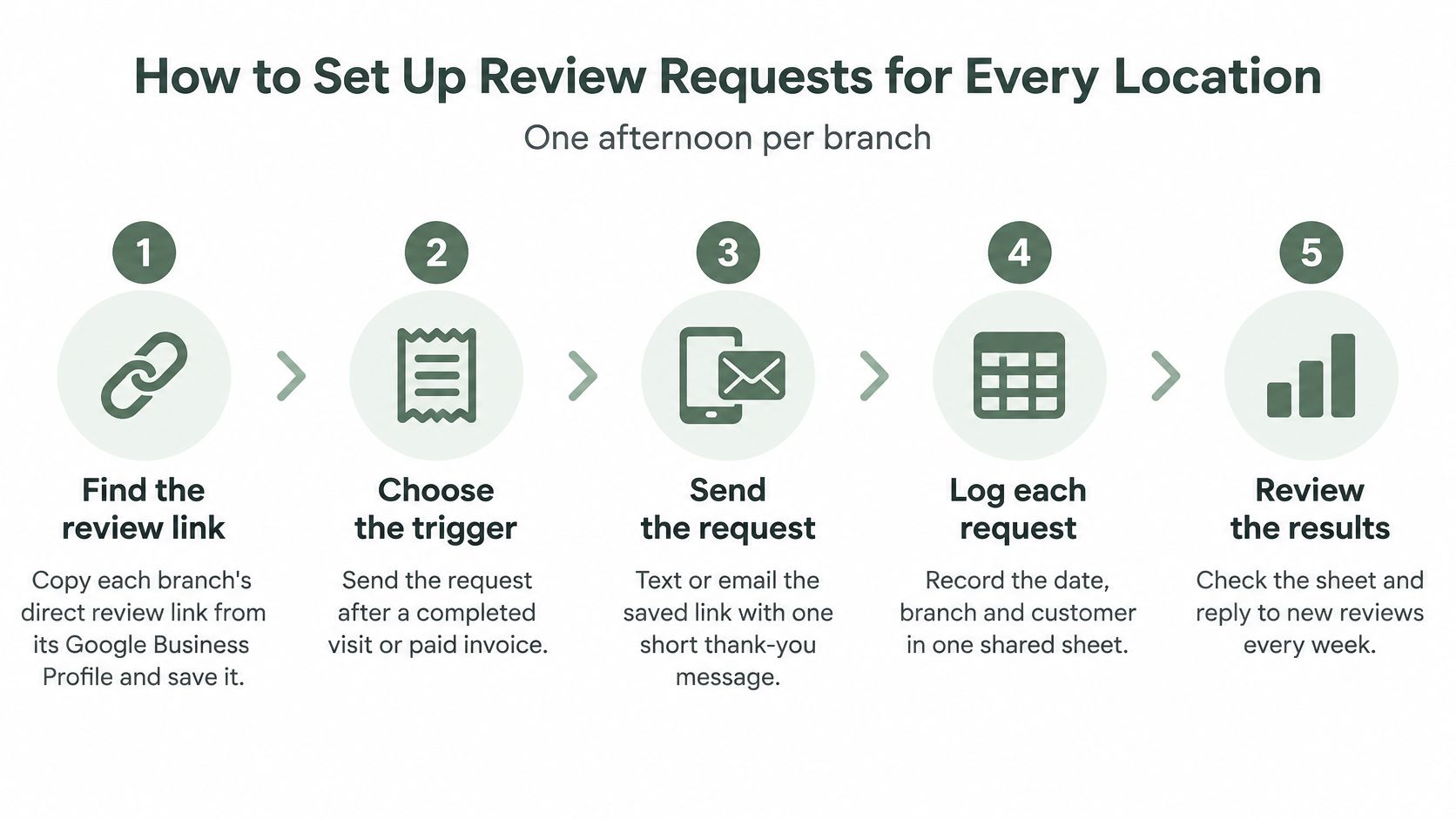
You can finish this routine in one afternoon per branch. Do not launch every location on the same morning. A burst of requests across the group can look like an unusual pattern, so spread the asks through the week.
If staff forget the ask once the rush starts, a short note on why you should automate your review requests covers the timing without adding another clipboard to the shift.
- Find the review link. Open that branch's Google Business Profile, copy the direct review link, and save it with the branch name. A shared brand link sends the review to the wrong listing.
- Choose the trigger. Use a receipt, checkout, paid invoice, or appointment-complete message, sent the same day. Waiting until next week means the guest has forgotten the visit.
- Match the channel to the customer. SMS fits salons and restaurants where the phone number is already on the booking. Email fits clinics and contractors. A QR code on the counter or the invoice fits walk-in traffic.
- Write one plain request. Use everyday English, plus a second language if that branch serves it every week. Never mention a diagnosis, a treatment, or any patient detail.
- Keep both options equal. Show a public Google review and a private feedback option side by side. The customer chooses. Do not send unhappy customers somewhere else, and do not decide who gets asked based on how the visit felt. That kind of routing breaks Google policy.
- Check every Monday. Compare review requests sent for each branch with reviews received. A branch that sends fifty asks and gets none has a broken link, not a shy customer base.
Two schedules that break a same-day ask
A hotel does not have one checkout moment. Departures bunch up between 7 and 11 a.m. Send the request after the folio closes, not while the guest is still in the lobby line. A contractor's ask depends on job closeout, which might be Thursday for one crew and the following Tuesday for another. Tie the request to the paid invoice, not to a fixed weekday, or you will ask before the work is actually done.
How to Run AI Reply Workflows Without Losing Your Voice
Customers read replies before they book. BrightLocal's 2023 Local Consumer Review Survey found that 89% of consumers would use a business that responds to all of its reviews, compared with 44% who would use a business that does not respond at all. Replies signal care and engagement. They are not a confirmed ranking lever, so a faster reply will not move a branch up the map on its own.
A workable workflow has three parts. Skip one and the voice drifts, or a serious review goes out wrong.
A reply library, sorted by review type. A five-star thank-you names one detail from the review, such as the color service or the lunch special. A mixed review acknowledges one specific point and does not argue with the rest. A negative review apologizes without a fight and moves the conversation offline to a named person and a phone number.
An AI draft in that branch's voice. Feed the library, not a generic brand paragraph. A beach hotel and a downtown clinic should not sound like the same person. Give each location a named owner for its replies, so the draft reads like it came from that branch and someone specific answers for it.
A manager check inside a set window. The branch manager reads the draft before it publishes. Negative reviews get that check the same day. Praise can wait until the next morning if the shift ran long. Once a week, the owner scans the replies that went out and fixes the library wherever the voice slipped.
What stays with a person
Keep a human-only list, and do not let a draft touch it:
Never offer a discount, a free service, or any reward for a new review or a changed one. That is an incentive, and it can put the profile at risk.
Say a clinic gets a one-star review about a rushed visit. A safe draft reads: "Thank you for taking the time to write this. We are sorry the visit felt rushed. Please call Maya at the front desk and she will look into it." It does not confirm the reviewer was a patient, and it does not argue about the wait.
Every review gets a reply within one business day, and every negative review gets one the same day.
- A named staff member. The manager confirms who was on shift before anyone replies.
- A legal claim. Counsel or the owner writes this, not a template.
- A health detail. Thank the person for the feedback. Do not confirm they were a patient.
- A refund dispute. Take it offline. Do not negotiate a dollar amount in public.
Reporting KPIs That Show Which Location Needs Help
A group dashboard that only shows averages will send you to the wrong branch. Track seven numbers per location, and read them on a schedule you can realistically keep.
| Metric | What it tells you | How to read it | Check how often |
|---|---|---|---|
| New reviews per month | Whether requests are producing reviews | Compare with requests sent, not with another branch's volume | Monthly |
| Average rating | Overall customer sentiment | Compare each branch with the group average and with its own last quarter | Monthly |
| Review count | Volume, a documented local ranking factor | Compare with nearby competitors on the same searches | Monthly |
| Response time | How quickly the branch answers | Negative reviews should get a same-day reply | Weekly |
| Unanswered reviews | Gaps in coverage | Should trend toward zero | Weekly |
| Recurring themes | Patterns such as waiting, parking or pricing questions | Count mentions per branch and compare with the last period | Monthly |
| Request-to-review rate | Share of customers who leave a review after a request | Compare branches with each other and with their own history | Monthly |
New reviews per month
Average rating
Review count
Response time
Unanswered reviews
Recurring themes
Request-to-review rate
OECD research on online ratings and reviews found that consumers may spend 31% more with businesses receiving excellent reviews, while 86% may hesitate to purchase from businesses with negative reviews. That is why each review is service data, not a marketing quote. Record the location, the date, the rating, the service type, and the recurring theme. Then you can tell a chain-wide problem from a bad afternoon at one site.
How to read a change
Before you change staffing or wait times, write down that branch's rating and its top themes. After the change, compare with that baseline and with a branch you left alone. If only the changed site moves, the change did the work. If both sites move the same way, something else did.
Priority is not volume. A low-rated branch with rising review volume is more urgent than a high-volume branch with steady sentiment. The first one is collecting fresh public complaints. The second is busy and stable.
Say a dental group, hypothetical. One branch's average rating holds steady, but mentions of waiting climb for three months. That points to the schedule, not the clinical work. Fix the booking grid. Do not write a longer reply about how much you value patients.
Set each branch's target from its own 90-day baseline, not from a sister site with a different market. A fuller set of reputation measures is in this note on the KPIs that actually matter. Review count and rating belong in the monthly look because they are documented local ranking factors. The other rows tell you whether the service is slipping.
Spotting Fake Reviews Without Hiding Real Criticism
Fake or incentivized reviews are a group risk, not a one-listing nuisance. Google's prohibited and restricted content rules mean those reviews can be removed, and the same policy can bring temporary limits on new reviews, unpublished ratings, or a warning on the Business Profile. Unusual review volume or contribution patterns can draw that scrutiny too. A push run from several branches at once is one pattern, even when each manager thinks they acted alone.
| Signal | What it may mean | First action |
|---|---|---|
| Several five-star reviews across branches on the same day | A coordinated campaign, possibly by staff or a paid service | Check your own requests and promotions for those dates, and stop any incentive |
| Reviewer with no other activity and generic wording | Possibly a fake account | Save a copy, then report it through the Business Profile |
| Review describes a service the branch never offered | Mistaken identity or a fake entry | Check the service list and records, then report with evidence |
| Several one-star reviews from one branch in a short window | Real anger, a coordinated attack, or both | Check transaction records first, reply calmly, and report only with evidence |
| Review praises or criticizes a staff member who was not on shift | Mistaken identity or a fake entry | Check the roster for those dates, then report with evidence |
Several five-star reviews across branches on the same day
Reviewer with no other activity and generic wording
Review describes a service the branch never offered
Several one-star reviews from one branch in a short window
Review praises or criticizes a staff member who was not on shift
Google removes reviews that break its content policies, and you can report a review you believe breaks them. A real negative review stays up. The branch does not filter it, hold it, or steer that customer away from the public listing. Treating honest criticism as fraud is its own kind of manipulation.
Build an evidence file before you appeal
Keep a folder per branch. It should hold booking or transaction records, the dates in question, the staff roster for those dates, a copy of the report you submitted, and any customer consent you already have. Compare the spike with that branch's own history. A holiday weekend, a grand opening, or a real promotion will look busy. A Tuesday with twenty five-star reviews and no matching visits will not.
You have three choices once the file is complete. Appeal with the evidence. Reply in public with one calm factual line, such as noting that you have no record of that visit. Or say nothing, when a reply would only amplify a post that is already coming down. Pick one. Do not do all three on the same review.
Start Your Review Routine With One Location This Week
Name one owner per branch. That person reads the branch's reviews every week and has authority to change a process, not only to report the problem upward. A manager who can only forward screenshots will not fix a late greeting.
The weekly huddle
Give each branch a 15-minute huddle. Read the top two recurring themes. Choose one process change. Log it in a shared sheet with the date, the branch, and the owner. Fifteen minutes is short enough to survive a Monday open. It is long enough to pick a fix.
Train from the theme, not from a memo.
Once a month, read the log. Drop any change that did not move the theme count. Keep the ones that did, and copy them only to branches with the same theme. Head office keeps the standards, the reporting format, and that monthly read. The branch owner keeps the weekly habit.

If review requests, replies, and branch reports currently live in three different tools, RecensioAI can hold them in one place so the branch owner is not hunting through inboxes before the huddle.
This week, use the 90-day numbers you wrote down at the start. Pick the weakest branch. Name its owner. Make one change to its process, and write that change in the log before Friday.
---
RecensioAI B.V. helps multi-location restaurants, salons, clinics, hotels, and service brands keep review requests, replies, and per-location reports in one routine, with a public Google review option and private feedback shown side by side. If a weak branch is getting lost in the group average, start with that location's reviews and profile. Visit RecensioAI B.V. to see how the workflow fits the way you already run the week.
- Slow greetings at a salon or hotel desk. Run a five-minute front-desk script at the start of the shift. A written reminder on the wall gets ignored by noon.
- Late arrivals for a contractor. Change the dispatch rule, such as a confirmation call the night before. A nicer public reply does not get the van there on time.
- Waiting complaints at a clinic or restaurant. Adjust the booking gap or the host stand. Do not add a sentence to the reply library and call it solved.
Frequently asked questions
You might also like
Handpicked articles for you
Hotel Review Management: Automate Post-Stay Requests with Apaleo, Mews and Your PMS
A practical guide to turning hotel checkouts into timely review requests, with Apaleo live, Mews early access and flexible PMS alternatives.
Why the Business Around the Corner Beats You on Google: What 21,373 Profiles Reveal
We compared 21,373 Google Business Profiles with their three strongest nearby competitors. The gap is smaller than most owners think, but it has two sides: rating and volume.
Treatwell Review Management for Salons: One Reputation View Alongside Google
Bring your public Treatwell rating and recent reviews into RecensioAI, then combine salon signals with Google for faster, better decisions.