
Local SEO for Small Business: A Practical Guide
A practical guide to local SEO for small business. Learn how to optimize your Google Business Profile, earn reviews, and win more near me searches.
Table of Contents
- 1Introduction
- 2How Google Picks the Local Map Pack
- 3What the three signals mean in practice
- 4Completing Your Google Business Profile
- 5Fill the fields that answer buying questions
- 6Earning and Managing Customer Reviews
- 7Build a steady request process
- 8Respond for trust, not ranking promises
- 9Aligning Your Website with Local Intent
- 10Put consistent details where people can find them
- 11Add LocalBusiness schema without overcomplicating it
- 12Building Local Citations and Links
- 13Choose relationships that fit the business
- 14Tracking Local Search Performance
- 15Use a small set of operating metrics
- 16Prepare for changing search interfaces
- 17Your First Steps to Better Local Visibility
- 18Complete this work this week
Introduction
You've claimed your Google Business Profile, added a logo, and moved on. Then a customer searches for a salon, clinic, restaurant, hotel, or contractor near them. A competitor with better hours, newer photos, clearer services, and recent reviews gets the call instead. Your business may be nearby, but nearby alone doesn't make you visible.
That's the operational reality of local SEO for small business. You're trying to win a small number of map results at the exact moment someone is ready to visit, call, or request directions. The work isn't usually another blog post. It's keeping your profile, reviews, website details, and local relationships accurate when the business is already demanding your attention.
How Google Picks the Local Map Pack
A customer searches for “Italian restaurant near me” while deciding where to eat. Google shows three businesses on the map. Those three receive most of the immediate attention because the customer can compare their hours, distance, ratings, photos, and directions without opening a long list.
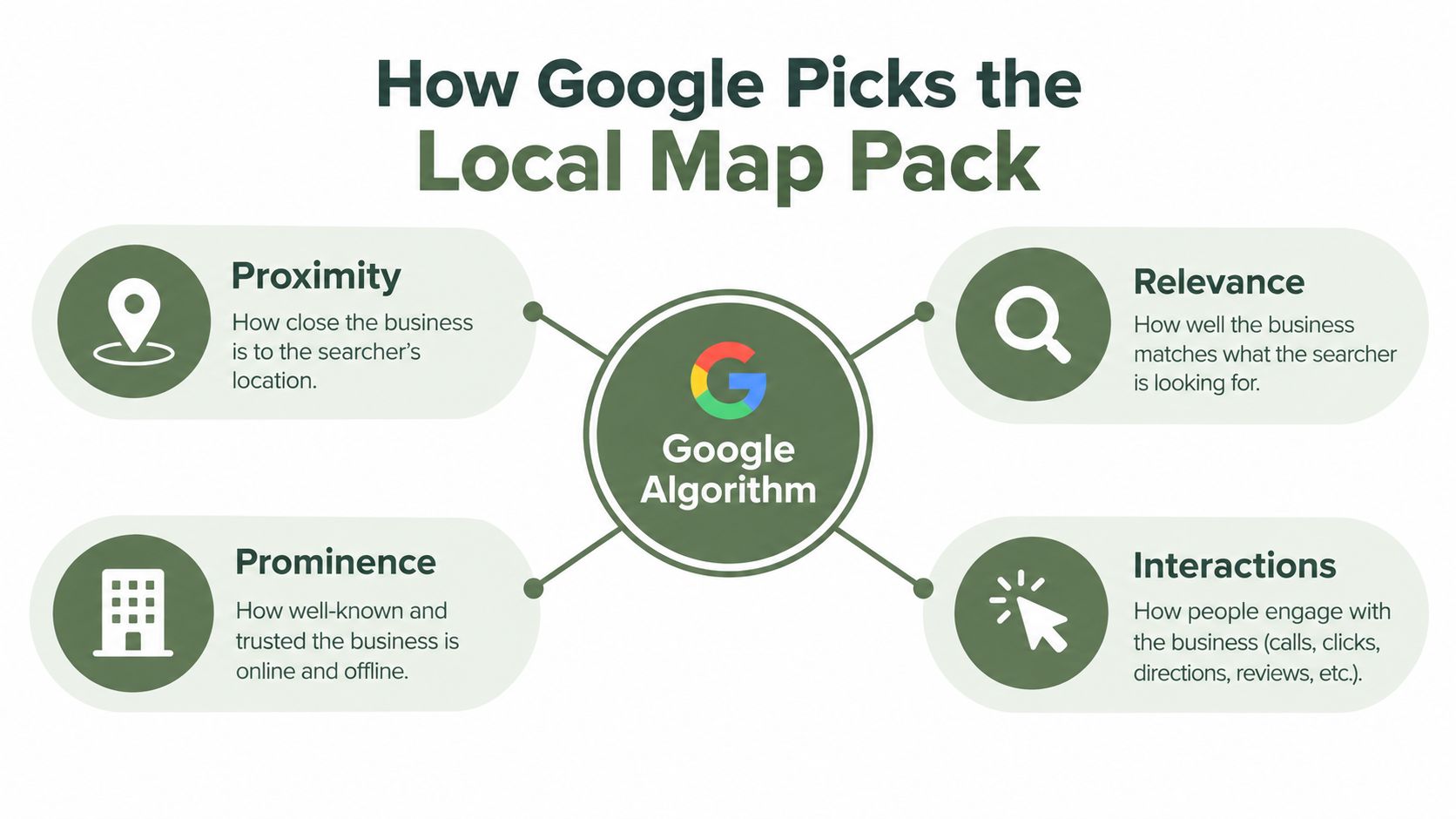
Google says local results rely mainly on relevance, distance, and prominence. Google's explanation of local ranking describes relevance as how closely a Business Profile matches the search, distance as how far the business is from the searcher, and prominence as how well-known the business appears.
Distance is the constraint you can't change. Your restaurant, salon, or clinic stays where it is. Relevance and prominence give you more room to work.
What the three signals mean in practice
Consider a salon competing with two others in the same ZIP code.
The first salon gives Google more information about what it does and why people trust it. That doesn't guarantee a map-pack position, but it gives the profile stronger relevance and prominence signals than an incomplete listing.
A restaurant faces the same issue. If its profile says only “restaurant,” Google has less context than it would if the business selected accurate categories, listed its services, added current menus or service details, and maintained correct hours. A complete profile also gives a customer enough information to act quickly.
Practical rule: You can't move closer to every searcher. You can make it easier for Google and customers to understand exactly what you offer.
The Google Business Profile ranking factors guide is useful when you need to review the fields that influence local visibility. Start with the information Google can verify and a customer can use immediately. Generic content marketing can support local SEO later, but it shouldn't distract you from the profile basics.
- Distance: All three are close to the searcher. No salon has a meaningful location advantage.
- Relevance: One profile clearly lists balayage, curly hair services, bridal styling, and the correct salon category. The others use broad or incomplete service information.
- Prominence: One salon has a steady pattern of genuine reviews, strong ratings, and links from local organizations. Another has an older review profile and little evidence elsewhere that the business is established.
Completing Your Google Business Profile
Many owners claim their listing and stop. That leaves the profile technically present but commercially weak. A customer may still find it, yet hesitate because the hours are unclear, the category is wrong, the photos are old, or the services don't match what they need.
BrightLocal reports that customers are 2.7 times more likely to view a business as reputable when its profile is complete, and 70% more likely to visit. Those findings are summarized in local SEO statistics from BrightLocal and other industry sources. Treat completeness as a customer-facing job, not an administrative task.
Fill the fields that answer buying questions
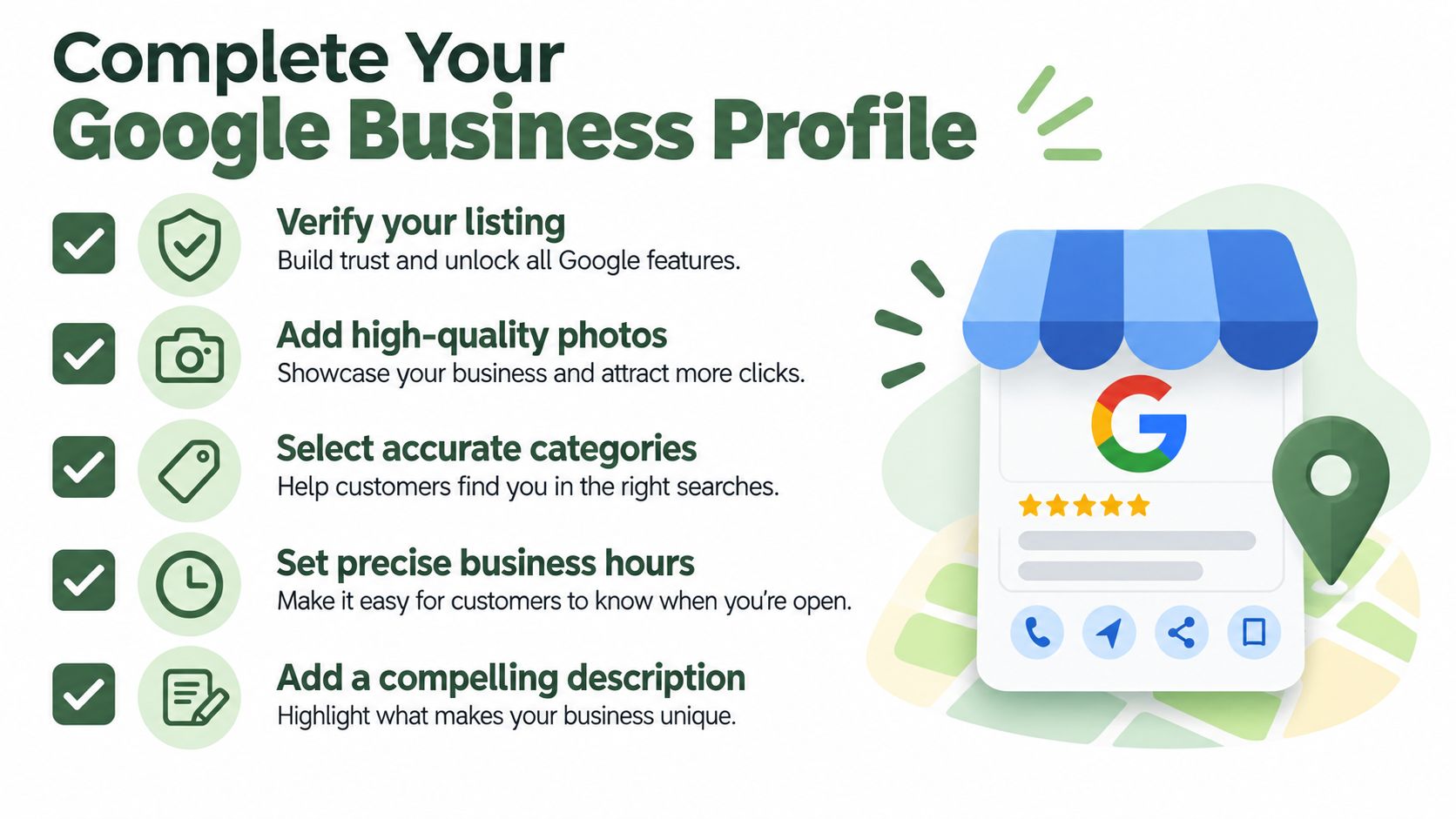
Work through the profile in this order:
Posts can show current activity, such as seasonal services, events, appointment availability, or new offerings. They won't replace accurate core fields. Think of them as updates for people already considering the business, not as a substitute for profile maintenance.
Use this Google Business Profile setup guide as a field-by-field reference. Once the profile is complete, assign one person to check it regularly. A profile with accurate information builds confidence before the customer calls.
- Choose the primary category carefully. A clinic should identify its main type of practice. A salon should avoid using a vague category if a more accurate one exists. Add relevant secondary categories, but don't list services you don't provide.
- Add every important service. Use plain names customers understand. A contractor might list roof repair, gutter installation, and storm damage inspections. A hotel should describe the accommodations and facilities customers search for.
- Set regular, special, and holiday hours. Google's Business Profile best-practice guidance specifically emphasizes accurate hours because they help Google understand when the business is open and show the right information to searchers. Update temporary closures before they become a customer complaint.
- Complete attributes. Add details that affect a visit, such as accessibility, outdoor seating, payment methods, or appointment requirements, when those options apply to your business.
- Upload useful photos. Show the storefront, interior, staff, products, rooms, treatment areas, completed work, or menu items. A contractor should show finished projects. A clinic should make the entrance and reception area easy to recognize.
- Write a factual description. Explain what you do, who you serve, and where you operate. Don't stuff city names or repeat keywords unnaturally.
Earning and Managing Customer Reviews
A customer comparing two local businesses often checks the reviews before calling either one. Google also evaluates review signals when assessing local prominence. An independent analysis of 16,098 Google Business Profiles found that the top-three local-pack rate increased from 39.3% for profiles with 1 to 5 reviews to 73.0% for profiles with 201 to 500 reviews. The figures come from Localo's analysis of local SEO ranking factors. For more context, see this guide to how Google reviews influence your local SEO.
Treat those figures as context, not a target. Pressuring customers for praise can create compliance and trust problems. An empty or neglected profile gives prospective customers less evidence and leaves Google fewer review signals to assess.
BrightLocal's consumer research found that 67% of consumers often or always check reviews after a local search, while 65% of consumers who rejected a business did so for review-related reasons, including negative ratings, low ratings, or old reviews. The BrightLocal consumer search behavior research provides the underlying findings.
Build a steady request process
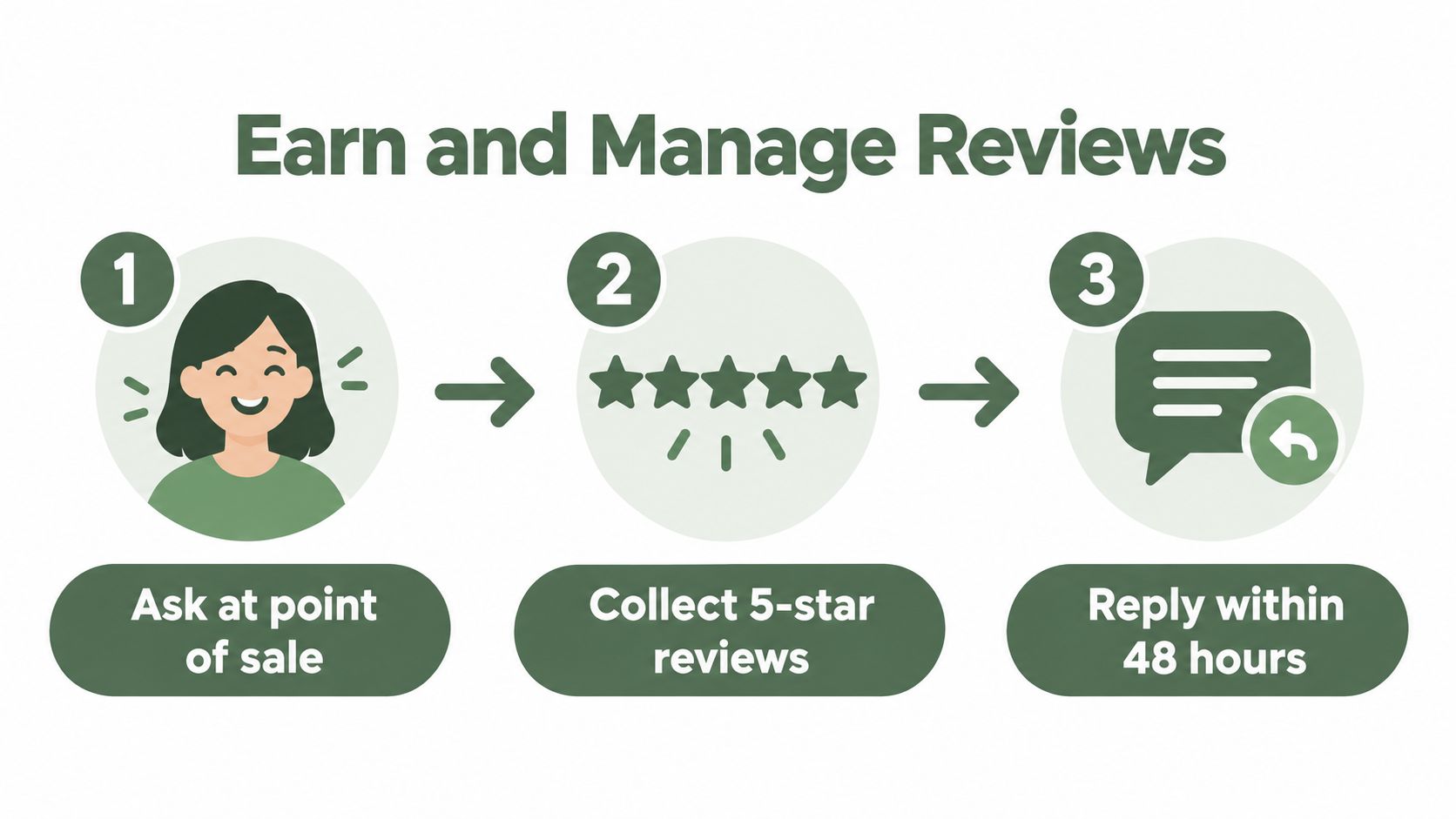
Ask soon after the completed service, while the experience remains clear. A restaurant can request feedback after a visit. A salon can send a message after an appointment. A clinic can ask after the relevant service interaction, subject to privacy and compliance requirements.
Choose a process staff can repeat:
Never filter, intercept, or hold back negative reviews. Show a public Google review option and a private feedback option side by side, then let the customer choose. Routing only satisfied customers to Google is review gating and can put the profile at risk.
- Email: Send a short request with a direct public Google review option.
- SMS: Ask after the visit when the customer has agreed to receive business messages.
- QR code: Place it at the counter, on a receipt, or in a follow-up message.
- Shareable link: Give staff and customers a simple route to the review page.
Respond for trust, not ranking promises
Review responses show that the business is present and willing to address customer experiences. They help future customers see how you handle a complaint, delay, mistake, or compliment. Do not describe responses as a confirmed direct ranking factor.
Keep each reply specific. Thank the customer for a useful detail, address the concern without exposing private information, and invite further discussion through an appropriate channel. Do not argue publicly or paste one reply across every review.
Review velocity matters operationally. A steady request process is easier to maintain than a quarterly campaign and gives customers a current view of the business. Authenticity matters more than volume, especially when platforms remove policy-violating reviews.
Aligning Your Website with Local Intent
Your Google Business Profile can surface the business, but your website often decides whether a customer feels ready to contact you. The site should make three things obvious: what you offer, where you operate, and how someone can reach you.
Start with the page title and main heading. A salon serving a specific neighborhood should name the service and location naturally. A contractor should make its service area clear. A clinic should identify its specialty and city without repeating the same phrase unnaturally across every page.
Put consistent details where people can find them
Check these areas:
Keep your NAP details, meaning name, address, and phone number, consistent with the Google Business Profile. Don't use an abbreviated street name on the website and a different version on the profile unless there's a practical reason. Check older location pages and social profiles as well.
- Title tags: State the main service and location for the page.
- Main headings: Describe the service in normal customer language.
- Service pages: Explain the work, who it suits, and the areas served.
- Footer: Display the exact business name, address, and phone number.
- Contact page: Include directions, parking details, hours, and appointment instructions.
- Mobile layout: Make the phone number easy to tap and the address easy to use.
Add LocalBusiness schema without overcomplicating it
LocalBusiness schema is structured information that tells search engines what the business is, where it operates, when it opens, and how customers can contact it. Your web developer or site builder can add the appropriate business type, address, phone number, hours, URL, and service details.
Independent 2026 data reports that only 18.5% of small business sites use LocalBusiness schema, while 67.3% keep NAP details consistent. The same dataset reports that 41.8% list business hours, and 27.9% show full hours. These figures are from Biziq's 2026 local SEO statistics.
If your site needs broader planning, this guide to a revenue system website strategy offers useful context on structuring a website around customer actions. For local SEO, keep the implementation practical. Accurate details and clear service pages matter more than adding technical features nobody maintains.
Building Local Citations and Links
External references help establish prominence, but not all links deserve the same effort. A citation is a business listing that repeats your name, address, phone number, and other basic details. A local backlink is a link from a real organization, publication, partner, or community site to your website.
Citations help confirm consistency. They're useful when your business has moved, changed phone numbers, opened a new location, or inherited listings from an older brand. They won't compensate for a wrong primary category, missing hours, or a poor customer experience.
Local links take more relationship work, but they can be more relevant. Google says prominence can be influenced by how many websites link to the business and how many reviews it has. That makes genuine local connections more useful than a large collection of unrelated directory pages.
Choose relationships that fit the business
A contractor could sponsor a youth sports team, provide a safety workshop, or earn a mention from a neighborhood association after completing a community project. A clinic might join the local chamber of commerce, contribute health information to a community organization, or participate in a neighborhood event.
A restaurant can work with a local food publication, support a charity dinner, or provide a venue for a community group. A hotel might build relationships with a convention organizer, tourism organization, or nearby attraction.
Compare the options before committing:
| Approach | Main value | Common trade-off |
|---|---|---|
| Basic directories | Consistent business details | Limited local relevance if the directory is generic |
| Chamber listing | A credible local reference | May require membership or participation |
| Community sponsorship | Relationship and local visibility | Requires real involvement, not just a logo placement |
| Neighborhood publication | Relevant editorial mention | You need a story or useful local contribution |
| Hundreds of low-quality directories | Quick submission volume | Little business value and difficult maintenance |
Basic directories
Chamber listing
Community sponsorship
Neighborhood publication
Hundreds of low-quality directories
Avoid buying links or submitting your business to large numbers of low-quality global directories. Spend the same time building one real local relationship that customers recognize. The link should be a byproduct of useful participation, not the only reason you join.
Tracking Local Search Performance
Traffic alone won't tell you whether local SEO is helping the business. A restaurant needs to know whether people request directions. A salon needs to know whether profile visitors call or click to book. A contractor needs to connect local discovery with form submissions and phone conversations.
Google Business Profile reporting can show actions such as direction requests, phone calls, and website clicks. Review those actions alongside your booking system, call records, and appointment notes. A rise in clicks is useful, but a call that produces a qualified appointment is closer to the business outcome.
Use a small set of operating metrics
| Metric | What It Means | Why It Matters |
|---|---|---|
| Direction requests | People asked for navigation to the location | Useful for restaurants, hotels, salons, clinics, and retail |
| Phone calls | Searchers used the profile to contact you | Shows high-intent behavior, especially for contractors and clinics |
| Website clicks | People opened the site from the profile | Helps identify interest in services, menus, bookings, or forms |
| Profile searches | Terms and discovery paths associated with the listing | Helps you understand how customers find the business |
| Review activity | New reviews, ratings, themes, and response status | Shows whether customer trust signals are current and manageable |
| Competitor visibility | How nearby businesses appear for shared searches | Provides context for changes in your own profile actions |
Direction requests
Phone calls
Website clicks
Profile searches
Review activity
Competitor visibility
Don't treat every movement as a ranking result. Seasonality, opening hours, promotions, weather, staffing, and local events can affect calls and visits. Record the date of important changes, such as new categories, revised hours, service updates, or a new review request process, then compare patterns over time.
Prepare for changing search interfaces
AI Overviews and AI tools are changing how some people discover local businesses. Recent industry reporting estimates that AI Overviews appeared in roughly 40% to 68% of local queries across 2026, and reports that 45% of consumers use ChatGPT or another AI tool for local business recommendations. These estimates are summarized in coverage of Google Business Profile review policy changes and AI-mediated discovery.
You can't control every interface. You can control whether your business details are complete and whether your reviews reflect genuine customer experiences. Those assets give search systems and customers clearer information to evaluate.
If you manage several locations, software can reduce the manual work. RecensioAI can automate review requests, draft replies in your brand's tone, and track competitor visibility across multiple locations. Use automation to maintain a process, not to manufacture customer sentiment or replace judgment on sensitive complaints.
Your First Steps to Better Local Visibility
Local SEO isn't a one-time setup. Your hours change. Services change. Staff forget to ask for reviews. Photos become outdated. A new competitor opens nearby. The businesses that remain visible usually treat local search as a recurring operating habit.
Start with the profile because it has the shortest path from information to action. Then make the website agree with it. After that, build review requests into the customer journey and monitor whether people call, click, or request directions.
Complete this work this week
For more location-specific context, Brisbane local search guidance provides another practical reference for small businesses working on local visibility.
Run a free audit of your current Google Business Profile next. Check exactly which fields are missing and how your business compares with the top three competitors in the local map pack. That gives you a workable priority list instead of another general SEO checklist.
---
RecensioAI B.V. helps local businesses automate review requests, manage replies, audit Google Business Profile completeness, and monitor competitor visibility across locations. Visit RecensioAI B.V. to review the tools available for maintaining your local search presence without adding another daily task to your schedule.
- Claim and verify the profile: Confirm ownership and remove duplicate listings where appropriate.
- Fill every missing field: Review categories, services, attributes, photos, description, regular hours, and holiday hours.
- Create an ethical review request: Use email, SMS, a QR code, or a shareable link. Give every customer both the public Google option and a private feedback option.
- Check the website footer: Confirm that the name, address, phone number, and hours match the profile.
- Review the map pack: Search the services and locations your customers use. Compare your categories, photos, hours, review freshness, and services with the businesses shown.
- Record the baseline: Note profile actions, phone calls, directions, website clicks, and current review activity before making changes.
Frequently asked questions
You might also like
Handpicked articles for you
How to Protect Your Google Business Profile: Stop Unwanted Changes and Suspensions
The complete guide to protecting your Google Business Profile: who can change it, why suggested edits lead to suspensions, a security checklist, what to do if your profile is suspended, and how 24/7 monitoring restores your details where Google permits.
White-Label Local SEO Tools for Agencies
What RecensioAI offers agencies: an embeddable white-label Google Business Profile audit that works as a lead magnet on your own site, plus an agency account where you run every client workspace, report, SMS credit and invoice. With pricing, margin and a 30-day rollout.
How to Beat Your Competitors on Google in 2026
The complete playbook to outrank local competitors on Google Maps in 2026: how many reviews you need to overtake the business above you, how to break into the top 3, and how RecensioAI runs the work for you, with real screenshots from the app.