
How to Get Rid of Negative Google Reviews
Learn how to get rid of negative Google reviews the right way. Report fake ones, respond to real ones, and build a stronger review profile over time.
Table of Contents
- 1Introduction
- 2When a Bad Review Lands and What You Can Actually Do
- 3Reporting Reviews That Break Google's Policies
- 4Use the right reason and preserve the record
- 5Responding to Legitimate Negative Reviews
- 6Escalating Reviews Google Did Not Remove
- 7Why Your Overall Review Profile Matters More
- 8Building a Steady Flow of Genuine Reviews
- 9Make the process repeatable
- 10Your Next Step This Week
Introduction
You check your restaurant's Google Business Profile on Monday morning and find two new one-star reviews. One says the writer never visited your restaurant but claims the food made them sick. The other comes from a real customer who waited 40 minutes for cold food.
Those reviews need different actions. The first may be a policy violation. The second is a service problem that probably won't qualify for removal. If you're searching for how to get rid of negative Google reviews, start by separating those cases before you write a reply or press Report.
When a Bad Review Lands and What You Can Actually Do
Treat every new negative review as triage. Read it once for the facts, then place it in one of three categories:
The category determines your next move. A fake review should be documented and reported. A borderline review needs careful evidence. A genuine complaint needs a calm public response and a private service-recovery conversation.
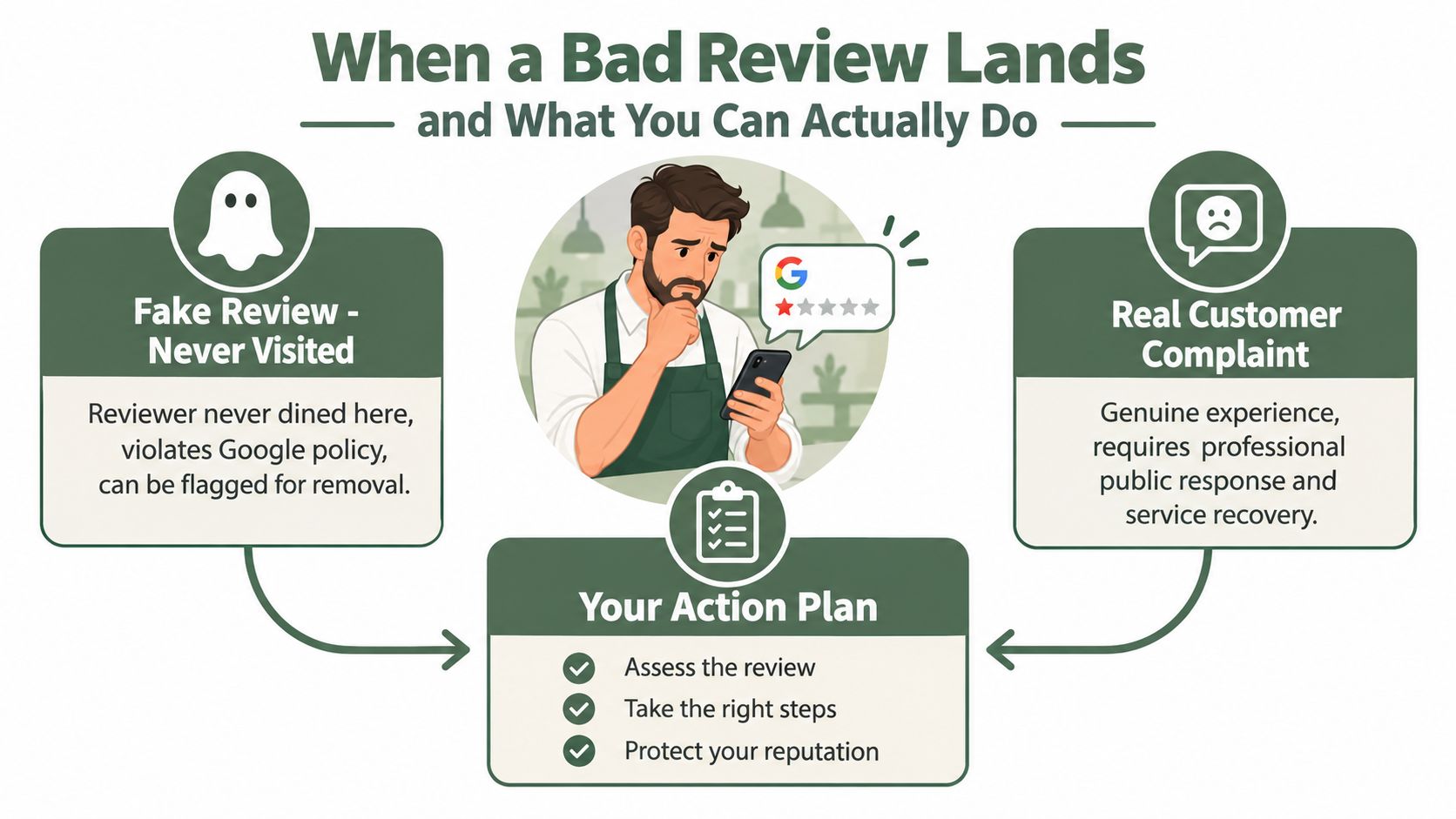
You can't delete a review yourself from your Google Business Profile. You also can't pay Google to remove an honest complaint, offer a customer money to delete a negative review, or ask friends and staff to post sudden five-star reviews to bury it. Google says reviews must reflect a genuine experience, and it prohibits incentives for removing negative reviews and activity designed to manipulate ratings. See Google's contribution policy for reviews before taking action.
A useful practical guide is Fitness GM's reputation playbook, which puts review monitoring and response discipline into an operating routine rather than treating reputation as an occasional emergency.
Practical rule: Report the review only when you can explain the specific policy violation. “This is unfair” may be true, but it isn't a removal reason.
The owner with the fake restaurant review should save the review URL, reviewer name, profile details, and any record showing there was no visit. The owner with the cold-food complaint should acknowledge the wait, investigate the kitchen and front-of-house handoff, and reply without arguing. Removal is only one lever. Documentation, response quality, and a steady flow of genuine reviews do more of the long-term work.
- Spam or fake content: The reviewer has no matching visit, repeats identical language, posts about the wrong business, or appears connected to a competitor.
- Borderline policy issue: The review may contain harassment, irrelevant material, a conflict of interest, or content that needs evidence before Google will act.
- Legitimate unhappy customer: The person describes a real experience, even if the account is unfair, exaggerated, or unpleasant.
Reporting Reviews That Break Google's Policies
Google's reporting process starts inside the listing, not with a demand that Google delete a review. Open the relevant Google Business Profile, select the review area, find the review, click the three-dot menu or flag option, and choose the most accurate violation category.
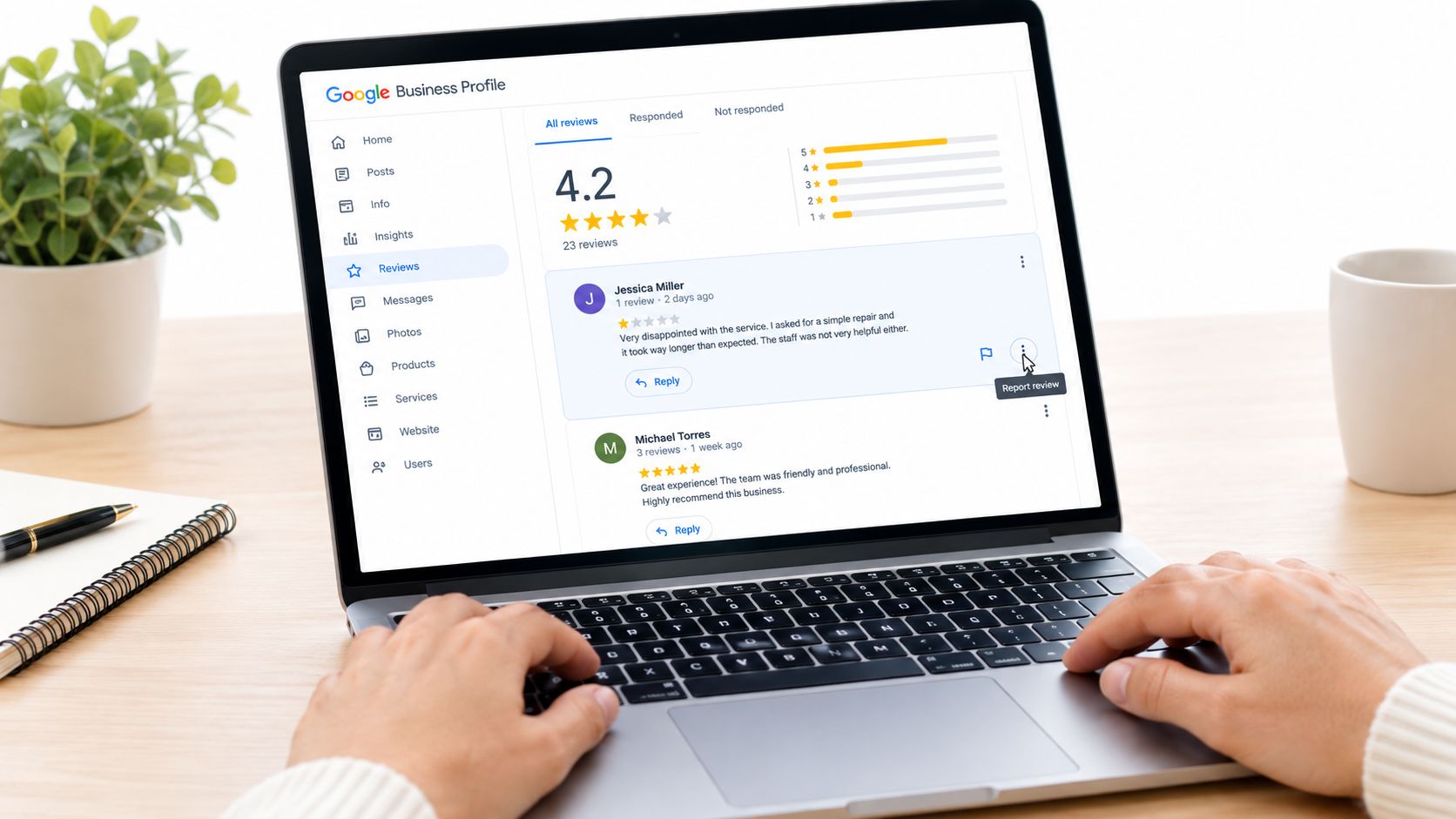
Google's official guidance is narrow. A review you merely dislike or disagree with isn't eligible for removal. The report should point to prohibited content such as spam or fake content, off-topic material, restricted content, illegal content, hate or harassment, or a conflict of interest. Google's Business Profile review guidance explains that distinction.
Consider a restaurant review written by someone who works for a nearby competitor. You might suspect the connection, but suspicion alone is weak. Save the reviewer profile, timing, wording, and any public evidence that connects the person to the competing business. Then report the conflict of interest or fake engagement, rather than selecting a random reason because the rating is low.
For a salon, an ex-employee's review may raise a conflict-of-interest issue. Document the employment relationship and explain why the review isn't an ordinary customer account. By contrast, a customer who complains about pricing, a long wait, or a disappointing haircut is usually expressing an honest opinion. Those complaints normally stay live.
Use the right reason and preserve the record
Before you report, capture screenshots showing the review, reviewer profile, date, and any relevant business records. Don't answer in anger first. Your public reply can remain visible even if Google later removes the review, and a hostile response can make a valid report look less credible.
The initial result may be a generic response or a request for more information. Practitioner guidance commonly describes review decisions as taking days, with an appeal adding more time. If the violation is clear, keep the case details and follow the available appeal route instead of filing the same report repeatedly.
The guide to removing fake Google reviews from TheBestReputation is useful when you need a checklist for evidence and policy-based wording. For the boundary between criticism and removable content, see when Google removes a review.
After reporting, record the review text, date, policy reason, screenshots, and case reference in one file. That record helps if Google declines the first report and prevents your team from making an emotional second attempt.
Responding to Legitimate Negative Reviews
A legitimate negative review is a public customer-service issue. Your reply has two audiences: the reviewer and every future customer comparing businesses in Google Maps. Write for the second audience too.
Use four parts:
A hotel reply to a guest who reports hallway noise at 2 a.m. should sound human:
“You deserved a quiet night, and the noise in the hallway clearly disrupted your stay. We're reviewing the overnight incident with the front-desk team and checking the floor assignment. Please contact Maria, our guest-services manager, at the direct number below so we can discuss your stay and make this right.”
A weak version would say, “We're sorry you feel this way. Our hotel follows strict noise policies.” That reply avoids the actual issue and makes the business sound defensive.
The same applies to a contractor who missed a project deadline. A useful response could say:
“We missed the completion date we gave you, and our updates during the delay weren't clear enough. We're reviewing the scheduling handoff with the project team. Please call James at the office so we can go over the remaining work and agree on the next date.”
Don't threaten legal action in public. Don't publish private customer details. Don't argue over every fact in the review, and don't apologize for an event you know didn't happen just to end the conversation. You can invite the customer to share order details without admitting claims you can't verify.
More examples of wording and structure are available in how to respond to a negative Google review. Keep the final reply short enough to read on a phone, and make sure it shows what a reasonable buyer can expect from your business.
- Acknowledge the specific problem. Mention the wait, missed deadline, noise, or communication gap without copying the entire complaint.
- Own what you control. Take responsibility for the service failure you can verify.
- State the concrete fix. Explain what you've checked or changed, without making promises you can't keep.
- Move the details private. Give a real contact name and direct phone number or email.
Escalating Reviews Google Did Not Remove
Google may leave a review live after the first report. That doesn't automatically mean the review is legitimate. It means your first submission didn't persuade the reviewer, or the case fell into a gray area.
Start a second pass with stronger evidence. A restaurant might compare the review date with reservation records, point-of-sale transactions, delivery logs, and staff schedules. A hotel can check reservation records and front-desk notes. A salon can review appointment records. A contractor can compare the reviewer's name with customer files and project correspondence.
Useful evidence includes:
Don't send a folder of unrelated accusations. Build a short timeline. State what happened, identify the policy category, attach the evidence, and explain how each item supports the report.
If the review remains live, use the support path available through your Google Business Profile, including support chat when offered. Ask for a review of the policy evidence and include the prior case reference. Google's process still controls the outcome, so a second submission isn't a guarantee.
A second report is worth your time when the violation is clear and documented. It isn't a substitute for evidence when the complaint is simply unfair.
Practitioner guidance indicates that initial decisions and appeals can take several days. Plan for monitoring rather than expecting an immediate result. Most rejected cases will remain rejected, and escalation makes the most sense for fake engagement, conflicts of interest, harassment, or clearly off-topic content.
- Transaction records: Receipts, reservation logs, appointment records, or delivery details showing whether a visit occurred.
- Profile history: Screenshots of repeated reviews, copied language, or coordinated activity across businesses.
- Timestamped material: Screenshots connecting the reviewer to a competitor or showing a suspicious sequence of events.
- Staff statements: Written accounts that explain why the review conflicts with operational records.
- Media records: Relevant CCTV timestamps, handled carefully and only through appropriate support channels.
Why Your Overall Review Profile Matters More
One bad review feels enormous when your profile has only a small number of reviews. It becomes less dominant as genuine customer feedback builds a fuller picture.
Imagine two restaurants with similar star ratings. Restaurant A has 40 reviews, while Restaurant B has 200. A new one-star review changes the impression of Restaurant A more sharply because visitors have less context. Restaurant B still needs to respond, but one outlier sits inside a broader record of customer experiences.
Google says local results are mainly based on relevance, distance, and prominence. Its guidance identifies review quantity and positive ratings as signals that can help local ranking, and it also refers to prominence signals such as links from other websites. The documented relationship matters for businesses competing in map results, but a review response isn't a confirmed direct ranking factor. Treat replies as trust and profile-completeness work, not as a ranking shortcut.
| Signal | Restaurant A, struggling | Restaurant B, strong |
|---|---|---|
| Review volume | Small review history, so one outlier dominates | Broader history gives customers more context |
| Rating pattern | A few ratings create a volatile impression | Ratings show a steadier customer pattern |
| Fresh feedback | Long quiet periods make the profile look neglected | Recent genuine feedback keeps the profile current |
| Owner replies | Customers see silence or generic answers | Customers see specific, calm service recovery |
| Review detail | Repeated general praise gives little context | Natural detail covers food, service, location, and experience |
Review volume
Rating pattern
Fresh feedback
Owner replies
Review detail
Don't chase an arbitrary number. Compare your review volume, rating, and freshness with the businesses appearing beside you for the same “near me” searches. Your target is a steady, authentic profile that looks normal for your category and location.
For a broader discussion of practical reputation habits, MODERN LYFE's reputation insights offer useful context. The operating principle is simple: removal handles qualifying violations, while consistent genuine feedback protects trust when legitimate criticism remains visible.
Building a Steady Flow of Genuine Reviews
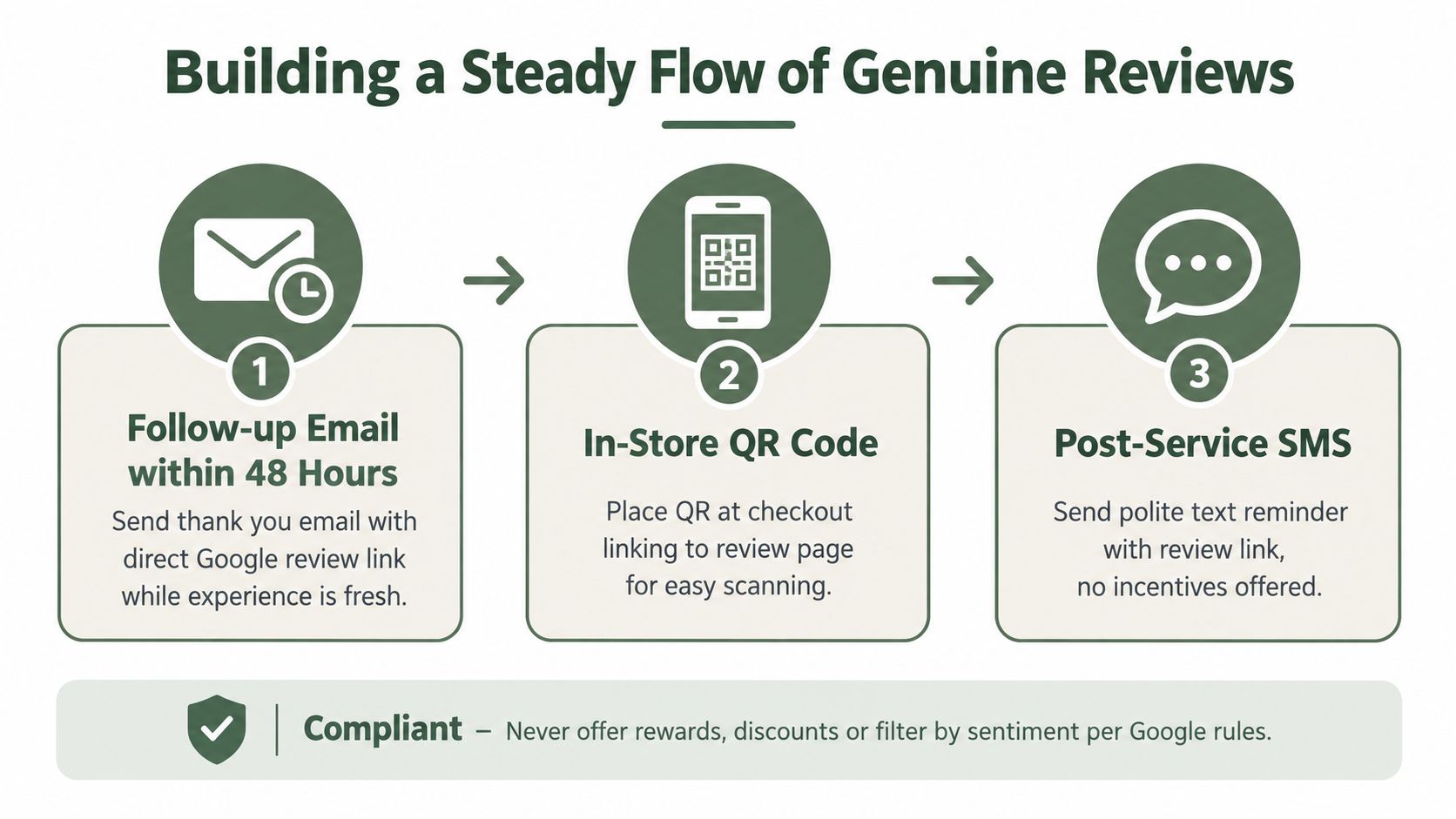
Ask customers who completed a transaction. That's the foundation of a compliant review system. Google prohibits incentives for reviews and says businesses shouldn't manipulate ratings through multiple accounts or other artificial activity, so never offer discounts, gifts, refunds, or points in exchange for a review or a deletion.
Use several ordinary touchpoints:
Use plain language in the request:
“Thanks for visiting [Business Name]. If you have a moment, please share your honest experience on Google: [review link]. Your feedback helps us improve.”
SMS
“Thanks for visiting [Business Name]. Please share your honest feedback on Google: [review link].”
Keep the SMS under 160 characters by shortening the business name and link if needed. Don't tell customers what rating to leave, and don't send requests only to people you believe are happy. Review gating, which sends unhappy customers somewhere else while steering satisfied customers to Google, is prohibited. Give every customer the public Google review option and let them choose whether to use it.
- Follow-up email: Send a thank-you message within 48 hours of the meal, appointment, stay, treatment, or completed service. Include a direct Google review link.
- Post-service SMS: Send a short, polite request after the transaction. Keep the message clear and don't pressure the customer.
- Printed QR code: Put the code at checkout, on a receipt, or inside a delivery bag. A salon can place it near the register. A clinic can place it at the front desk. A contractor can add it to the final project handoff.
Make the process repeatable
Connect the request to your CRM or booking system so it fires after a completed visit, not after a lead or canceled appointment. Exclude duplicate contacts, unresolved billing cases, and customers who haven't transacted. Review the automation regularly to make sure the link works and the timing matches the customer journey.
The guide to getting more Google reviews can help you build a fuller request process. A platform such as RecensioAI B.V. can also manage review requests through email, SMS, QR codes, and shareable links, while giving customers equal public and private feedback choices. The customer decides where to leave feedback.
Your Next Step This Week
Choose the most damaging review on your profile. Don't try to redesign your entire reputation process this week. Complete one careful pass from diagnosis through response, reporting, documentation, and a compliant review request.
Use this order:
Set a five-minute daily check for your Google Business Profile. A restaurant manager can review new feedback before the lunch shift. A salon owner can check after closing. A clinic, hotel, contractor, or franchise manager can assign the task to one named person and review unresolved cases during the weekly operations meeting.
Review recovery is a habit, not a one-time project.
Google may remove a review only when it violates policy. A real low-star opinion may stay, even when you believe it is unfair. Your job is to make the profile accurate, responsive, and representative over time. One ignored review rarely loses a customer, but a pattern of silence can.
---
RecensioAI B.V. helps local businesses automate genuine review requests, manage public replies, document suspected policy violations, and monitor Google Business Profile activity across locations. Visit RecensioAI B.V. to see how you can turn this week's review check into a repeatable operating routine.
- Read the review as a buyer would. Decide whether it is fake, borderline, or a legitimate complaint.
- Respond to legitimate criticism promptly. Acknowledge the specific issue, own what you can control, state a practical fix, and offer a direct private contact.
- Flag a clear violation through the Google Business Profile review tool. Select the policy reason that matches the evidence.
- Save the record. Keep screenshots, dates, reviewer details, business records, and any case reference if Google declines the report.
- Contact recent customers. Send a short request for genuine feedback through email, SMS, or a QR code. Don't offer an incentive or steer people by sentiment.
Frequently asked questions
You might also like
Handpicked articles for you
Hotel Review Management: Automate Post-Stay Requests with Apaleo, Mews and Your PMS
A practical guide to turning hotel checkouts into timely review requests, with Apaleo live, Mews early access and flexible PMS alternatives.
Why the Business Around the Corner Beats You on Google: What 21,373 Profiles Reveal
We compared 21,373 Google Business Profiles with their three strongest nearby competitors. The gap is smaller than most owners think, but it has two sides: rating and volume.
Treatwell Review Management for Salons: One Reputation View Alongside Google
Bring your public Treatwell rating and recent reviews into RecensioAI, then combine salon signals with Google for faster, better decisions.