
Google Business Profile Optimization Service Guide
Learn what a google business profile optimization service does, how pricing works, and how to choose a provider that improves your local map results.
Table of Contents
- 1Introduction
- 2Why Your Business Misses the Top Map Results
- 3What an Optimization Service Actually Includes
- 4The core operating tasks
- 5How Google Decides Who Gets the Local Pack
- 6Relevance
- 7Distance
- 8Prominence
- 9Evaluating Providers and Pricing Tiers
- 10One-time audit agencies
- 11Monthly retainer firms
- 12Automated software platforms
- 13The Review Request Process Done Right
- 14Build requests into the customer journey
- 15Give customers an equal choice
- 16Your Profile Audit Checklist for This Week
- 17Check the identity and location
- 18Check the information customers use before calling
- 19Check the visual and review record
- 20Choosing Your Next Step for Local Visibility
Introduction
A customer searches for “salon near me” while you're serving someone in the chair. Your profile still shows last season's hours, the latest photo is from years ago, and several recent reviews have no response. Three nearby salons appear in the map results instead. You know your service is competitive, but Google and the customer see a profile that looks less current.
The same problem affects restaurants, clinics, hotels, contractors, and franchise locations. Profile maintenance is repetitive work, so it's usually the first task dropped when staff are busy. A Google Business Profile optimization service takes responsibility for that ongoing work, while giving you a clearer view of what's changing and what needs attention.
Why Your Business Misses the Top Map Results
Search your main category from your own neighborhood. You may find three competitors displayed prominently on Google Maps while your restaurant, clinic, or contracting business appears lower down. Those top map results are often the businesses customers call, request directions to, or visit first.
The gap isn't always service quality. A competitor may provide Google with clearer, more current information. Its category may match the search more closely. Its opening hours may be accurate. Its service list may answer a specific question, and its recent reviews may give customers more confidence.
Practical rule: Treat your profile as part of the operation, not as a listing you set up once and forget.
A restaurant manager has tables to turn and staff to schedule. A clinic has appointments, cancellations, and patient questions. A salon owner may be working with clients all day. A contractor may spend most of the week on job sites. None of these operators wants to remember every profile update manually.
That creates a maintenance problem:
A service can handle this recurring work, but it shouldn't promise a fixed position in the local pack. Your location still affects which searches you can serve. The useful question is whether your profile accurately represents the business and gives customers enough current information to choose you.
- Hours change: Holiday schedules, temporary closures, and appointment availability need attention.
- Services change: A clinic adds a treatment, a salon removes a service, or a contractor expands its service area.
- Photos age: The profile stops representing the current space, team, menu, or equipment.
- Reviews accumulate: Customers leave feedback, but staff don't have time to respond consistently or request new reviews after completed visits.
What an Optimization Service Actually Includes
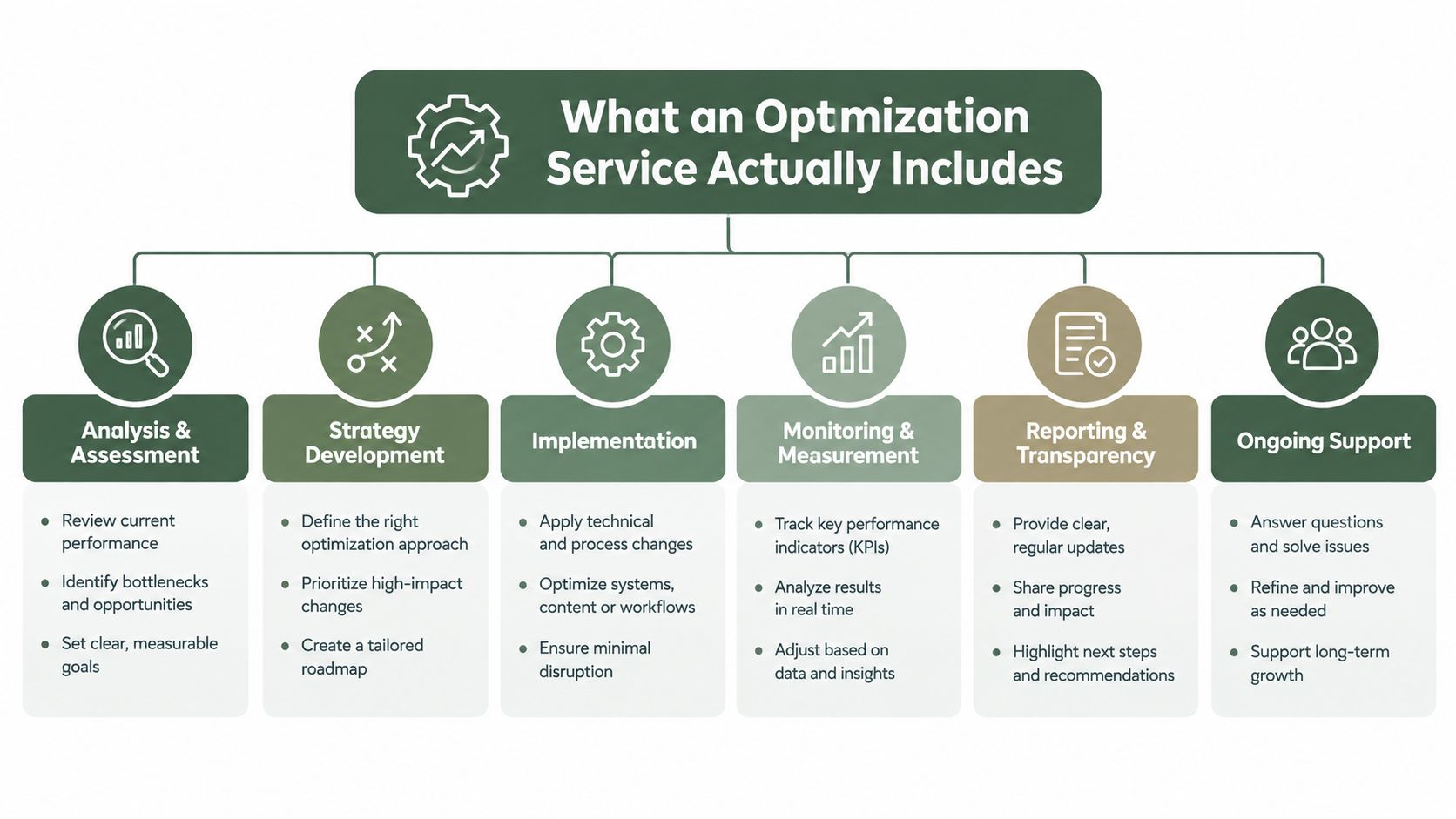
A professional service should manage the information customers and Google use to understand your business. That starts with the business name, address or service area, phone number, primary category, supporting categories, hours, services, attributes, photos, and reviews.
A one-time setup agency may correct these fields and hand the profile back to you. That can help if the listing is incomplete, but it leaves you responsible for every later change. An ongoing service checks for drift and keeps the profile aligned with the actual business.
The core operating tasks
Category selection requires judgment. Your primary category should describe the core business, while additional categories should clarify relevant offerings without turning the profile into a list of every possible service.
Service and attribute management makes specific offerings easier to understand. A hotel may need accurate amenities. A contractor may need clearly described repair services. A clinic should keep treatment information current and avoid adding claims the business can't support.
Location accuracy matters for both storefronts and service-area businesses. A contractor shouldn't create extra profiles for every town served. A physical location shouldn't use an address that doesn't reflect where customers can find the business.
Media maintenance keeps the listing representative. Exterior photos help customers identify a location. Interior, team, product, and equipment images answer practical questions before someone calls.
Post and question management keeps the profile useful, but activity should come from genuine business information. Posts shouldn't be treated as a shortcut around accurate foundational data.
Google introduced the Local Business Center in 2005, consolidated tools under Google My Business in 2014, and renamed it Google Business Profile in 2021, shifting routine management into Search and Maps, as documented in this history of Google Business Profile. The platform's evolution shows why a profile isn't a static directory entry. It's an information layer that keeps changing with Google's discovery surfaces.
For businesses handling calls across several locations, an AI receptionist for local listings can be useful alongside profile management, especially when customers ask questions outside opening hours. It doesn't replace accurate profile data, but it can reduce the operational burden around local enquiries.
For a closer look at the ongoing workflow, compare the tasks in these Google Business Profile management services. The important distinction is whether the provider continues checking the profile after the initial cleanup.
How Google Decides Who Gets the Local Pack
Google says local results are based mainly on relevance, distance, and prominence, and that review count and review score factor into local search ranking, as explained in its local ranking guidance.
These factors don't give you equal control.
Relevance
Relevance measures how closely the profile matches the search. If someone searches for “emergency plumber near me,” a profile with the correct plumbing category and a clearly described emergency service gives Google more useful information than a profile with only a generic business description.
You can improve the information available to Google by checking:
This work improves the query-to-business match. It doesn't let you add unrelated keywords to the business name or claim services you don't provide.
- Primary category: Choose the most accurate description of the core business.
- Supporting categories: Add only categories that apply.
- Services: Name the services customers search for and explain them plainly.
- Attributes: Keep facilities, accessibility details, booking options, and other applicable attributes current.
- Hours: Include regular hours and special hours when the schedule changes.
Distance
Distance is calculated from the searcher or the location included in the search. A profile service can't move your restaurant closer to a customer or make a contractor appear next to every service area. It also can't guarantee that your business will appear in the same position for every person searching from a different location.
Prominence
Prominence reflects how well-known a business appears to be. Google may use broader signals such as links, articles, directories, review count, and review score. Genuine reviews matter here, but more reviews don't cancel out distance or poor relevance.
A useful provider separates these factors in its reporting. It should show whether the issue is incomplete information, weak local prominence, or a location that sits farther from the search area. Tools designed for related paid-search workflows, such as bulk Google ad uploads, solve a different problem. Don't accept a general advertising package as a substitute for profile-specific local visibility work.
The practical target is not a promised number-one position. It's a complete, accurate profile that gives Google enough information to match your business with relevant “near me” searches and gives customers a reason to contact you.
Evaluating Providers and Pricing Tiers
Providers usually fall into three groups. The right choice depends on how many locations you operate, how often your information changes, and how much work your staff can realistically absorb.
| Provider Type | Typical Monthly Cost | Best For |
|---|---|---|
| One-time audit agency | Often project-based, with scope set in the proposal | A single location that needs foundational corrections |
| Monthly retainer SEO firm | Varies by services, reporting, and account scope | Businesses needing ongoing human strategy and broader local work |
| Automated software platform | Varies by locations, users, and enabled features | Owners and teams that need repeatable profile and review workflows |
One-time audit agency
Monthly retainer SEO firm
Automated software platform
One-time audit agencies
This option can suit a single-location salon with an incorrect category, outdated hours, weak service descriptions, or duplicate profile issues. You pay for diagnosis and corrections, then someone on your team takes over.
Ask whether the proposal includes actual Google Business Profile work. A generic website audit, keyword report, or blog calendar won't fix a holiday-hours problem or an incorrect service area.
Monthly retainer firms
A retainer may make sense when your business needs profile management plus other local work, such as directory consistency, location pages, or link development. The trade-off is complexity. You need to know which deliverables relate directly to Google Maps and which support broader search visibility.
Request a sample report before signing. It should distinguish profile views, searches, and customer actions rather than burying local performance inside a general SEO score. Google provides these measurements for verified profiles, with reporting available for individual profiles and multiple profiles, according to its Business Profile performance documentation.
Automated software platforms
Software fits a restaurant group or franchise when every location needs the same review-request process, audit routine, and reporting structure. It can reduce dependence on staff memory, but automation without rules creates risk.
Check whether the platform supports:
A franchise should be cautious about a single corporate report that hides local problems. One location may have accurate hours and steady feedback while another has stale photos and unanswered questions. A platform that only produces a roll-up score won't tell the area manager what to fix this week.
- Location-level diagnosis: Each branch should have its own missing fields, review activity, and profile issues.
- Multi-location reporting: You should be able to compare locations without losing local detail.
- Approval controls: Sensitive review responses and policy issues need human oversight.
- Data ownership: Confirm who controls profile access and exports.
- Clear task history: You should see what changed, when it changed, and who approved it.
The Review Request Process Done Right
A strong rating is useful, but it doesn't tell the whole story. Customers also look for signs that the feedback is current. According to 2025 Google Business Profile review reporting, 83% of consumers use Google to find local business reviews, and many consider reviews from only the previous three months relevant.
That creates a practical distinction between review volume and review recency. A hotel may have years of positive feedback but little recent activity after a staffing change. A restaurant may have a solid rating, yet its newest reviews may mention slow service. A clinic may receive excellent feedback, but only in occasional bursts.
Build requests into the customer journey
Staff shouldn't have to remember review requests at the end of every visit. A compliant workflow can send a request by email, SMS, QR code, or shareable link after a completed visit or job.
The wording should ask for an honest experience. It shouldn't demand a positive rating, offer payment, or tell the customer what to write. Every customer should receive the same opportunity to choose.
Google prohibits fake engagement, including paid reviews, reviews posted from multiple accounts at one person's request, and incentivized or biased reviews. Its Maps user-contributed content policy also says a profile that violates the policy can face restrictions, including temporary limits on new reviews or temporary unpublishing of existing reviews.
Give customers an equal choice
A proper review page shows a public Google review option and a private feedback option side by side. The customer chooses. The business must not intercept unhappy customers, hide the public option, or route only satisfied customers to Google.
Private feedback can help you identify an operational problem. It must not become a gate that prevents criticism from appearing publicly. Google's user-generated-content policy covers reviews, photos, posts, and edits, and requires content to reflect real experiences and accurate information.
AI can help draft replies, but it needs governance. Routine positive reviews may need a simple approval path. Complaints involving safety, discrimination, legal threats, health claims, or suspected fraud should go to a person.
Keep an audit trail with the original review, generated draft, edits, publisher, timestamp, and escalation reason. A useful workflow can also flag suspected fake reviews for reporting. It must never invent a customer experience or publish a fabricated review.
For practical ideas on making review requests part of daily operations, see this guide to automating your review requests.
Your Profile Audit Checklist for This Week
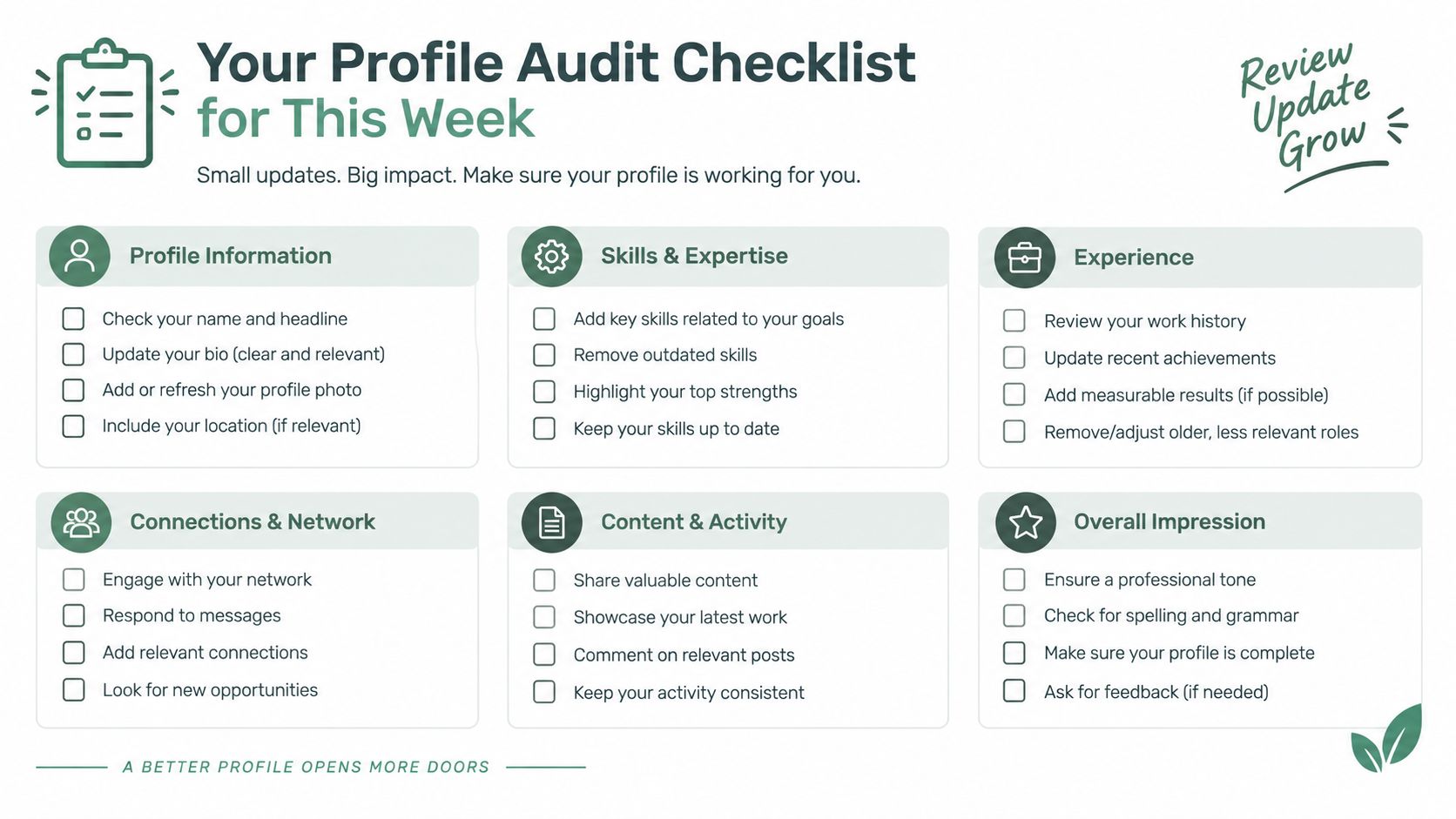
You can find obvious profile problems before paying a provider. Open Google Search and Google Maps, search your main category with “near me,” and compare your listing with the businesses that appear. Don't judge only the position. Look at what information they provide that your profile lacks.
Check the identity and location
Your business name should match the name customers see on your storefront, website, invoices, or vehicles. Don't add service keywords to the name just to target searches.
Check the address if customers visit you. If you're a contractor or mobile provider, review the service area and make sure it reflects where you work. Don't create extra profiles for separate towns when there isn't a real staffed location.
Google requires a profile to represent the business as it exists in the physical world, use the fewest categories needed to describe the core business, and provide regular customer-facing hours, according to its business representation guidelines.
Check the information customers use before calling
Review these fields while you have the profile open:
A restaurant should verify its holiday schedule and menu-related details. A clinic should check appointment information. A salon should remove services it no longer offers. A contractor should make its service boundaries clear.
- Primary category: Does it describe the central business rather than a minor service?
- Additional categories: Are they relevant and defensible?
- Regular hours: Do they match the current schedule?
- Holiday hours: Have upcoming closures or special opening times been added?
- Services: Are the current services listed with clear descriptions?
- Attributes: Are booking, accessibility, payment, or facility details accurate?
- Phone and website: Do both connect customers to the right location?
Check the visual and review record
Look at the profile as a new customer would. Can someone identify the entrance? Do the photos represent the current interior, team, products, or equipment? Are there unanswered reviews or questions that need a response?
Record the gaps before contacting providers. Save screenshots, note the date, and write down the searches you used. A provider should be able to turn those observations into specific tasks, not just send you a generic local SEO package. This Google Business Profile audit checklist can help organize the review.
Choosing Your Next Step for Local Visibility
Local visibility isn't a one-time cleanup. Your hours change, services change, customers leave new feedback, and each location develops its own operational issues. The service that makes sense for you is the one that keeps those details current without creating another daily task for the owner.
A single-location salon may only need a careful audit and a simple process for future updates. A busy restaurant may need automated review requests and a clear response workflow. A franchise needs location-level checks, consistent standards, and reporting that shows which branch needs attention.
Don't judge a provider by the number of features in its sales presentation. Ask what happens after a profile is corrected. Ask who checks stale information, how review requests stay compliant, how sensitive replies are approved, and whether you can see the difference between locations.
If you're comparing broader local-search providers, a specialist such as an local SEO agency Berlin may help with strategy beyond the profile itself. For a focused workflow, choose a service that audits profile completeness, supports genuine review requests, manages responses with human oversight, and gives you a usable action list.
The platform described by RecensioAI B.V. is one example of a workflow built around profile audits, review requests, AI-assisted responses, and multi-location visibility. Whatever you choose, start with evidence. Search your primary category from your service area today, record the three map results, and compare each profile with yours.
---
RecensioAI B.V. offers profile audits, review requests, AI-assisted response workflows, and reporting for local businesses and multi-location teams. Visit RecensioAI B.V. to review the available tools and run a practical starting check for your Google Business Profile.
Frequently asked questions
You might also like
Handpicked articles for you
Why the Business Around the Corner Beats You on Google: What 21,373 Profiles Reveal
We compared 21,373 Google Business Profiles with their three strongest nearby competitors. The gap is smaller than most owners think, but it has two sides: rating and volume.
Treatwell Review Management for Salons: One Reputation View Alongside Google
Bring your public Treatwell rating and recent reviews into RecensioAI, then combine salon signals with Google for faster, better decisions.
Review Sentiment Analysis: Turn Scattered Feedback Into Clear Priorities
Combine reviews from Google, Treatwell and other platforms, detect recurring patterns, and see where your team and service can genuinely improve.