
Reputation Management Software for Hotels Guide
Compare reputation management software for hotels on features, pricing and integrations. Find the right platform to grow reviews and bookings.
Table of Contents
- 1Introduction
- 2Why Hotel Reviews Directly Drive Bookings and Revenue
- 3The financial effect is measurable
- 4What Reputation Management Software for Hotels Actually Does
- 5The daily jobs belong in one place
- 6Automation needs a human checkpoint
- 7How to Compare Platforms on Hotel Specific Criteria
- 8Score the workflow, not the sales presentation
- 9Check permissions and ownership
- 10Pricing Models and Total Cost for Hotels
- 11Four pricing structures you may see
- 12Build two simple budgets
- 13Integrations and Setup That Fit Hotel Operations
- 14Assign the work before connecting anything
- 15Protect guest choice
- 16Which Platform Fits Your Hotel Type and Use Case
- 17Independent boutique hotels
- 18Multi-location groups and franchises
- 19Resorts with strong OTA dependence
- 20City hotels serving multiple languages and time zones
- 21Evaluation Checklist and Recommended Next Step for Hotels
Introduction
A guest checks two nearby hotels on Google Maps before breakfast. One has a larger review history, recent comments, and a stronger average score. The other has good rooms and a fair rate, but its latest review is old and several complaints mention the same unresolved problem. The guest doesn't know your housekeeping schedule or staffing constraints. They see the public record and choose the hotel that feels safer.
That decision repeats on Booking.com, Tripadvisor, and other booking channels. For a hotel, review work isn't a vanity exercise. It affects whether a traveler notices you, trusts you, and accepts your room rate. The challenge is keeping up when the front desk is busy, a manager is covering a shift, and guests speak different languages.
Why Hotel Reviews Directly Drive Bookings and Revenue
Hotel managers often notice the problem during a busy week. A negative review arrives on Google, two guests mention slow check-in on Booking.com, and nobody has time to compare those comments with feedback from the previous month. Staff answer what they see first, not necessarily what matters most.
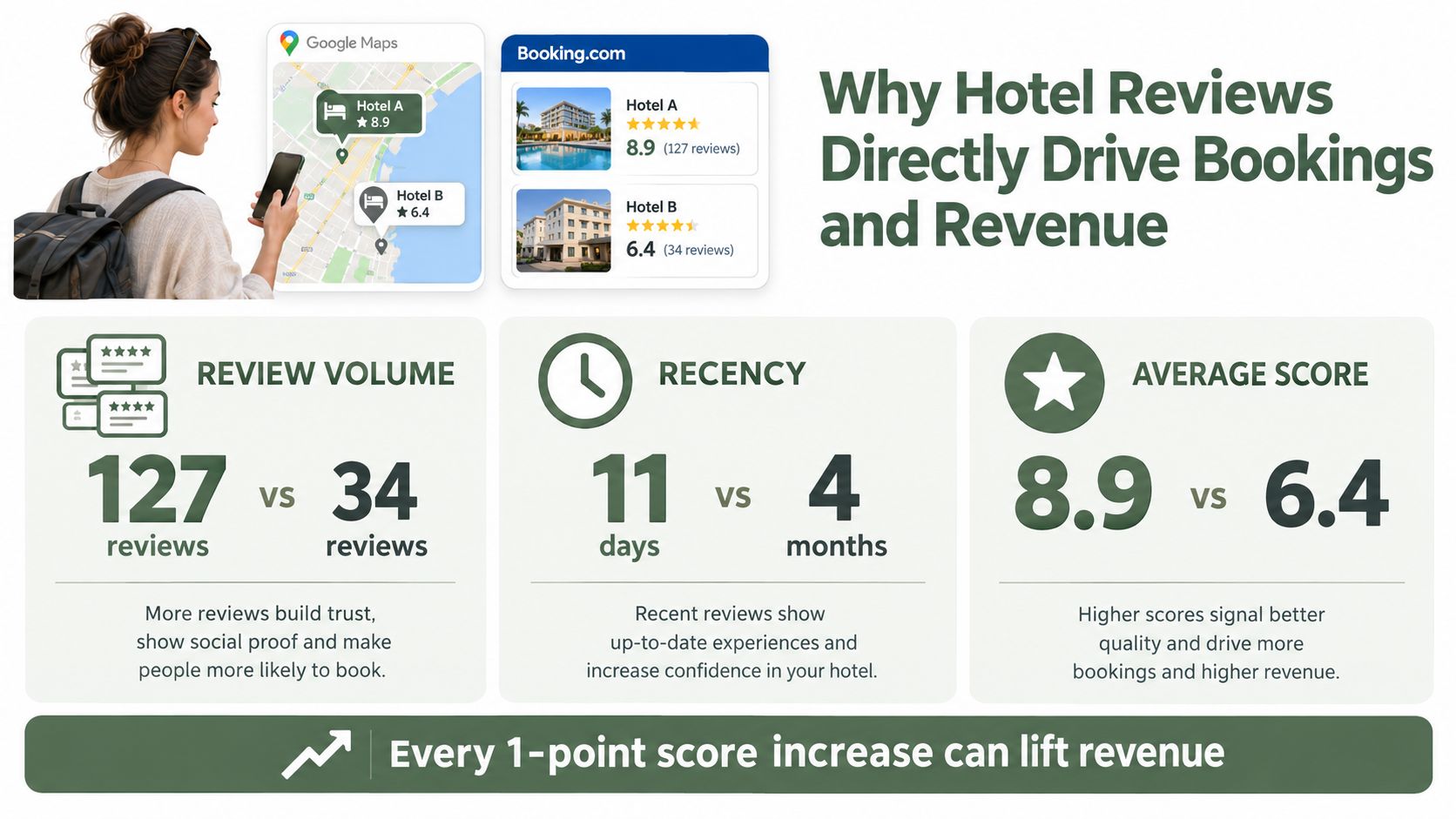
Review volume, recency, and average score all shape the choice a traveler makes. Google says local results rely mainly on relevance, distance, and popularity, and that prominence is influenced in part by review count and review scores on a Google Business Profile. That doesn't mean replying to a review guarantees a higher map position. It means your public review record contributes to how visible and credible your property may appear in local searches.
Booking sites create a similar comparison. A traveler may accept a slightly higher rate when one property has a stronger, more current record of guest experiences. The review page becomes a substitute for a physical inspection.
The financial effect is measurable
Academic hotel research connects rating changes with commercial outcomes. One analysis found that a 1-point increase in review rating raised revenue by 1.6%, increased bookings by 1%, and lifted prices by 0.4% to 0.6%. A broader U.S. hotel panel covering 2005 to 2014 estimated that a 1-point rating increase was associated with a 6.5% increase in demand and a 1.5% increase in price. The same research linked a one-star cross-platform increase with a 6% increase in room-nights sold. These findings appear in the academic analysis of hotel review effects.
Those figures don't promise a result for your property. They show why the work deserves an operating process. A small rating difference can influence occupancy, demand, and the rate guests accept.
Practical rule: Treat reviews as operating data with a revenue connection, not as compliments and complaints that sit outside the business.
Manual monitoring fails for a simple reason. It depends on memory. A manager has to log into several channels, identify the property, read the full comment, write a suitable reply, and pass recurring issues to the right department. When occupancy rises, that routine gets delayed. Reputation management software for hotels brings the work into one controlled workflow, so the team can see what arrived, who owns it, and what needs to change.
For a deeper look at the rating and revenue relationship, see this guide to Google star ratings and hotel revenue.
What Reputation Management Software for Hotels Actually Does
A useful platform handles the work between checkout and operational follow-up. It doesn't replace a manager's judgment. It removes repetitive searching and gives that judgment better information.
Start with the post-stay workflow. The system connects to the property management system, identifies a completed stay, and sends a review request after checkout. Timing matters because the guest remembers the stay more clearly soon after leaving. The message should make the next action simple and work on a phone.
The daily jobs belong in one place
A hotel-focused platform should let you:
A reporting dashboard tells you what happened. A service-recovery system helps someone act. Look for an assignment feature, due dates, notes, and a way to turn repeated complaints into a task for housekeeping, maintenance, food service, or the front office.
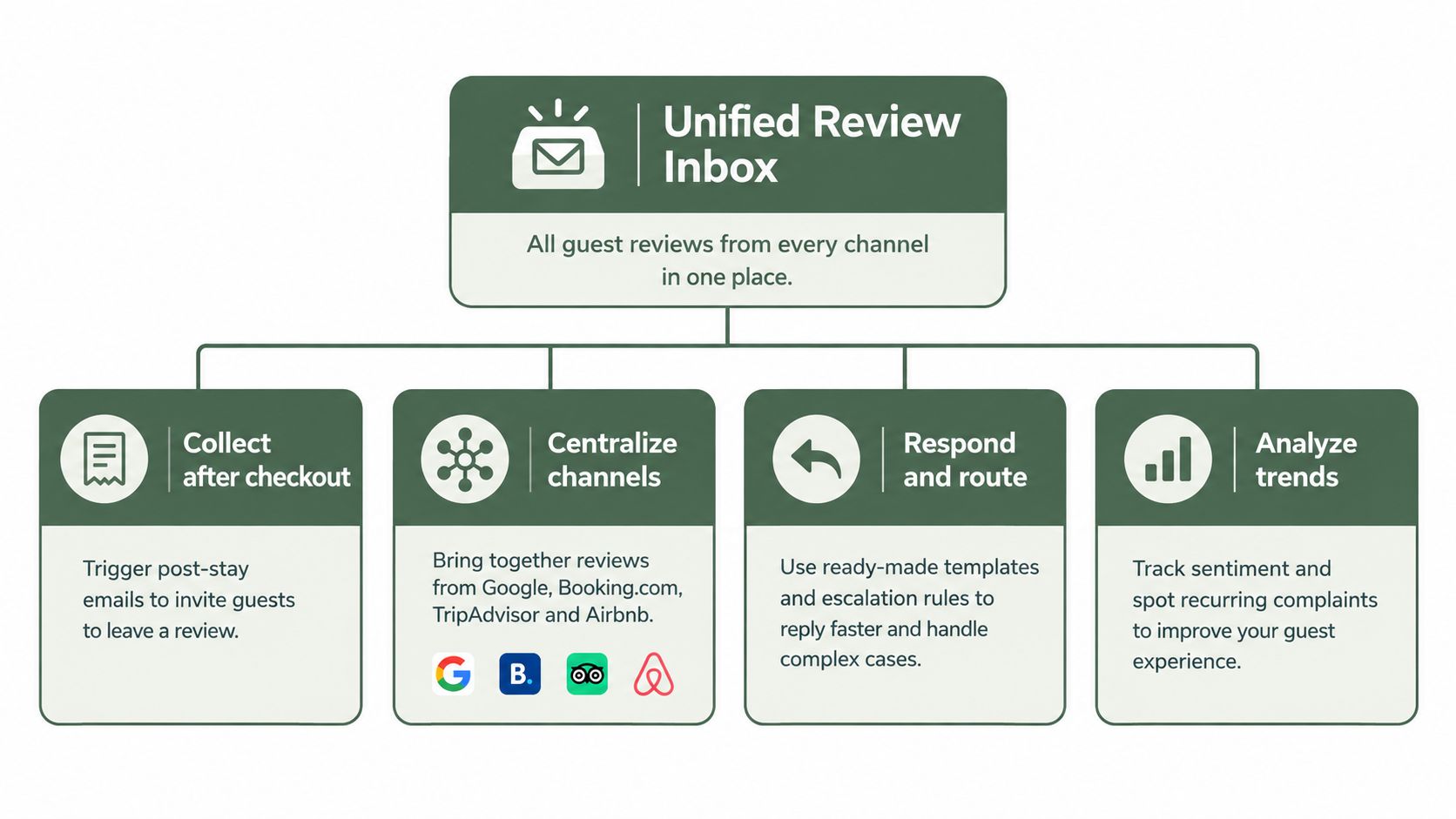
- Collect review requests: Send a clear request after checkout, with the guest offered a public Google review option and a private feedback option side by side. The guest chooses. The system must not filter, intercept, or hold back negative reviews.
- Centralize channels: Bring Google, Booking.com, Tripadvisor, and Airbnb feedback into a shared inbox. Staff shouldn't need separate tabs to understand the property's reputation.
- Respond consistently: Provide editable drafts, templates, approval rules, and escalation paths. A draft can save time, but a manager still needs to correct names, facts, tone, and promises.
- Group recurring themes: Sort comments into subjects such as room cleanliness, breakfast, noise, check-in, Wi-Fi, or staff service. A star average can't tell you which department needs attention.
- Support profile upkeep: Help the team review categories, hours, attributes, services, and photos on the Google Business Profile. A complete profile supports guest confidence, but completeness alone isn't a ranking guarantee.
Automation needs a human checkpoint
AI-generated replies are useful when staff can edit them. The important question isn't how many drafts the system produces. Check whether the team edits drafts accurately and whether those edits improve relevance.
For a quick starting point, a resource that helps teams generate review responses can provide draft language. Use it as a writing aid, not as permission to publish generic apologies without checking the stay details.
A hotel also needs a response policy. Positive comments can receive appreciation that names a specific detail. Negative comments need acknowledgment, a clear next step where appropriate, and no public disclosure of private guest information. A platform should make that process easier without making every reply sound identical.
The best system closes the loop. It shows the review, the response, the theme, the owner, and the operational action in one view.
How to Compare Platforms on Hotel Specific Criteria
Don't compare software by counting feature names. Compare what your team can complete during a normal shift. A platform that collects reviews but can't connect feedback to a staffing or maintenance action is still mainly a reporting tool.
Use the same questions for every vendor. Ask for a live demonstration with your property structure, your channels, your languages, and your approval process. If the demo only shows a polished dashboard, ask the representative to show what happens after a guest mentions a dirty room or a long queue at check-in.
Score the workflow, not the sales presentation
| Capability | What Good Looks Like for Hotels | Why It Matters |
|---|---|---|
| Post-stay review requests | PMS-triggered requests after checkout, with clear timing controls | Guests receive the request while the stay is still fresh |
| Public and private feedback | Google review option and private feedback option shown side by side to every guest | Guests choose how to respond, without review gating |
| Unified channel inbox | Google, Booking.com, Tripadvisor, and Airbnb in one workspace | Managers see the full guest picture |
| Editable AI drafts | Staff can revise drafts, apply tone rules, and approve sensitive replies | Automation supports judgment instead of replacing it |
| Sentiment and themes | Comments grouped into operational subjects and sentiment | Managers can identify staffing, training, or process issues |
| Multi-property control | Portfolio dashboard, property views, roles, and permissions | Regional teams can standardize work without giving everyone access to everything |
| Competitive benchmarking | Comparisons against relevant nearby hotels and selected competitors | Owners can see where their public reputation differs from the local set |
| Enterprise integrations | Connections with PMS, CRM, BI, ticketing, and related systems | Feedback can move into the tools where staff already manage work |
| Response reporting | Response rate, response time, sentiment score, review volume, and edit activity | You can measure process quality, not just output |
Post-stay review requests
Public and private feedback
Unified channel inbox
Editable AI drafts
Sentiment and themes
Multi-property control
Competitive benchmarking
Enterprise integrations
Response reporting
A response queue should show priority. Recent negative reviews, safety concerns, billing disputes, and repeated service failures deserve faster attention than routine praise. Industry guidance commonly uses a target of under 24 hours for negative reviews and 24 to 72 hours for most other reviews, as outlined in hotel reputation software guidance. Treat those as working targets, not universal laws.
Check permissions and ownership
A single-property hotel may need a general manager, front-office lead, and marketing or guest-relations user. A group needs more control. The property manager should see local feedback, while a corporate user may need roll-up reporting across locations. Ask whether users can approve replies, assign tasks, export reports, and restrict access by property or role.
The platform should also show whether themes become actions. If “room not ready” appears repeatedly, can the system assign it to housekeeping and track the follow-up? If “breakfast queue” grows across weekends, can food-service leadership review the comments alongside staffing schedules?
Use this review management software comparison framework to keep your shortlist consistent. Score each capability from your own operating needs, but don't let an attractive score hide a weak PMS connection or poor support for multilingual replies.
Enterprise comparisons also emphasize centralized dashboards, role-based permissions, competitive benchmarking, and connections to PMS, CRM, business intelligence, and ticketing systems. Those integrations matter because unstructured guest comments only become useful when the hotel can turn them into structured, reportable signals, as described in this hotel reputation management software comparison.
Pricing Models and Total Cost for Hotels
Hotel software pricing usually follows the way the vendor measures your operation. A small independent property may pay by location each month. A larger group may be quoted by property, room count, user count, message volume, or a combination of those measures.
Ask vendors to show the full recurring cost in US dollars. The headline subscription often excludes optional services. Common additions include SMS sending, extra users, AI response capacity, competitive benchmarking, survey features, onboarding, and premium integrations.
Four pricing structures you may see
The right comparison is not the monthly license alone. Estimate the staff time required to monitor channels, write replies, report policy violations, build monthly reports, and pass complaints to operating departments. A lower-priced tool that leaves those jobs manual may cost more in management time.
- Per location: Simple for one hotel, but the group cost rises with each property.
- Per room: Can reflect property size more closely, though the bill may increase even when review activity stays stable.
- Tiered bundles: Features and usage limits are grouped into plans. Check which channels and users each tier includes.
- Add-on pricing: The base system may look affordable, while SMS, AI drafts, benchmarking, or integrations carry separate charges.
Build two simple budgets
For a boutique hotel, list one property, the number of staff who need access, the PMS connection, expected review-request volume, and the channels you use. Don't pay for a portfolio dashboard if one manager only needs a clear property-level queue.
For a 10-property group, list every location separately. Ask whether the contract includes portfolio reporting, property-level permissions, centralized templates, language support, onboarding, and exports. Confirm whether a new property requires a new setup fee or changes the price tier.
Contract check: Ask what happens when you add a property, exceed a message allowance, need another user, or cancel. Get those answers in writing before you approve the purchase.
Look for review-request limits, retention terms, support coverage, data ownership, and renewal conditions. Also ask whether the platform charges for every guest message or only for sent requests. A clear estimate lets you compare a single hotel with a group without confusing a low entry price with a low operating cost.
Integrations and Setup That Fit Hotel Operations
Implementation succeeds when each connection has an owner. It doesn't need to become a technology project owned by nobody. Start with the PMS because checkout data controls the post-stay trigger. Then connect the public channels and decide how staff will handle feedback during each shift.
Assign the work before connecting anything
The front-office manager should own the response queue and escalation rules. The guest-relations or service manager should own survey wording and recovery follow-up. An operations leader should own recurring themes. A corporate administrator should own permissions and portfolio reporting.
Use this setup sequence:
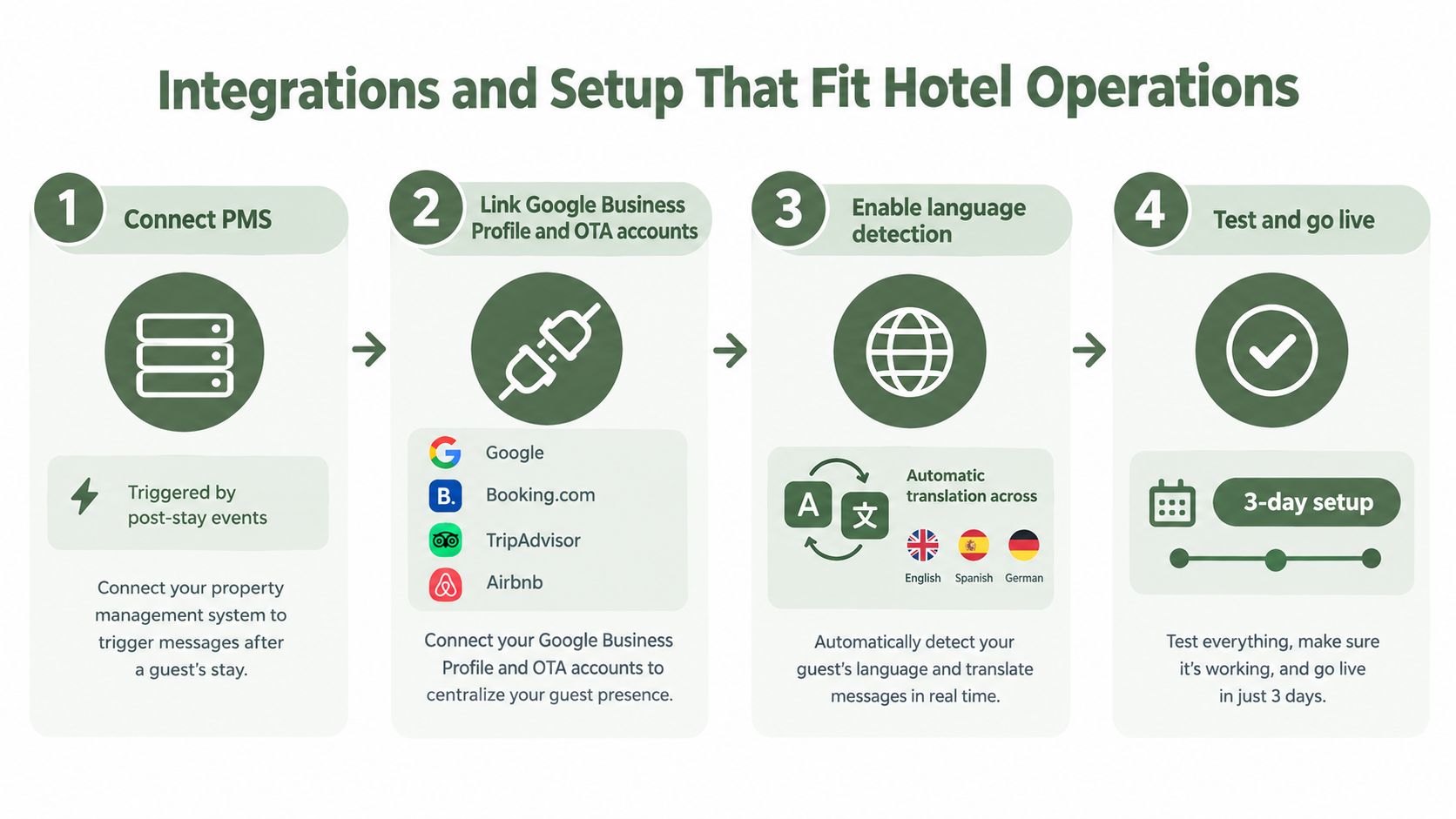
- Connect the PMS. Confirm which event starts a review request, which guest details are passed, and how duplicate or cancelled stays are handled.
- Link the Google Business Profile and OTA accounts. Connect Google, Booking.com, Tripadvisor, and Airbnb where supported. Verify that each property maps to the correct account.
- Enable language detection. Test requests and responses with the languages your guests use. Automatic detection can reduce manual translation, but staff should review sensitive replies.
- Test and go live. Run a small internal test for checkout triggers, links, permissions, notifications, and reporting. The infographic for this process uses a 3-day setup label, but your actual timeline depends on access, approvals, and integrations.
Protect guest choice
Every guest should see both options side by side, a public Google review option and a private feedback option. The guest chooses which one to use. Don't create a flow that shows Google only to happy guests or sends unhappy guests away from public review sites. Review gating can create policy risk and undermines the feedback process.
Google says a negative review isn't removable merely because it is negative. It must violate the content policy. If you suspect spam, fake content, profanity, or another policy breach, use the official manual process: open the Business Profile, choose Read reviews, select Report next to the review, choose the reason, and submit it. Keep screenshots and dates. If the review remains after several days, contact Business Profile Support through the documented Google review reporting flow.
The platform should help document suspected fake reviews. It shouldn't promise removal. Google can restrict a profile for fake engagement, including blocking new reviews or ratings, unpublishing existing reviews for a period, and displaying a warning to consumers, as stated in Google's Fake Engagement policy.
Before launch, test a Spanish review, a German review, a negative room complaint, and a public compliment. Check who receives each alert and whether the right manager can edit the response.
For practical guidance on connecting business systems to automated requests, see this guide to connecting your POS or CRM for Google reviews.
Which Platform Fits Your Hotel Type and Use Case
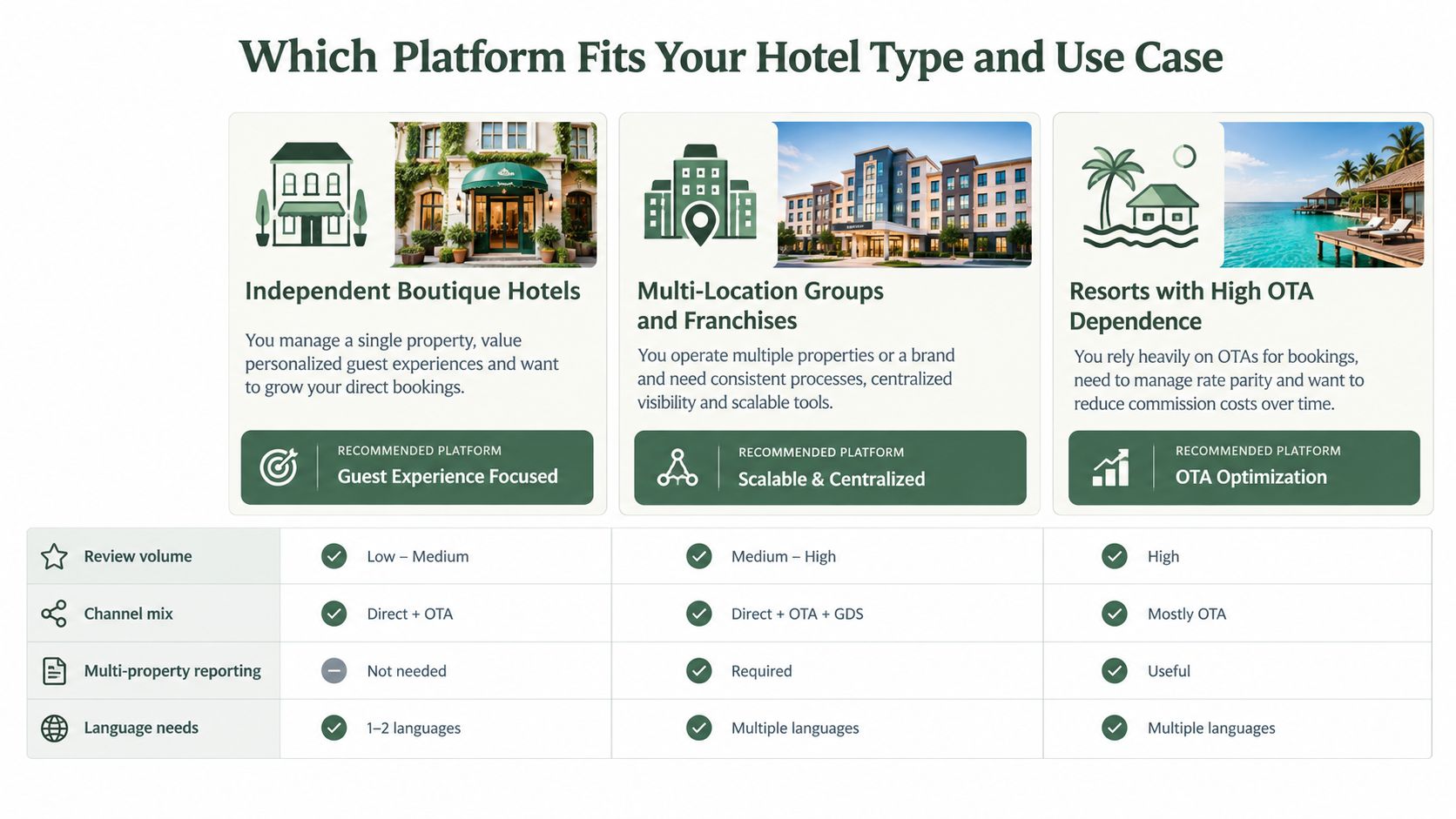
The right platform depends on where your work breaks down. An independent hotel may need reliable post-stay requests and a manageable inbox. A group may care more about permissions, roll-up reporting, and consistent standards. A resort may need strong OTA coverage because guests often judge the property on booking channels before they visit.
Independent boutique hotels
A boutique property usually benefits from a small system with a fast setup, clear ownership, and editable reply drafts. Don't buy a complex enterprise package if nobody will maintain the rules. Prioritize PMS-triggered requests, Google Business Profile support, language-aware messaging, and a theme view that turns comments into specific fixes.
For a boutique hotel: Choose the platform your front desk can use during a busy arrival period, not the one with the longest feature list.
A manager should be able to see today's new reviews, approve a reply, and assign a recurring issue without opening several systems. Competitive comparison is useful when nearby hotels compete on the same location and rate range.
Multi-location groups and franchises
Groups need control without forcing every property into identical language. Look for a centralized dashboard with property-level views, role-based permissions, common response standards, and local editing rights. Corporate leadership may want portfolio trends, while each general manager needs access to guest details for their own hotel.
For a group: Standardize the process, not every sentence.
Test how the system handles a new property, a temporary closure, a franchise role, and a regional administrator. Confirm that reports distinguish one hotel from the full portfolio. A platform that only shows an overall average can hide a serious issue at one location.
Resorts with strong OTA dependence
Resorts often receive feedback about several departments in one review, including rooms, food, activities, transport, and service. The platform should group themes by operational area and support Booking.com, Tripadvisor, Airbnb, and Google where those channels matter to your business.
A resort team should be able to route a complaint internally without hiding it from the public. The public response acknowledges the issue appropriately. The internal task gives the department a way to investigate and improve.
City hotels serving multiple languages and time zones
A city hotel may receive guests from many markets while staff work in local shifts. Language detection, editable translation, time-zone-aware notifications, and clear escalation coverage matter more than a generic “multilingual” label.
Ask the vendor to demonstrate a guest request in the languages you serve. Check whether the original text remains visible beside the draft. You need to know what the guest wrote before approving a public answer.
A practical shortlist usually includes two or three platforms that fit your channels and staffing model. Eliminate any option that can't show the complete workflow from checkout trigger to public response to operational task.
Evaluation Checklist and Recommended Next Step for Hotels
Run the trial with real operating conditions. Don't judge a platform only by its dashboard or an impressive automated reply. Ask whether your team can use it accurately after checkout, during a late shift, and when several properties need attention at once.
Check these items:
Track draft edit rate, not just automation volume. A high number of published drafts means little if staff accept inaccurate or impersonal replies. The useful measure is whether automation helps people respond promptly and whether the resulting themes lead to staffing, training, maintenance, or process changes.
Review management software for hotels should make the operating loop visible. A guest comments on check-in delays. The front-office lead sees the theme. The manager assigns a follow-up. The team checks whether later feedback changes. That is more useful than a monthly chart with no owner.
This week, audit every Google Business Profile and OTA listing for missing information, list the channels your guests use, and record your current response process. Then choose one property, run a short pilot, and test the complete path from checkout request to edited response to operational task.
---
RecensioAI B.V. offers automated post-checkout review requests, AI-assisted replies in the guest's language, sentiment themes, and multi-location monitoring across hotel review channels. Visit RecensioAI B.V. to review whether its workflow fits your hotel's public feedback and service-recovery process.
- Review requests: Can the PMS trigger requests after checkout, and can every guest choose between public Google feedback and private feedback?
- Response operations: Can staff edit AI drafts, approve sensitive replies, and track response time?
- Theme analysis: Does the system group sentiment into recurring complaints that someone can assign to housekeeping, maintenance, food service, or the front office?
- Portfolio control: Can managers view one property while regional users see roll-up reporting with appropriate permissions?
- Profile completeness: Does the workflow help you review categories, hours, attributes, services, and photos on the Google Business Profile?
- Measurement: Can you monitor response rate, response time, sentiment score, and review volume in one report?
Frequently asked questions
You might also like
Handpicked articles for you
Hotel Review Management: Automate Post-Stay Requests with Apaleo, Mews and Your PMS
A practical guide to turning hotel checkouts into timely review requests, with Apaleo live, Mews early access and flexible PMS alternatives.
Why the Business Around the Corner Beats You on Google: What 21,373 Profiles Reveal
We compared 21,373 Google Business Profiles with their three strongest nearby competitors. The gap is smaller than most owners think, but it has two sides: rating and volume.
Treatwell Review Management for Salons: One Reputation View Alongside Google
Bring your public Treatwell rating and recent reviews into RecensioAI, then combine salon signals with Google for faster, better decisions.