
Google Business Profile for Restaurants: Optimization Guide
Optimize your Google Business Profile for restaurants to win near me searches. Actionable steps for menus, photos, reviews, and map results.
Table of Contents
- 1Introduction
- 2Why Your Map Listing Drives Immediate Dining Demand
- 3What gets a business into the local pack
- 4The profile is often the first brand touchpoint
- 5Setting Categories and Attributes for Local Relevance
- 6Complete the fields customers use to filter choices
- 7Keep hours accurate, including exceptions
- 8Structuring Menus and Booking Links for Conversions
- 9Make the main customer paths obvious
- 10Match the link to the location
- 11Using Photos and Posts to Build Guest Trust
- 12Show the experience customers are trying to buy
- 13Use posts for timely information, not ranking promises
- 14Generating Reviews Without Violating Platform Policies
- 15Ask every customer in the same neutral way
- 16Give customers a real choice
- 17Respond like the manager customers will meet
- 18Your Weekly Maintenance Routine and Next Steps
- 19Your Monday profile check
- 20Turn the checklist into ownership
Introduction
You're busy running service, managing staff, checking deliveries, and solving problems at the front desk. Then a guest searches for “restaurant near me,” sees three map results, and chooses one before you even know they were looking.
Your Google Business Profile often decides whether that person calls, asks for directions, books a table, or places a takeout order. The same is true for a salon, clinic, hotel, contractor, or local franchise. If the profile has old hours, weak photos, no clear menu, or missing services, the customer has to work too hard to choose you.
Why Your Map Listing Drives Immediate Dining Demand
A couple leaves work and searches for dinner nearby. One restaurant has clear hours, current food photos, a menu link, and a visible reservation button. Another has an incomplete profile and a photo of its storefront from several years ago. Both may serve good food, but the first profile answers the customer's questions faster.
That speed matters because local search often carries immediate intent. A widely cited local-search benchmark says 88% of people who search for a restaurant on mobile visit or call within 24 hours, while 76% of people searching for something nearby visit a business they find online within a day. The figures come from local-search statistics compiled by SEO Sandwitch. Your profile has to support a decision while the customer is hungry, not after they've opened five websites.
What gets a business into the local pack
Google evaluates local visibility through relevance, distance, and prominence, as explained in Google's Business Profile ranking guidance.
You can't control distance. You can control whether Google and customers have enough accurate information to understand your business. A pizza restaurant that also operates a late-night bar should make both parts of the offer clear, provided the categories and services accurately describe the actual operation.
Google Business Profile is therefore more than a digital directory entry. It's a conversion surface where a guest can view your menu, call the host stand, request directions, book a table, or order food without taking a long route through your website.
- Relevance means your profile matches what the person searched for. Your category, cuisine, services, menu, and attributes all help describe the business accurately.
- Distance reflects how close the business is to the searcher or the location in the query. You can't move your building closer to every potential guest.
- Prominence reflects how well known and established the business appears online. Review count and broader web authority influence this signal.
The profile is often the first brand touchpoint
Restaurants receive particularly strong profile visibility in several 2026 benchmark sets. One independent industry summary reports an average of 2,520 Google Business Profile views per month for restaurants and hospitality, compared with hotels at 2,180, healthcare at 1,890, and retail at 1,640. The figures appear in Google Business Profile statistics for 2026 from Searchlab.
The same summary reports that restaurants receive 7x higher views on their Google Business Profile than on their website. That doesn't mean your website is unimportant. It means many diners encounter the profile first, so sending them to a weak or empty listing wastes an existing discovery opportunity.
If you're setting up or claiming a listing, use a clear process such as this guide to verify a restaurant on Google Profile. Then treat the profile like a digital storefront that needs regular attention.
Setting Categories and Attributes for Local Relevance
Your primary category tells Google and customers what the business is. Choose the category that best describes the restaurant's main operation, rather than one that sounds more attractive.
A sushi restaurant should select the most accurate restaurant category available for its main offer. A venue that serves food and runs a genuine bar operation may also qualify for a relevant secondary category. The same rule applies to clinics, salons, hotels, and contractors. Add secondary categories only when they reflect services customers can receive at that location.
A wrong category creates poor matches. A vague category leaves relevant searches uncovered. Both outcomes make it harder for customers to find the right business nearby.
Complete the fields customers use to filter choices
Attributes give guests practical information before they call, visit, or choose another location. Review every available option and keep it tied to the experience your team can provide.
For example, a pizzeria with a licensed bar adds Outdoor seating and Serves alcohol only after confirming both are available on a Tuesday night in February. Seasonal or limited availability should not become a permanent promise.
Google's Business Profile help says you can add or edit attributes by signing in, opening the Business Profile, choosing Info, and clicking the pencil next to Attributes, as described in Google's instructions for changing Business Profile details.
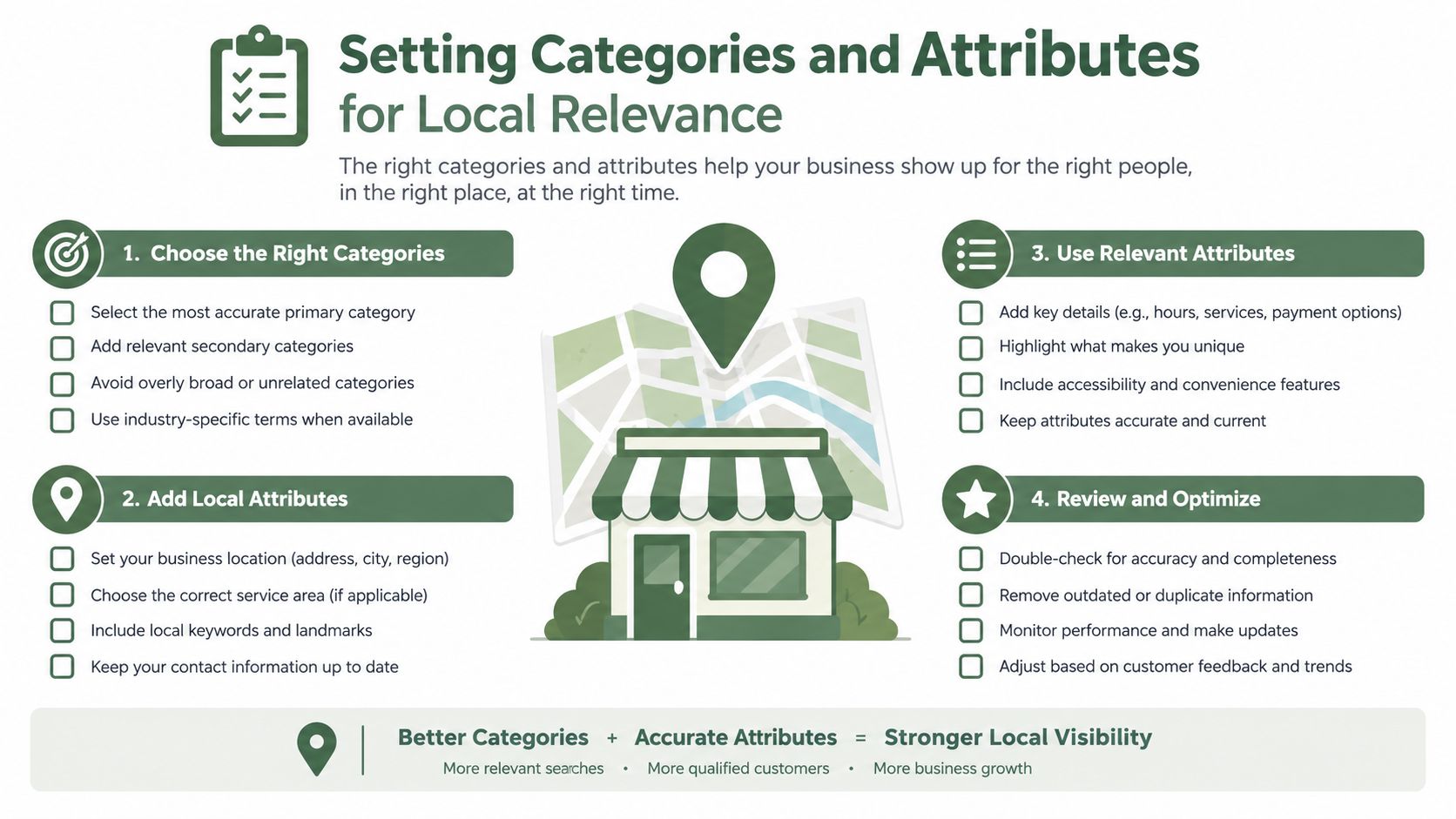
- Accessibility: Confirm wheelchair-accessible entrances, restrooms, and other facilities only when they are available.
- Dining setup: Add outdoor seating, takeout, delivery, dine-in, or curbside options that you currently offer.
- Food preferences: Select dietary options only when your kitchen can support them reliably.
- Amenities: Include Wi-Fi, parking information, live sports, or other relevant facilities when they are part of the customer experience.
- Payment and audience details: Keep accepted payment methods and customer-friendly attributes accurate.
Keep hours accurate, including exceptions
Opening hours are easy to neglect and quick to damage trust. Check regular hours, kitchen hours, bar hours, holiday hours, and temporary closures. If the dining room closes before the kitchen, make that distinction clear on your website and ordering page.
Review special hours before holidays, private events, seasonal changes, and staff training days. A guest who arrives at a closed restaurant may not return. A salon with an incorrect Saturday schedule or a clinic showing the wrong appointment hours creates the same problem.
Do not copy a competitor's attributes or services. Add them only when your team can deliver them consistently. Accurate details improve the match between the search and the visit. Incorrect details lead to calls, complaints, and abandoned bookings.
Make the main customer paths obvious
A restaurant usually has several different types of intent. Don't send every visitor to one generic homepage.
| Customer intent | Profile path to prioritize | What the destination should show |
|---|---|---|
| Dine-in | Reservation link | Availability, party size, date, and booking confirmation |
| Takeout | Online ordering link | Current menu, pickup timing, fees, and payment |
| Delivery | Delivery partner link | Delivery area, menu, and estimated process |
| Quick decision | Call button | A working number answered during service |
| Menu research | Menu link | Dishes, prices, dietary details, and location |
Dine-in
Takeout
Delivery
Quick decision
Menu research
Use the booking provider or ordering platform that your team monitors. A link that opens slowly, demands unnecessary steps, or sends customers to an unavailable service creates friction instead of removing it.
Match the link to the location
For a multi-location brand, each profile should lead to the correct restaurant, not a national booking page that forces the customer to search again. The landing page should show the location's address, hours, menu, parking or access information, and booking options.
The same principle applies outside hospitality. A salon should link to the correct appointment calendar. A clinic should send patients to the right location and service. A contractor should make the contact action specific to the service area.
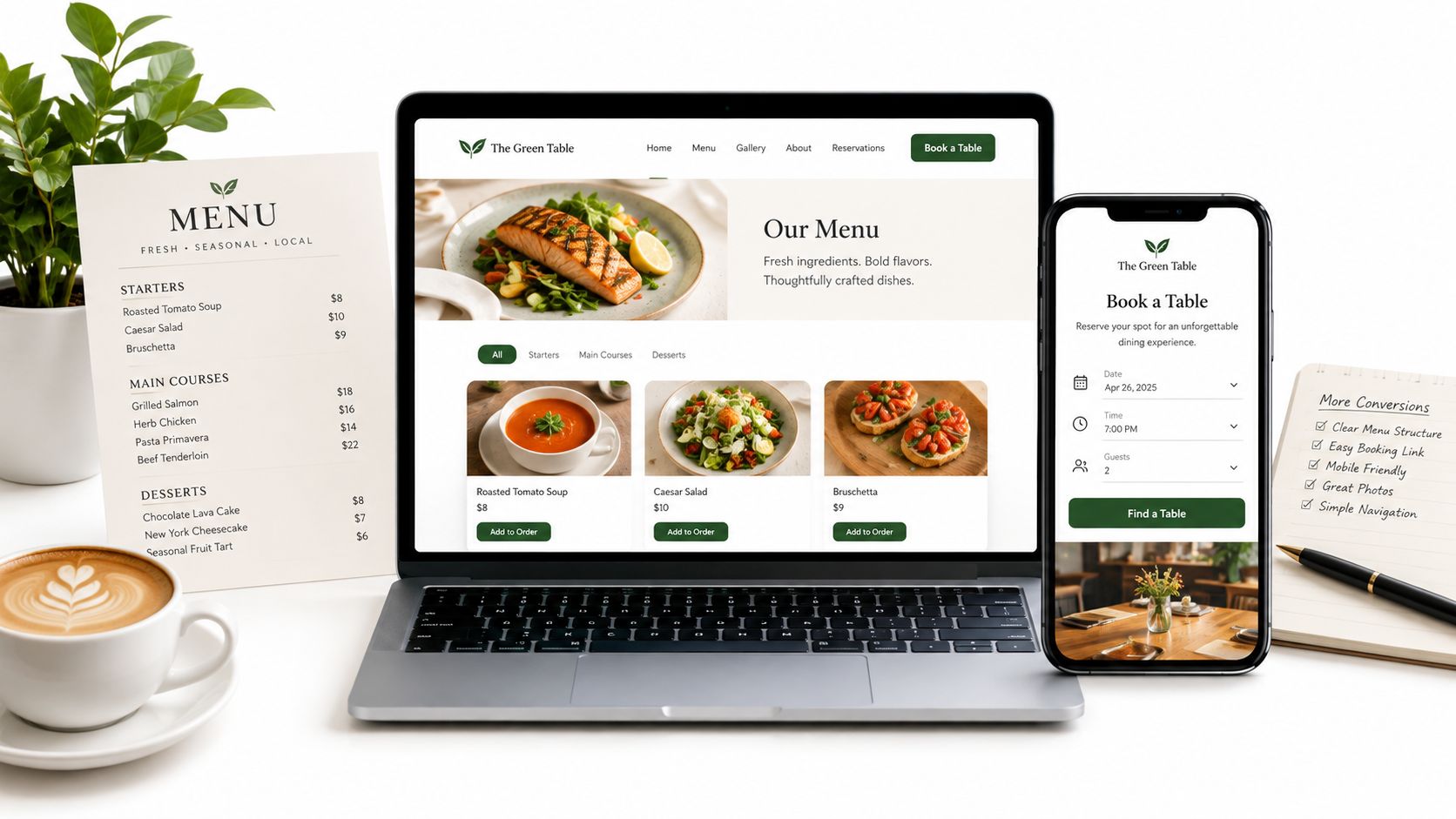
Check every live link from a phone. Ask a staff member who didn't create the profile to complete the path. If they hesitate over where to book or order, customers will hesitate too.
Using Photos and Posts to Build Guest Trust
A guest checking your profile is often deciding whether to book, order, or keep looking. Photos and posts should answer that decision quickly. A dish photo shows portion and presentation. An interior photo shows whether the room fits a quiet meal, a family gathering, or a special occasion. An exterior photo helps a first-time guest find the entrance.
Use the profile as a current sales surface, not a gallery. Customers should see the food, setting, and practical details they will encounter after tapping the menu or booking link. Broader Google Business Profile context is covered in the Searchlab summary of Google Business Profile statistics, but the operating rule is simple: publish images that reduce uncertainty before the transaction.
Show the experience customers are trying to buy
Build a balanced set of images:
Accuracy matters more than polish. A bright, honest image of a small dining room helps guests choose correctly. Heavy editing that makes the space look larger can create disappointment, complaints, and poor reviews.
Use this guide to choosing photos for your Google Business Profile to set an upload checklist. Assign someone to remove outdated specials and replace images when the menu, layout, or frontage changes.
- Food: Show signature dishes, popular categories, drinks, desserts, and seasonal items. Remove images for dishes the kitchen no longer serves.
- Space: Photograph the dining room, patio, bar, private room, and entrance in good light. Include different seating types when they affect booking decisions.
- Practical details: Show accessibility features, parking context, counter-service areas, or pickup points when they shape the visit.
- People and atmosphere: Include the team or a busy dining room only with permission. Natural images usually set better expectations than staged scenes.
- Menu information: Add a readable menu image as a backup to the live menu. Keep prices and availability on the current menu page, where staff can update them.
Use posts for timely information, not ranking promises
Posts work best as service updates. Publish a weekend special, tasting event, holiday opening time, new menu item, or temporary notice. Add the relevant date, a clear photo, and one action that leads to the correct menu, booking, or ordering page.
Google does not confirm posting activity as a local ranking factor, so do not promise that frequent posts will move the listing into the local pack. Their practical value is communication. A current post can help a guest choose between similar restaurants. An expired promotion can make the business look unattended.
Keep a small rotation that the team can maintain. Check every link and date before publishing. Follow Google's content and photo policies, including permission for identifiable people and accurate representation of the business. Report customer-contributed images that violate policy or misrepresent the restaurant. Leave honest criticism in place. A profile earns trust when its photos and updates match the operation guests will experience.
Generating Reviews Without Violating Platform Policies
Reviews affect both reputation and local visibility. Google identifies review count and rating as factors connected to prominence, so a restaurant needs a steady, genuine flow of feedback rather than a one-time push.
Independent restaurant-focused analysis reports that top-three Google Maps listings often average more than 240 reviews, and one cited benchmark claims optimized restaurant profiles can produce 2.3x more reviews and at least a 15% increase in interactions within six months. Those figures appear in Restaurant Velocity's 2026 restaurant statistics summary. Treat them as benchmarks, not promises for your business.
The operational problem is simple. Staff remember to ask for reviews during a quiet shift, then forget when service gets busy. Build the request into the customer journey instead.
Ask every customer in the same neutral way
Choose a few contact points that fit your operation:
The request should ask for an honest review. Don't ask only happy customers. Don't offer a discount, gift, or other benefit in exchange for a positive review. Don't write the review for the customer.
- After dine-in: Send a short email or SMS after the visit.
- After takeout: Include a review request with the receipt or order follow-up.
- At the counter: Place a QR code where customers can scan it without staff pressure.
- For recurring customers: Use a shareable review link, but don't repeatedly target the same person after every minor interaction.
- For multiple locations: Make sure the request opens the correct location's profile.
Give customers a real choice
A compliant feedback flow can show two equal options side by side: leave a public Google review or send private feedback. The customer chooses which path to take.
Never filter out low ratings. Never intercept negative feedback before it reaches Google. Never route unhappy customers away from the public review option. Review gating violates Google policy and can put the profile at risk.
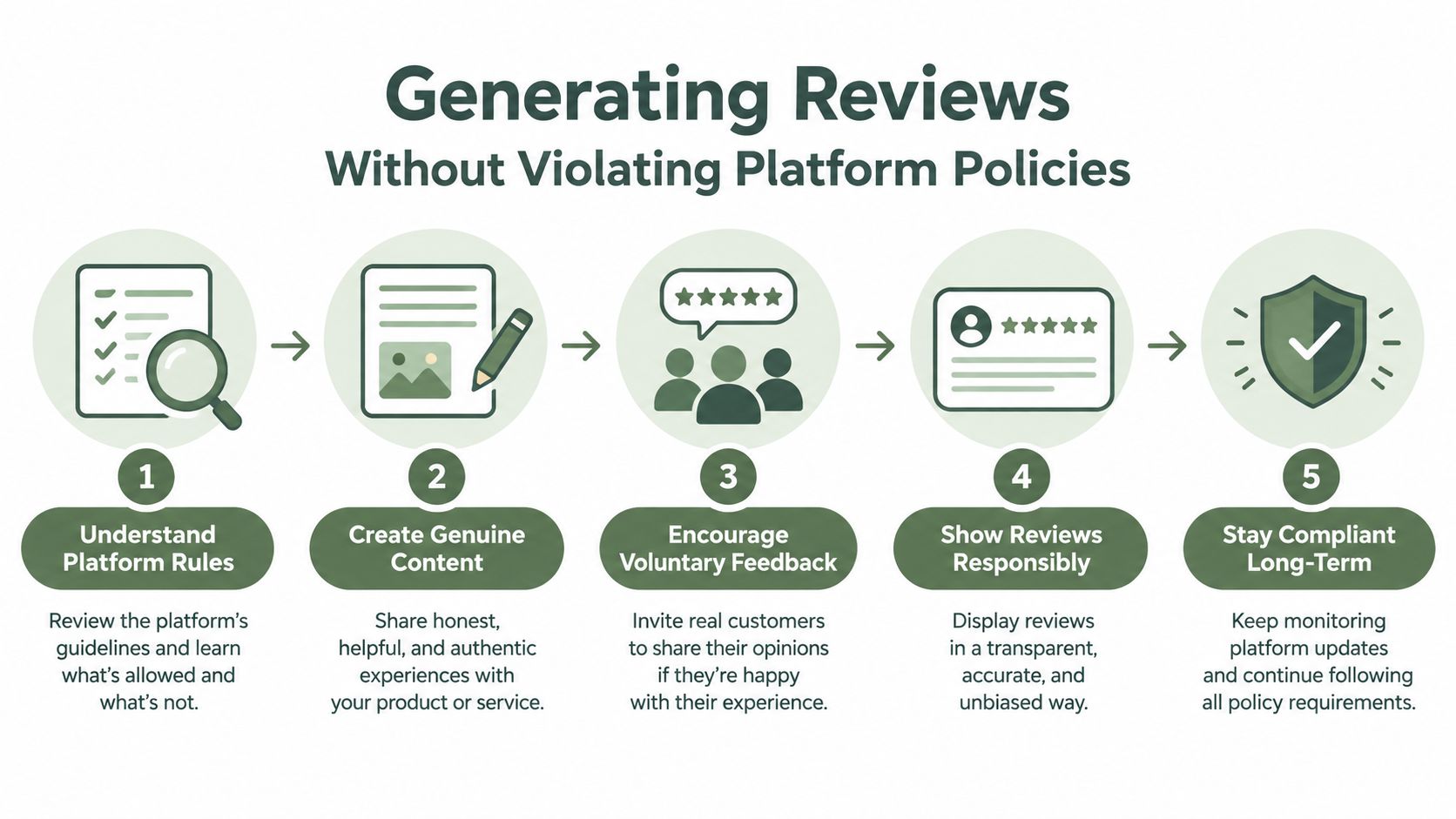
Use private feedback as an additional service channel, not as a replacement for public reviews. A guest who wants to tell the manager about a cold dish should be able to do that. A guest who wants to publish an honest review should have the same clear opportunity.
Respond like the manager customers will meet
Reply to reviews with enough detail to show that a real person read them. Thank the customer for useful feedback. Address the specific issue without arguing. Don't reveal private customer information. Move complex service recovery to a private channel, while keeping the public response respectful and concise.
Positive reviews deserve responses too, but don't copy and paste the same sentence every time. Mention the dish, occasion, or service detail when appropriate. For negative reviews, avoid defensive explanations and promises your team can't keep.
You can find a restaurant-focused approach to review strategy for restaurants and hospitality. The aim is a repeatable system that invites honest feedback and shows future guests that management pays attention.
Your Weekly Maintenance Routine and Next Steps
A guest searching on a phone may be ready to eat within minutes. If the profile shows yesterday's hours, an outdated menu, or a broken booking button, the transaction stops before the guest reaches your restaurant. A Google Business Profile needs regular maintenance because menus, staff, opening hours, links, photos, and customer questions keep changing.
Google's local ranking system considers relevance, distance, and prominence. Distance is fixed, but you can keep the profile relevant and build prominence through legitimate reputation and consistent business information. Treat the profile as an operating channel for menus and bookings, not as a directory entry you update once and forget.
Your Monday profile check
Set aside a short block at the start of each week. Use the same checklist for every location, then record what was checked and what needs action.
- Hours: Confirm regular hours, holiday exceptions, kitchen hours, and temporary closures.
- Menu: Compare dishes, prices, dietary details, and availability with the current menu.
- Links: Test reservation, ordering, delivery, website, and phone actions from a mobile device.
- Reviews: Reply to new reviews that need a response and send service issues to the responsible manager.
- Photos: Add current images when the menu, dining room, signage, or seasonal offer changes. Avoid uploading images only to create volume.
- Attributes: Confirm accessibility, seating, service options, amenities, and payment details.
- Posts: Remove expired offers and publish an update when there is timely information for customers.
- Customer questions: Check questions and answers for incorrect or outdated details.
- Competitors: Search the local terms guests use. Note whether nearby restaurants show clearer menus, stronger photos, or simpler booking paths.
Turn the checklist into ownership
An independent owner can complete the check personally. A multi-location group needs named responsibility. Give each manager access to the information they maintain, while keeping brand rules consistent across locations.
Use one shared record for changes. Note who updated the hours, when the menu was checked, which links were tested, and which customer issues require follow-up. This record prevents repeated checks on one profile while another location receives no attention.
When a two-location group finds the Monday checklist slipping, tools like RecensioAI B.V. can handle repetitive review requests, reply drafts, and profile audits, leaving the manager to deal with exceptions and service decisions. The tool should support the process, not replace judgment about a guest complaint or a misleading menu detail.
Your next action is simple. Open the current profile on a phone and use it as a hungry customer would. Check the hours, menu, booking button, ordering path, photos, attributes, and newest reviews. Fix the first incomplete or misleading item today, then assign the next check to a named person.
RecensioAI B.V. helps restaurants and local businesses manage Google Business Profile audits, review requests, customer feedback, replies, and profile activity across locations. Visit RecensioAI B.V. to review the tools and apply them to your own near me search presence.
Frequently asked questions
You might also like
Handpicked articles for you
How to Protect Your Google Business Profile: Stop Unwanted Changes and Suspensions
The complete guide to protecting your Google Business Profile: who can change it, why suggested edits lead to suspensions, a security checklist, what to do if your profile is suspended, and how 24/7 monitoring restores your details where Google permits.
White-Label Local SEO Tools for Agencies
What RecensioAI offers agencies: an embeddable white-label Google Business Profile audit that works as a lead magnet on your own site, plus an agency account where you run every client workspace, report, SMS credit and invoice. With pricing, margin and a 30-day rollout.
How to Beat Your Competitors on Google in 2026
The complete playbook to outrank local competitors on Google Maps in 2026: how many reviews you need to overtake the business above you, how to break into the top 3, and how RecensioAI runs the work for you, with real screenshots from the app.