
App Review Sentiment Analysis Explained for Local Operators
Learn how app review sentiment analysis works, what metrics to watch, and how local businesses use it to act on real customer feedback.
Table of Contents
- 1Introduction
- 2What Scattered Reviews Feel Like When You Run the Place
- 3What App Review Sentiment Analysis Actually Is
- 4Start with three simple labels
- 5Use the output as a sorting system
- 6How the Models Read Your Reviews
- 7From word counts to learned patterns
- 8Transformers and large language models
- 9Metrics and Dashboards Worth Looking At
- 10Build the screen around operating questions
- 11Where Local Businesses Use It Day to Day
- 12Match the theme to the person who can fix it
- 13Use language and location as operating clues
- 14Accuracy, Languages, and Automation Trade-offs
- 15Check accuracy where decisions get difficult
- 16Choose the level of automation carefully
- 17Turning Insight Into Maps Visibility and a Next Step
- 18Use sentiment to improve the loop
Introduction
A Tuesday morning starts with a familiar problem. A restaurant owner checks the reservation app on her phone and finds three one-star reviews from the weekend. Google Business Profile shows different complaints. Yelp has comments that don't match what the staff heard at the tables. By the time she answers one review, more have appeared.
The problem isn't only the number of reviews. It's that the useful pattern is buried inside them. “Great food, but we waited forever” may look like one unhappy customer. Several similar comments may point to a Friday-night staffing problem. App review sentiment analysis helps turn those scattered sentences into themes you can act on, while also giving you a clearer view of what customers experience before they decide whether to visit.
What Scattered Reviews Feel Like When You Run the Place
The restaurant owner has to manage the dining room, order stock, handle staff questions, and deal with a supplier who delivered late. Reviews arrive across different platforms, each with its own alerts and layout. One review praises the food but criticizes the host stand. Another complains about parking. A third says the service was slow, but never mentions the day or time.
The details are easy to miss because each comment feels isolated. A manager might answer the most recent review, then move on to the next operational problem. That approach handles individual messages, but it doesn't reveal whether wait-time complaints cluster around particular shifts, whether cleanliness comments have increased, or whether customers consistently praise one part of the experience.
Practical rule: Read reviews as operating notes, not just as compliments or complaints.
The same issue appears in other local businesses. A salon may receive booking complaints through its scheduling app and service comments on Google. A clinic may see front-desk feedback in one place and appointment comments in another. A hotel may receive reviews in several languages from guests who describe the same breakfast or check-in problem differently.
You don't need to read every review with the same level of attention. You need a way to sort comments by sentiment, topic, location, service, and urgency, then open the original wording when context matters. Owners who want a broader foundation for managing public feedback can also check Google Reviews resources for practical guidance.
That shift matters for local visibility too. Reviews help shape how customers judge a business in Google Maps, but they also contain operational information that can improve the experience behind the profile. A review dashboard can't run the Friday shift for you. It can show you where to look before the same complaint becomes part of your reputation.
What App Review Sentiment Analysis Actually Is
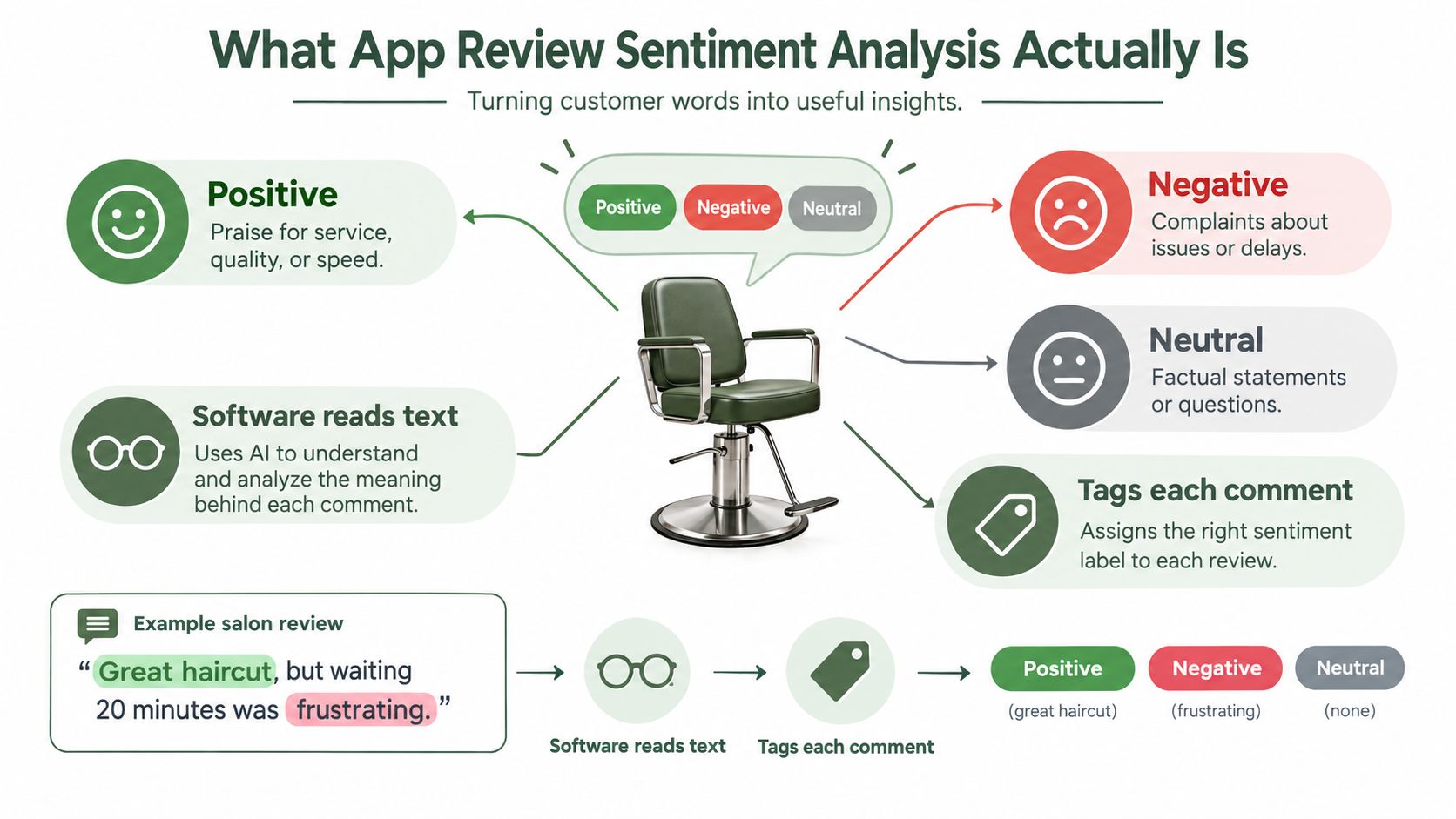
Consider a salon manager with reviews spread across Google Business Profile, Yelp, Facebook, a booking platform, and an app store. App review sentiment analysis is software that reads customer text, labels the feeling expressed, and connects that feeling to a topic.
A comment such as “The color looks fantastic, but I waited too long before my appointment” contains more than one signal. The color service is positive. The wait is negative. A useful system keeps those parts separate instead of forcing the whole review into one label.
Start with three simple labels
Most systems begin by classifying each comment as:
That first label is useful, but it isn't enough. A dashboard that says reviews are positive or negative still leaves you asking, “What should I fix?” The next layer groups sentiment by topics such as booking, stylist changes, cleanliness, products, waiting, or payment.
- Positive: Praise for service, quality, speed, staff, or a specific feature.
- Negative: A complaint about a problem, delay, price concern, or poor experience.
- Neutral: A factual statement, question, suggestion, or comment without a clear emotional direction.
Use the output as a sorting system
The dashboard might show that recent comments are mostly favorable, while negative mentions are concentrated around booking friction and last-minute stylist changes. It might also show that customers repeatedly praise a new color line. You can then open the original reviews, check whether the pattern is real, and decide what belongs in training, scheduling, or customer communication.
The software should sit beside your weekly review routine, not replace it. It can surface reviews that need a personal response, identify recurring themes, and help you compare locations or service categories. You still decide whether a complaint reflects a one-off event, a staff issue, a broken process, or a customer misunderstanding.
The research literature shows why topic-level analysis matters. A systematic review found that overall review sentiment reached 91% accuracy in one cited study, while feature-specific analysis was harder, with median precision around 71% and median recall around 67% across reviewed approaches, as documented in the systematic review of app-review mining. In plain terms, identifying that a review feels negative can be easier than determining whether the problem was the booking system, the staff, the product, or the wait.
How the Models Read Your Reviews
The simplest method uses a word list. Words such as “great,” “love,” and “amazing” push the score upward. Words such as “rude,” “cold,” and “dirty” push it downward. This approach is quick and inexpensive, which makes it useful for an initial scan, but it struggles with sarcasm and context.
“Great, another forty-minute wait” contains a positive word with a negative meaning. “The coffee was cold, but the server fixed it quickly” contains both negative and positive signals. A word list may not understand either sentence correctly.
From word counts to learned patterns
Classical machine-learning models improve on word lists by learning from labeled examples. If people label enough reviews, the model can learn that “cold coffee” points to a product problem while “cold reception” points to a service problem. It examines combinations of words and their surrounding context rather than relying on one term.
This still depends heavily on the quality and range of the training examples. A small dataset may not include local slang, spelling mistakes, short comments, or the languages your customers use. Fine-grained analysis also requires the model to identify the relevant aspect first. The SCARE corpus contained 1,760 annotated Google Play reviews, 2,487 aspects, and 3,959 subjective phrases, and a conditional random field baseline achieved 0.62 for aspect detection and 0.63 for subjective-phrase extraction, according to the ACM record for the SCARE dataset. That illustrates why “negative review” is a much simpler label than “negative front-desk interaction during check-in.”
Transformers and large language models
Transformer-based models read a sentence in relation to its surrounding words. Large language model workflows can go further by examining mixed sentiment across multiple sentences, identifying the topic involved, and producing a summary or draft response.
That additional context can improve handling of messy reviews, but it introduces trade-offs. More capable models generally require more processing and careful instructions. They can still misread sarcasm, invent a connection between unrelated comments, or assign a review to the wrong topic. You need a process for checking borderline results.
| Method | How It Works | Accuracy on Real Reviews | Typical Cost |
|---|---|---|---|
| Lexicon scoring | Matches words against positive and negative lists | Fast for clear language, weaker with sarcasm and mixed sentiment | Low |
| Classical machine learning | Learns patterns from labeled reviews | Useful when training examples match your business and customers | Low to moderate |
| Transformer models | Reads words in broader sentence context | Often stronger on nuance, but results vary by task and language | Moderate |
| LLM-based analysis | Classifies, extracts topics, summarizes, or drafts replies | Flexible for complex reviews, but needs review and quality controls | Moderate to high |
Lexicon scoring
Classical machine learning
Transformer models
LLM-based analysis
Recent evidence shows that model choice can change by task. In one Spotify review study, DistilBERT reached 71.68% accuracy, while XLM-RoBERTa led on F1 at 69.24%, as reported in the multilingual app-review research. For an owner, the lesson is practical: don't choose a tool because it uses a newer model. Ask how it performs on your review types, languages, and topics.
Many production systems combine methods. A fast model can sort ordinary comments, while a more capable model examines mixed, urgent, or ambiguous reviews. That gives you speed without pretending every review can be understood by a keyword list.
Metrics and Dashboards Worth Looking At
A useful dashboard should help you make a decision during a weekly management meeting. It shouldn't bury you under technical terms.
Start with overall sentiment, which some systems show as a score from zero to one hundred or as the share of positive comments. Treat it as a directional measure, not as a replacement for reading reviews. Then check the trend. A falling line matters more than one isolated bad comment because it can signal a change in staffing, scheduling, service, or product quality.
Build the screen around operating questions
A practical dashboard might contain a scorecard, a trend chart, and a theme view. The scorecard shows current review volume, average rating, sentiment, response rate, and response time. The trend chart compares recent periods. The theme view groups phrases around food, service, wait time, cleanliness, parking, booking, or check-in.
Track each location separately if you manage multiple sites. A group average can hide one branch with a front-desk problem or one crew receiving repeated complaints. Review volume by location, service, shift, or day can help you decide whether an issue is isolated or widespread.
| Metric | What It Shows | Healthy Range | Warning Sign |
|---|---|---|---|
| Overall sentiment | The general direction of customer language | Stable or improving | A sustained decline |
| Sentiment trend | Whether the experience is changing | Consistent movement | A sharp or continuing drop |
| Review volume | How much feedback you receive | A regular flow | Long gaps or an unusual spike |
| Response rate | How many reviews receive attention | Consistent coverage | Reviews left unanswered |
| Response time | How quickly the team responds | Prompt handling | Delays on serious complaints |
| Theme mentions | Which topics customers discuss | Minor, understood issues | One topic appearing repeatedly |
Overall sentiment
Sentiment trend
Review volume
Response rate
Response time
Theme mentions
There isn't one universal “healthy range” for these measures. Your baseline depends on the business, season, location, and service mix. The important comparison is against your own recent pattern, with the original reviews available for verification.
A word or phrase cloud can help you spot language quickly, but don't let visual prominence make the decision for you. Open the comments behind a theme. A phrase may appear often because customers praise it, criticize it, or mention it in a neutral question.
For a broader framework on selecting reputation measurements, review which online reputation KPIs matter. Your weekly routine can stay simple: check the trend, identify the largest negative theme, read representative reviews, assign an owner, and record what changed.
Where Local Businesses Use It Day to Day
The value becomes clear when the output changes a decision.
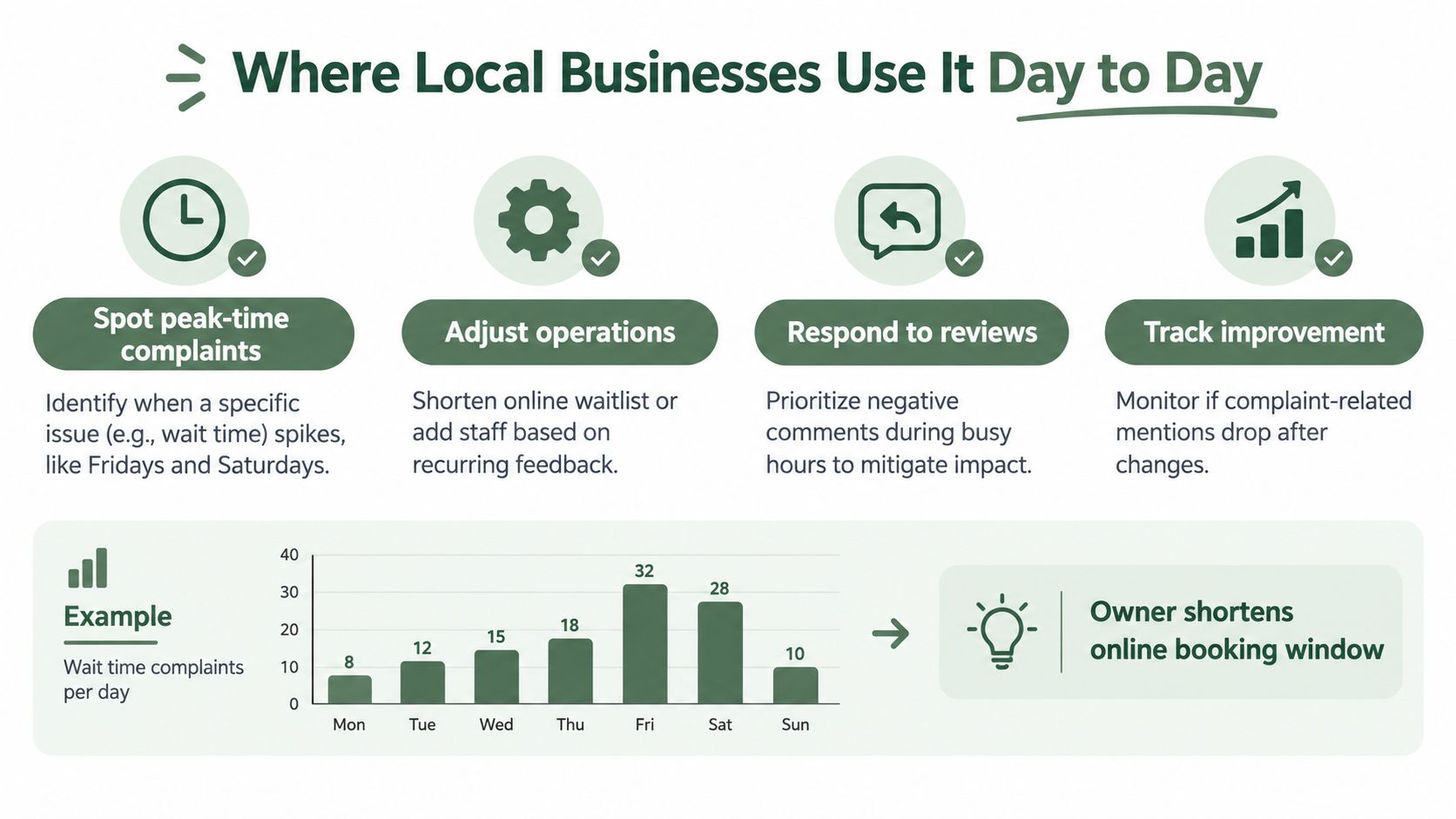
A restaurant owner notices that wait-time complaints are concentrated on Friday and Saturday evenings. The reviews don't prove the exact cause, so she checks the booking flow, staffing plan, and kitchen timing. She changes the online waitlist wording and tests whether guests receive clearer expectations before arriving. The action came from grouping the comments, followed by an operational check.
Match the theme to the person who can fix it
A salon manager sees that reviews praise certain stylists for consultation, communication, and finishing. She compares those themes with rebooking records, then asks the team what those stylists do before the appointment ends. The result is a shared consultation checklist, not a generic instruction to “be better.” The data triggered a training conversation.
A dental clinic finds a cluster of negative comments about the front desk after introducing a new scheduling system. The dentist doesn't assume the clinical experience has changed. The office manager watches a few booking interactions, identifies confusing steps, and updates the process before the same frustration spreads across more reviews. The action is a workflow review.
Use language and location as operating clues
A small hotel notices repeated feedback from business travelers in Spanish, Mandarin, and Portuguese about breakfast timing. The manager checks whether the posted hours match the needs of early departures and adjusts the information given at check-in. The action is a clearer guest schedule and a better morning handoff.
A roofing contractor groups reviews by crew and sees one team receiving repeated complaints about cleanup and arrival communication. The owner pairs that crew with a senior lead and adds a closeout checklist for each job. The action is field supervision, not a public argument with reviewers.
These examples don't mean sentiment software identifies the correct fix by itself. It identifies a pattern worth checking. You still need to compare the comments with schedules, staff reports, booking records, and what customers experienced.
A helpful review workflow is:
This short video gives another visual explanation of how review feedback can support daily business decisions.
- Spot the pattern: Group comments by topic, day, location, service, or crew.
- Verify the cause: Read the original reviews and compare them with internal records.
- Assign the fix: Give one manager responsibility for the next action.
- Watch the next batch: Check whether the same theme continues after the change.
Accuracy, Languages, and Automation Trade-offs
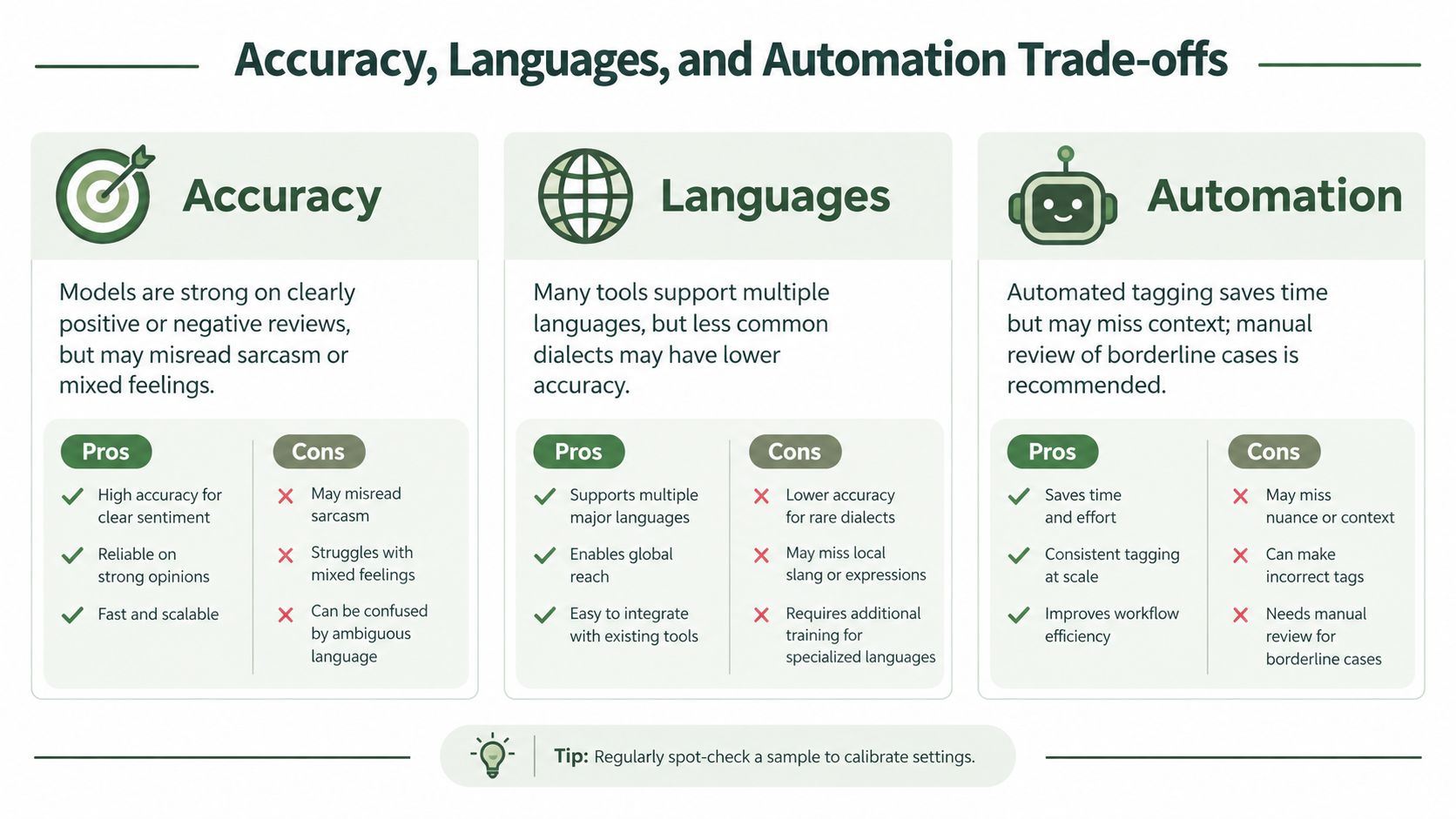
A sentiment tool can look impressive in a demonstration and still struggle with your real reviews. The difficult comments are usually short, sarcastic, mixed, misspelled, or written in a language the system handles less confidently.
“Great, another forty-minute wait” is clearly negative to a human manager. “The food was excellent, but the server ignored us” contains both praise and criticism. A one-word review such as “Fine” may be neutral, mildly positive, or disappointed depending on the surrounding experience.
Check accuracy where decisions get difficult
Ask to see how the system handles three-star reviews, not only obvious five-star and one-star comments. Those middle reviews often contain the most useful operating detail because customers explain what worked and what didn't.
Languages need the same scrutiny. A tourist-town salon or hotel may receive reviews in Spanish, Mandarin, or Portuguese. Automatic translation can help you read a comment, but translation alone doesn't guarantee that the sentiment, tone, slang, or topic will be classified correctly.
Choose the level of automation carefully
You can use automation in stages:
The third option carries more risk. A clinic may need to avoid discussing private health details. A contractor may need to check warranty language. A restaurant may not want an automated reply to promise a refund that staff can't authorize.
Human review matters most when a comment involves health, safety, money, legal concerns, or a serious service failure.
Before choosing a vendor, ask:
You can also review practical considerations around automated customer communication in this guide to the pros and cons of automation. The safest setup is one that saves reading time while keeping a person responsible for sensitive decisions.
- Digest emails: The system summarizes themes and sends them to an owner or manager.
- Drafted replies: The system prepares a response, but a person approves it before publication.
- Automatic replies: The system publishes responses without individual approval.
- Three-star performance: How does the system classify mixed or moderate reviews?
- Language coverage: Which languages and regional variations does it support?
- Sarcasm handling: Can you see examples of difficult comments?
- Approval controls: Can replies be held for review before publication?
- Data storage: Where is review data stored, and who can access it?
- Correction process: Can your team fix a wrong topic or sentiment label?
Turning Insight Into Maps Visibility and a Next Step
Sentiment analysis connects to Google Maps visibility indirectly. Google says local results are mainly based on relevance, distance, and popularity, and explains that prominence can be influenced by information such as how many websites link to a business and how many reviews it has. Google also states that more reviews and positive ratings can help local ranking, as described in its Google Business Profile local ranking guidance.
That makes review count and rating important measures to monitor. An independent Localo analysis of 16,098 Google Business Profiles found that profiles with 1 to 5 reviews had a 39.3% top-three rate, while profiles with 201 to 500 reviews had a 73.0% top-three rate in its study of map performance, as reported in its local SEO ranking factors analysis. This is evidence of a relationship in that analysis, not a promise that collecting a particular number of reviews will place your business in the local pack.
Use sentiment to improve the loop
The operating loop is straightforward:
Review text can also show you the language customers naturally use for your service. A dentist looking for practical ideas beyond review management may find marketing insights for dentists useful when connecting customer language with patient communication.
You can run a basic review analysis this week without buying anything. Pull your last thirty reviews, group them into a few themes, read the original comments behind each group, and reply to the three lowest-rated reviews with specific, professional responses. Then make one operational change tied to the most common complaint and record the date so you can compare future feedback.
For owners who don't want to group comments and prepare drafts by hand, RecensioAI offers review theme analysis, sentiment monitoring, review-response workflows, and Google Business Profile tools in one system. Learn more about how reviews relate to Maps visibility in this local owner's guide to Google reviews and Maps.
Sentiment analysis only matters if it changes what you do Monday morning. Start with the last thirty reviews, identify one recurring problem, assign one person to fix it, and review the next set of comments after the change.
---
RecensioAI B.V. helps local businesses collect genuine review requests, organize review sentiment and recurring themes, draft responses, and maintain Google Business Profile activity. Visit RecensioAI B.V. to see how the platform can fit your weekly review and Maps visibility routine.
- Classify feedback: Separate positive, negative, and neutral comments.
- Group the themes: Find recurring issues such as waiting, booking, cleanliness, or communication.
- Fix the process: Change staffing, instructions, scheduling, training, or service delivery.
- Reply carefully: Acknowledge public feedback without exposing private information or making promises you can't keep.
- Watch the next batch: Check whether the same complaint continues.
You might also like
Handpicked articles for you
Hotel Review Management: Automate Post-Stay Requests with Apaleo, Mews and Your PMS
A practical guide to turning hotel checkouts into timely review requests, with Apaleo live, Mews early access and flexible PMS alternatives.
Why the Business Around the Corner Beats You on Google: What 21,373 Profiles Reveal
We compared 21,373 Google Business Profiles with their three strongest nearby competitors. The gap is smaller than most owners think, but it has two sides: rating and volume.
Treatwell Review Management for Salons: One Reputation View Alongside Google
Bring your public Treatwell rating and recent reviews into RecensioAI, then combine salon signals with Google for faster, better decisions.