
Google Reviews for Small Business: 2026 Growth Guide
Learn how to earn, manage and showcase Google reviews for small business success. Get practical tips to build trust, rank locally and win more customers in
Table of Contents
- 1Introduction
- 2The Problem Most Local Owners Miss
- 3How Google Reviews Affect Local Rankings
- 4What reviews do inside prominence
- 5What not to confuse with ranking
- 6How to Request Google Reviews After Every Visit
- 7Keep the ask simple
- 8Make the choice equal
- 9How Many Recent Reviews Are Enough
- 10Match the review pattern to the business
- 11What to Do with Negative, Mistaken, or Fake Reviews
- 12Choose the right response
- 13Don't make the mistake most owners make
- 14A Weekly Workflow for Managing Reviews
- 15Monday through Friday
- 16The Next Step This Week
Introduction
You can run a solid local business and still lose the click. The phone rings, the dining room needs attention, the stylist chair is full, or the next appointment is waiting, and the businesses in the map results keep showing up above you with fresher, fuller review profiles. That gap feels unfair until you realize customers are making the same comparison you are, fast, public, and in front of Google.
For google reviews for small business, the real problem isn't just collecting praise. It's figuring out how many recent reviews are enough, what kind of reviews matter for your type of business, and how to keep the profile active without crossing Google's policy lines.
The Problem Most Local Owners Miss
A restaurant owner can answer phones, manage the floor, and still look up after a rush to see three other places in the local pack with more recent reviews. A salon owner may have happy clients every day, but if those clients never leave public feedback, the profile starts to look quiet. A clinic owner can watch older reviews age out while new patients come and go without ever adding fresh proof.
That's the part most owners miss. Google reviews aren't just a courtesy layer on top of your business. They're part of how customers decide whether you feel current, trusted, and worth the detour.
Practical rule: A steady flow of real reviews matters more than a one-time burst. If your profile goes stale, customers notice before you do.
BrightLocal's 2024 Local Consumer Review Survey found that 81% of respondents used Google to read reviews, and 77% used at least two review platforms when researching a business, which means Google is central but not the only place shaping decisions. The same survey showed 96% considered a review search function useful and 47% found sorting by newest highly useful, which is why fresh feedback carries weight. BrightLocal's 2024 Local Consumer Review Survey
If you run a local business, that changes the job. You're not trying to “get some reviews” and move on. You're trying to keep enough current, believable customer evidence on the page that a person searching near me feels safe choosing you over the place above or below you.
How Google Reviews Affect Local Rankings
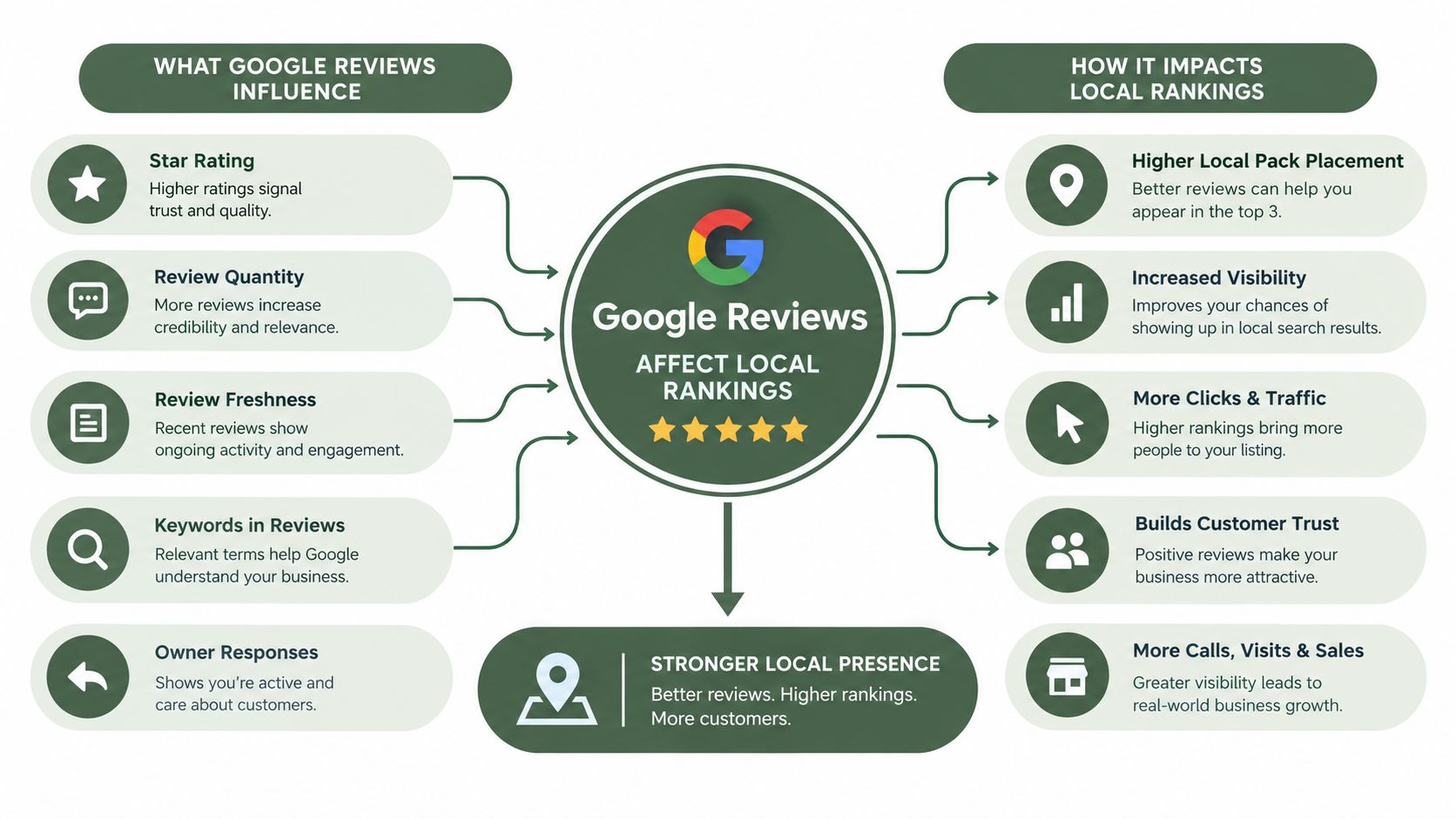
Google says local results are mainly based on relevance, distance, and prominence. Relevance is how well your Business Profile matches the search. Distance is where you are relative to the searcher. Prominence is how well-known the business is, and Google says that can depend on things like how many websites link to you and how many reviews you have. Google's local ranking guidance
What reviews do inside prominence
Review count and positive ratings are not the only things Google looks at, but they are real signals inside prominence. That means a profile with a healthy stream of genuine reviews has more evidence of activity and trust than one that's silent for months. For a restaurant, hotel, salon, clinic, contractor, or retailer, that can matter a lot in map results where customers are comparing several options in seconds.
The important line is this. Review volume and rating are documented local-ranking factors, but replies, posting activity, and automated request tools are not confirmed ranking factors. Use replies and profile updates to build trust, clarity, and completeness. Don't promise yourself they'll push you up the map.
What not to confuse with ranking
A lot of owners waste time on activities that feel productive but don't have the same direct standing. Replying to reviews is still worth doing, because people read replies before they call. Google Business Profile posts are still useful, because they show the profile is maintained. Automated review requests are still useful, because they help you keep the profile current. None of those should be sold to yourself as a ranking shortcut.
If you want a practical starting point for the broader local setup, building a geo SEO plan is a useful companion to the review work. For a deeper look at map visibility, the internal guide on local pack ranking factors fits this topic well.
How to Request Google Reviews After Every Visit
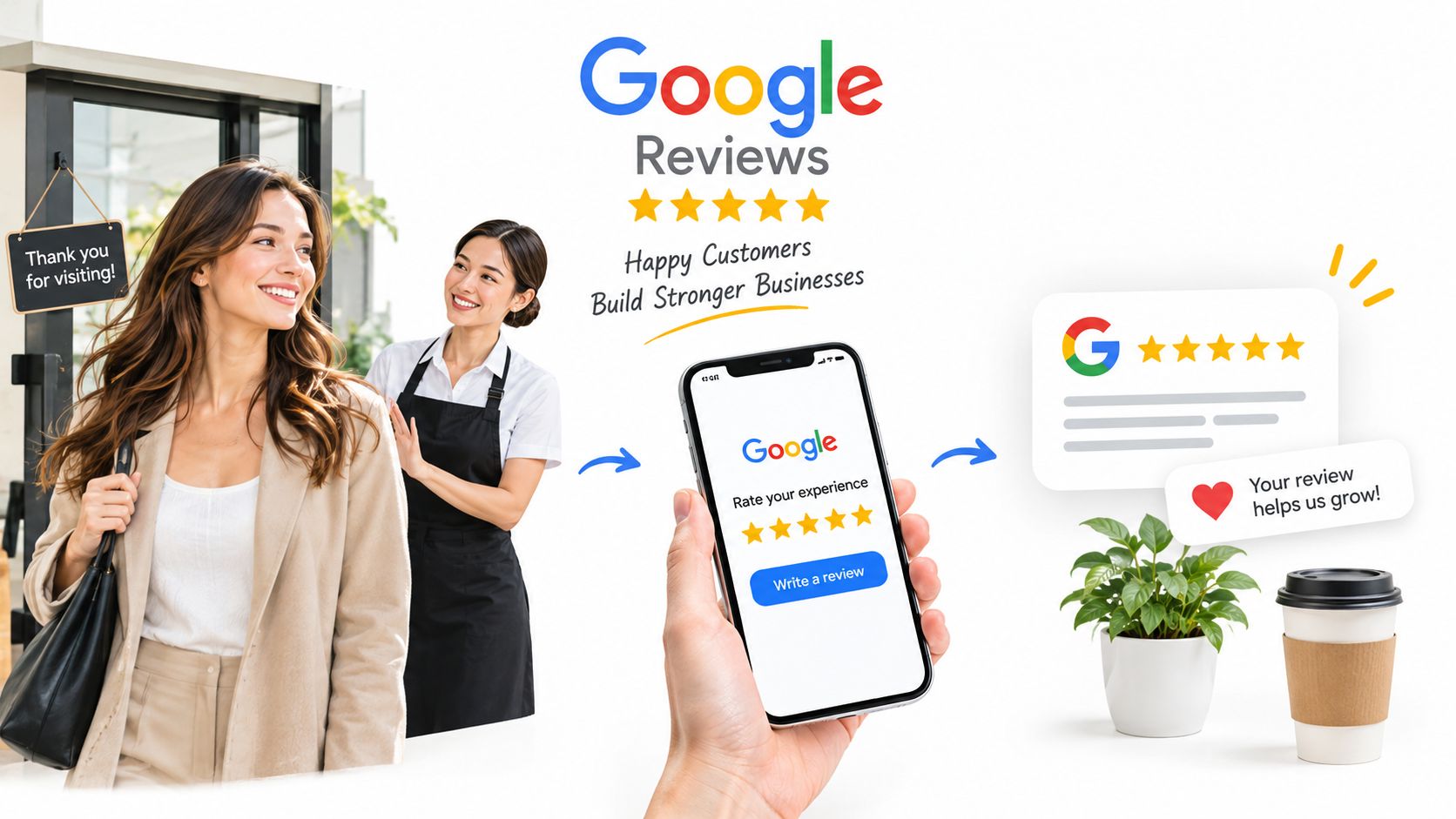
The safest review request process starts after a real visit, real order, or real appointment. Not before. Not with pressure. Not with a reward tied to a star rating. Google requires each review to reflect a genuine customer experience and prohibits incentives in exchange for posting, changing, or removing a review. Violations can lead to review removal, temporary blocks on new reviews, and warnings to consumers about fake reviews. Google's review policy
Keep the ask simple
Use the same basic request every time, after the transaction is complete. Email works well for restaurants, hotels, clinics, and retailers with customer records. SMS is often better when people booked on their phone. QR codes work at the counter, on receipts, or on checkout cards. A shareable link is useful for follow-up calls and service jobs.
The wording should stay neutral. Ask for honest feedback. Don't ask only the happiest customers. Don't promise a discount, gift, or future perk. Don't tell someone to change a review after they've posted it.
If you wouldn't say it to every customer in the same situation, don't build it into the request.
Make the choice equal
A lot of owners need a compliant way to collect useful feedback without filtering who gets the Google link. That's where a branded review page can help when it gives every customer the same two choices, public Google review or private feedback, and lets the customer decide. For a field service company, that can be especially useful after a repair, and review requests after a repair is a good example of how that process gets automated in practice.
If you want a plain-language script for the actual ask, the internal guide on how to ask customers for a review without being awkward is a strong fit.
How Many Recent Reviews Are Enough
The wrong question is, “How do I get as many reviews as possible.” The better question is, “How many recent, useful reviews do I need for this business to look credible to the next person who's checking me out?”
BrightLocal found that 59% of consumers said a business should have between 20 and 99 reviews before they trust its average star rating, and 97% read reviews for local businesses in 2026. BrightLocal's local consumer review research
Match the review pattern to the business
A restaurant needs a steady trail of recent comments about food, service, speed, and consistency. People want to know whether the place still feels good this week, not just last season.
A clinic or contractor usually needs something different. Those buyers care about trust, clarity, follow-through, and responsiveness. A detailed review that explains how the appointment went, how the problem was handled, or how the crew communicated can matter more than a pile of thin one-liners.
A salon, hotel, or retailer sits somewhere in the middle. Cleanliness, timing, and staff behavior tend to show up again and again. That tells you what to ask about and what to watch for in the reviews you already have.
Useful rule: Chasing one more review makes sense when it adds fresh evidence. It doesn't make sense when it only repeats what your profile already shows.
The practical move is to track three things at the location level, recency, volume, and substance. If your current reviews already answer the basic buyer questions, stop obsessing over the number and start improving the evidence. If your profile still looks thin or old, ask more often until the story looks current and believable.
What to Do with Negative, Mistaken, or Fake Reviews
Not every bad review means the same thing. A genuine complaint, a confused customer, a competitor hit, and a policy-breaking fake review all need a different response. If you handle them the same way, you either look defensive or waste time trying to remove something that Google will keep.

Google allows businesses to report suspected spammy or fake reviews and submit a one-time appeal through the Reviews Management Tool after an initial decision. Google's review reporting process
Choose the right response
If the review is real and the complaint is fair, reply calmly and directly. Acknowledge the issue, avoid private details, and show that you're taking it seriously. That often does more for the next reader than trying to scrub the complaint away.
If the review is suspicious, document what looks off before you report it. Keep the profile, the transaction record, the date, and any evidence that shows why the review doesn't match a real customer experience. Then use Google's reporting flow instead of arguing in public.
If the review is false but not obviously policy-violating, don't overreach. A calm public reply can still protect the business better than a messy back-and-forth. The internal guide on how to respond to a negative Google review with examples is worth keeping handy for this kind of situation.
Don't make the mistake most owners make
The instinct is to remove every bad review. That's not always the smartest move. A profile with only glowing reviews can look less believable than one that shows how you handle problems in public.
The better standard is simple. Don't discuss private customer details. Don't try to filter unhappy customers away from Google. Don't treat every low rating as something that should disappear. Respond where it helps, report where policy is broken, and keep your records tight.
A Weekly Workflow for Managing Reviews
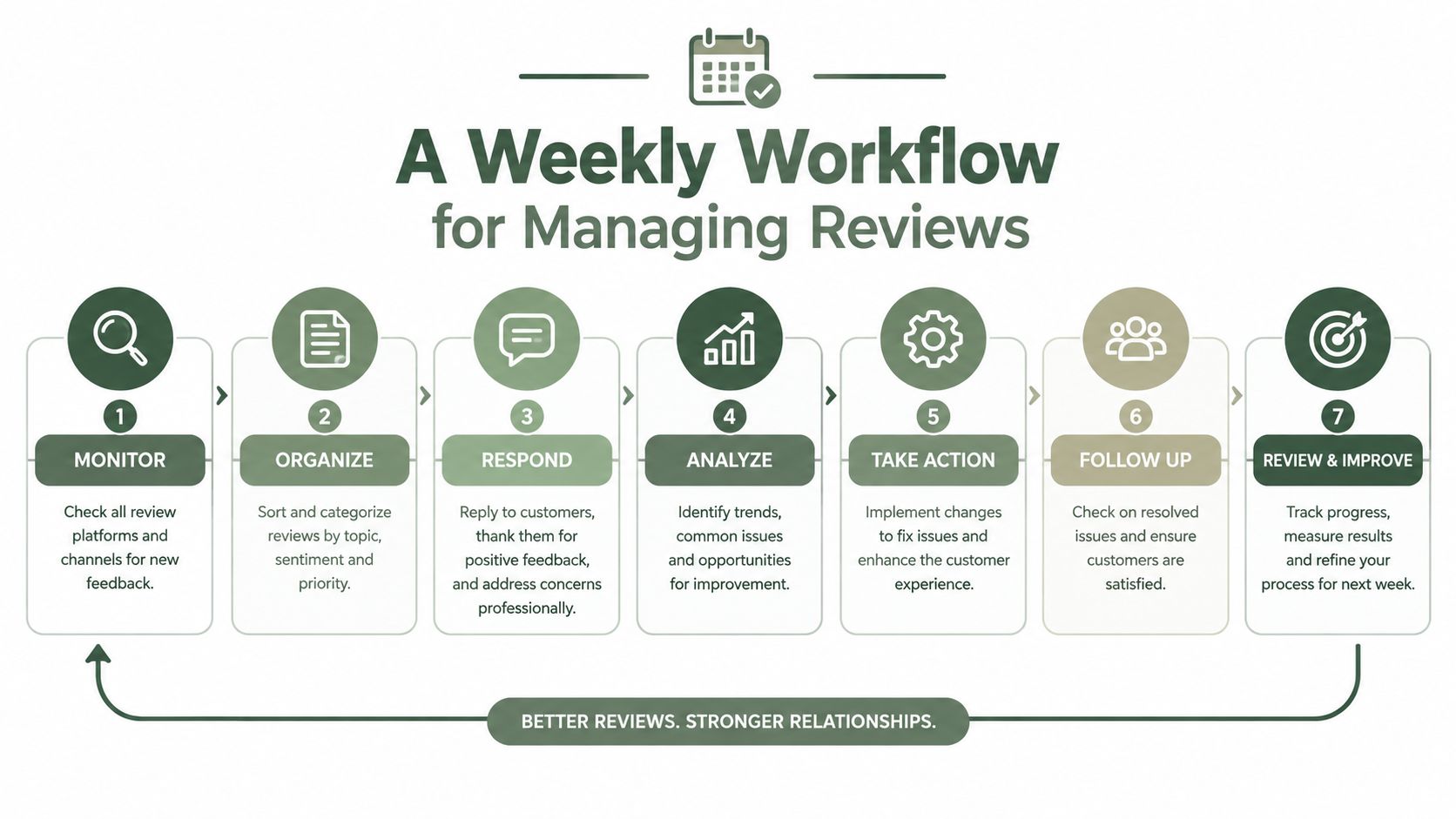
A small team doesn't need a fancy system. It needs a repeatable one. If you run a restaurant, salon, clinic, hotel, or contracting company, the work can fit into the same weekly rhythm you already use for cash, staffing, and follow-up.
Monday through Friday
Google's post options include Update, Offer, and Event, and it allows scheduling for future publication. Google also says posts should stay professional and respectful, avoid automatically generated content, and link only to trusted websites. Posts help keep the profile complete, but they're not a confirmed local ranking factor. Google Business Profile posts guidance
The best review system is the one your front desk, shift lead, or office manager can run without asking for permission every time.
For multi-location teams, the same workflow works better when each location gets its own view of requests, responses, and themes. That's where tools like RecensioAI can fit if you want review requests, AI replies, profile audits, and roll-up reporting handled in one place.
- Monday, send review requests: Trigger requests after completed visits, services, or checkouts.
- Tuesday, answer new reviews: Reply to anything new while the experience is still fresh.
- Wednesday, group themes: Look for repeated mentions like wait time, friendliness, cleanliness, or scheduling.
- Thursday, clean the profile: Check hours, attributes, photos, and services in Google Business Profile.
- Friday, review the posts: If you use Google Business Profile posts, keep them professional and current.
The Next Step This Week
A lot of owners wait for reviews to happen on their own, then wonder why the profile still looks old when customers search on Google Maps. The fix is usually less complicated than the stress around it. Audit the current state of your Google Business Profile, decide how many recent reviews you need for your category, and set one simple request process that goes out after every real visit.
Then keep the response habit steady. Reply to new reviews, group recurring complaints, and make sure the profile stays complete enough that the next person searching near me sees a business that looks active, current, and real.
If you need a system that keeps review requests moving, helps draft replies, audits the profile, and supports multi-location reporting, RecensioAI B.V. handles that workflow in one place. Visit RecensioAI B.V. and see how it fits your review process before the next busy week slips by.
Frequently asked questions
You might also like
Handpicked articles for you
Hotel Review Management: Automate Post-Stay Requests with Apaleo, Mews and Your PMS
A practical guide to turning hotel checkouts into timely review requests, with Apaleo live, Mews early access and flexible PMS alternatives.
Why the Business Around the Corner Beats You on Google: What 21,373 Profiles Reveal
We compared 21,373 Google Business Profiles with their three strongest nearby competitors. The gap is smaller than most owners think, but it has two sides: rating and volume.
Treatwell Review Management for Salons: One Reputation View Alongside Google
Bring your public Treatwell rating and recent reviews into RecensioAI, then combine salon signals with Google for faster, better decisions.