
Automated Review Requests for Google Business Profiles
Learn how automated review requests can support genuine local visibility, improve customer trust, and fit your workflow without crossing review policy rules.
Table of Contents
- 1Introduction
- 2The Review Request Problem
- 3What requests can and can't do
- 4Choose the Right Request Workflow
- 5Match the trigger to the real finish
- 6Choose for the work your team actually does
- 7Build a Request People Can Answer
- 8Set the workflow before writing the message
- 9Keep the choices clear and equal
- 10See How Local Businesses Use Requests
- 11Adapt the timing to the job
- 12Test the whole customer experience
- 13Keep Requests Fair and Policy-Safe
- 14Keep an audit trail
- 15Measure the Workflow Without Chasing Rankings
- 16Use a scorecard that guides action
- 17Pick Tools and Templates for Your Team
- 18Keep templates simple
- 19Your First Week With Automated Requests
- 20Put the first workflow into practice
Introduction
Automated review requests are neutral messages sent after a verified customer interaction, asking customers to leave an honest public Google review or share private feedback. In a dataset of more than 50,000 online reviews, Lehigh University researchers found that 98% were written after a retailer sent a review-request email.
You may recognize the gap: a customer leaves your restaurant, salon, clinic, hotel, or job site, and the shift gets busy. Someone means to follow up, but the request never goes out. Automation can make that follow-up consistent. It should organize the work, not decide who gets asked or steer customers toward a particular rating.
The Review Request Problem
A restaurant manager notices the missed opportunity while closing up. A table had a good dinner, the guests thanked the server, and everyone moved on. At a salon, the front desk may mean to send a message after a successful appointment. A contractor may finish a job and head to the next call. In each case, the customer is already gone by the time someone remembers.
That makes review requests an operational task, not just an idea for a quiet day. When requests depend on staff memory, customers' chances of being asked can vary by shift, location, or workload. The public record can then reflect only a small, uneven slice of customer experience.

Automated review requests are messages sent after a real customer interaction, either when an event occurs or at a schedule you've set. Think of a restaurant receipt that provides a clear way to share feedback, except the request follows the customer after the meal. The important part is that the process reaches every eligible customer with the same neutral invitation. A system that tries to produce a preferred rating is no longer just handling follow-up.
The Lehigh University analysis found that after solicited reviews were removed, 88% of the products in the dataset would have had no reviews. Its findings illustrate how much review activity can depend on asking rather than waiting for customers to post on their own. The same researchers caution against implying that customers should leave positive feedback. In experiments involving more than 3,000 participants, conditional requests were associated with lower future loyalty to the retailer. Lehigh University's account of the research supports a simple operating principle: ask broadly and neutrally after a genuine experience.
What requests can and can't do
Google says local results are mainly shaped by relevance, distance, and prominence. Prominence can include information such as reviews, ratings, and links from other websites. Google also says that more reviews and positive ratings can help local ranking, but an automated request can't promise a place in the local pack or map results. Google's explanation of local ranking is a useful guide to those limits.
Requesting feedback is also different from responding to reviews, publishing Google Business Posts, or managing all the details in your Google Business Profile. Each is a separate job. A request workflow can help you ask consistently, but it can't replace a thoughtful response, accurate business information, or good service.
Choose the Right Request Workflow
The right workflow depends on when your customer journey is complete and how much follow-up your team can realistically manage. A restaurant may have a clear checkout event. A contractor may need a completed-job marker in a CRM. A manual reminder is quick to start, but it still relies on someone remembering when the work gets busy.
| Workflow | How it works | Main advantage | Main limitation |
|---|---|---|---|
| Manual request | Staff asks or sends a message after the interaction | Easy to start and personalize | Can be missed during busy shifts |
| Fixed schedule | Requests are sent in a batch on a chosen schedule | Straightforward to oversee | May arrive well after the experience |
| Event-triggered | A completed visit, appointment, delivery, or job starts the request | Follows the customer journey more closely | Needs a reliable connection to the completion event |
| Multi-channel | Uses email, SMS, QR codes, or shareable links | Gives customers different ways to reach the request | Requires careful consent, duplicate prevention, and reporting |
Manual request
Fixed schedule
Event-triggered
Multi-channel
Match the trigger to the real finish
An appointment booked is not an appointment completed. A deposit paid is not a finished repair. Choose an event that means the customer has had the experience they're being asked to review. For work with a delayed outcome, build in a suitable pause instead of asking before the customer can assess the result.
Industry benchmark data reports that requests sent within 1–2 hours of job completion generate approximately 2–3 times the response rate of next-day requests, while SMS requests produce roughly 3–4 times the response rate of email requests. Treat these as benchmarks to test against your own customer journey, not guarantees for your business. The review automation benchmark discussion also highlights practical controls such as consent, deduplication, and channel preferences.
Choose for the work your team actually does
A single location may be able to start with one trigger and an email. A franchise with different booking or point-of-sale systems at each branch may need shared rules with local settings. If email volume already makes follow-up hard to manage, a resource on sorting business emails automatically can help you think about keeping operational messages organized.
Before connecting a system, map where it records a completed interaction, what customer contact details it can pass along, and how an opt-out will stop future requests. For practical integration considerations, see how to connect a POS or CRM and send Google review requests automatically.
Build a Request People Can Answer
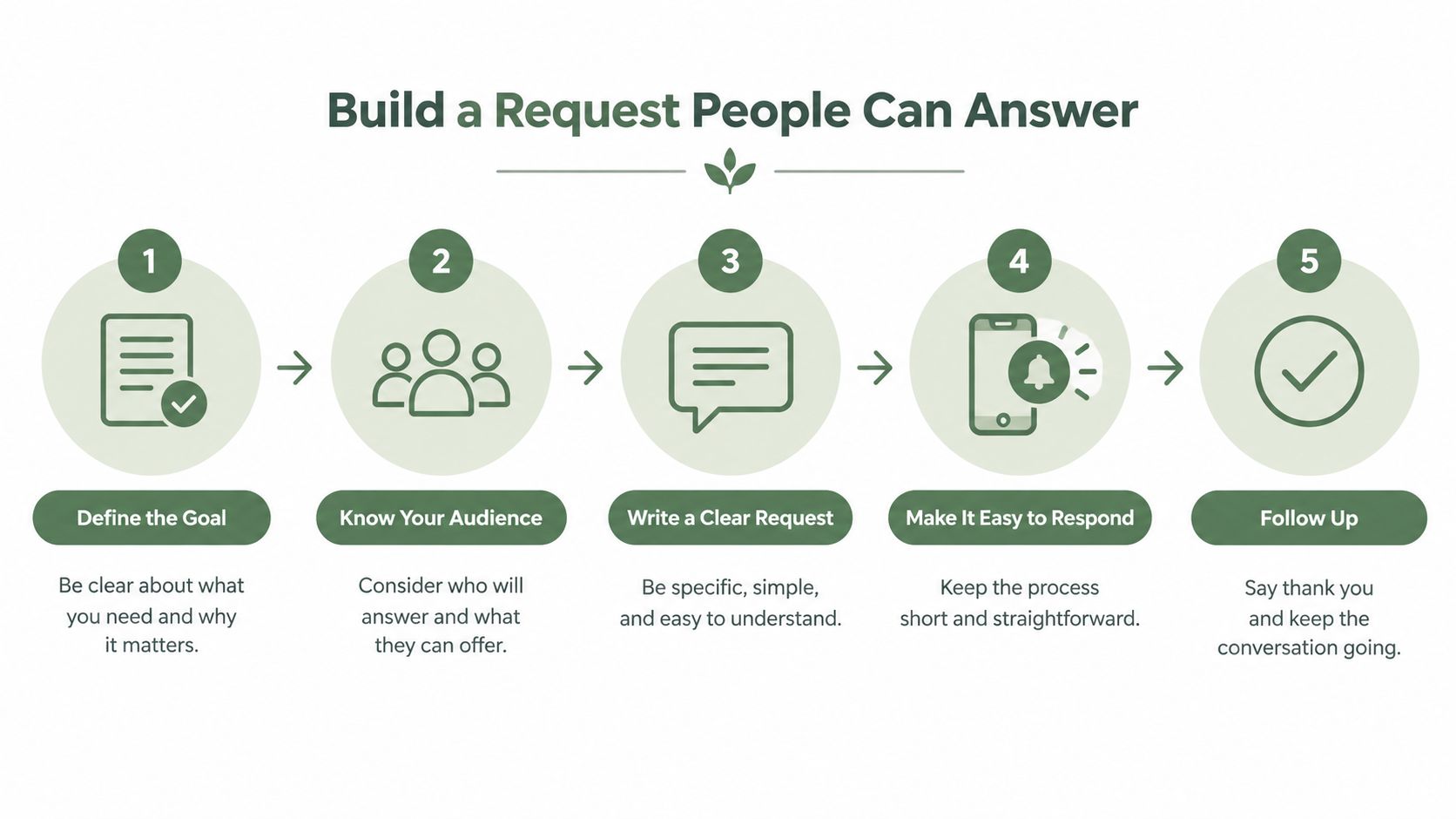
Start with one customer journey and one location. Don't begin by connecting every branch and channel at once. A small, clear workflow is easier to test and easier to correct.
Set the workflow before writing the message
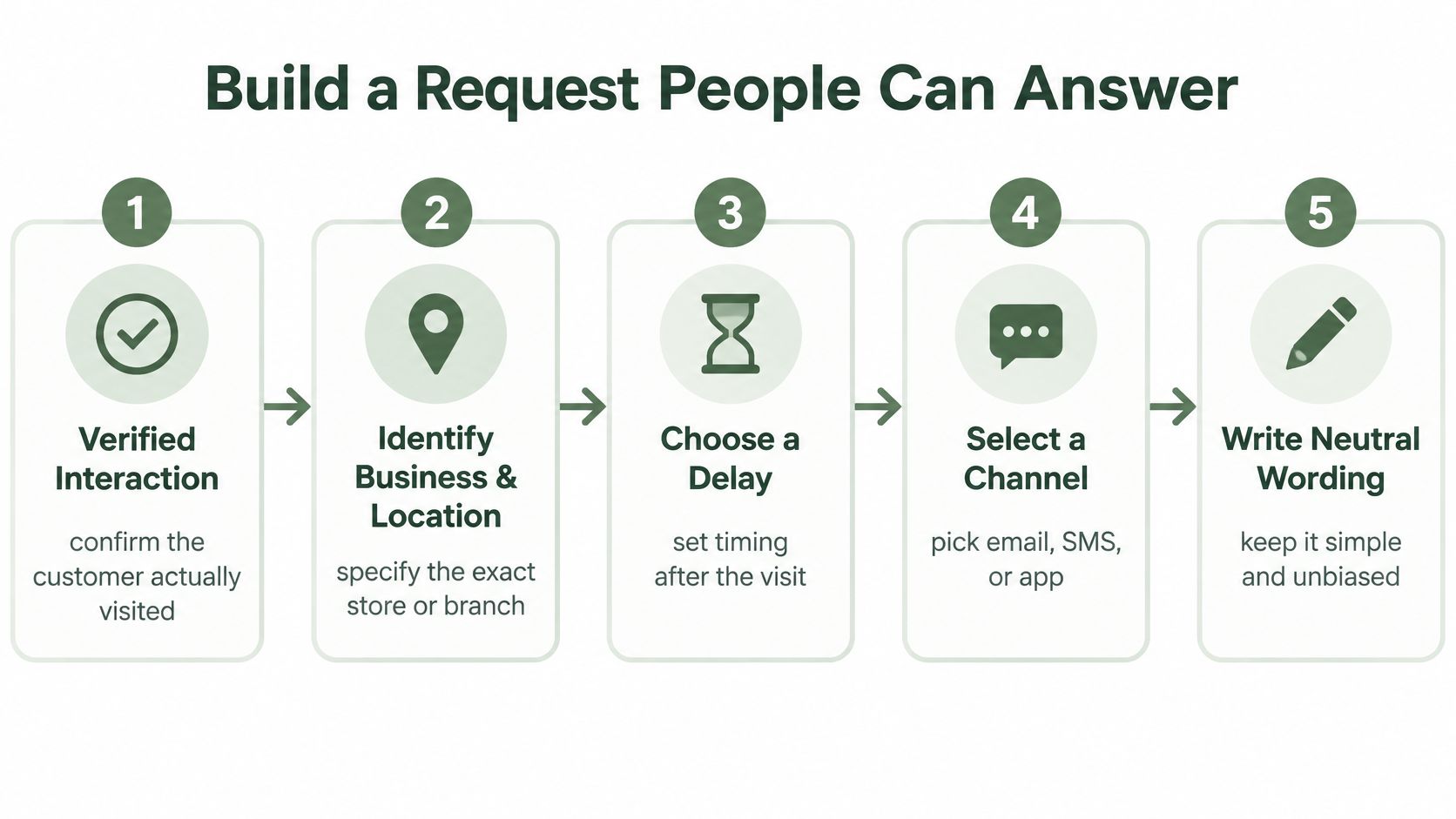
Write down the trigger first. A restaurant might use a completed order; a salon or clinic, a finished appointment; a hotel, checkout; a contractor, a job marked complete. A franchise can use a common eligibility rule while including the correct branch name and review destination.
Then choose a delay that fits the experience. An email may suit a customer who prefers to check messages later. An SMS may be useful when the customer has agreed to receive texts and the interaction is fresh. Neither channel is right for everyone. Consider consent, regional messaging requirements, delivery reliability, customer preference, and language before selecting a route.
BrightLocal's 2025 Local Consumer Review Survey found that 40% of consumers said they'd be most likely to leave a review when asked by email, up from 32% in the prior survey. That makes email a practical option to test, not a universal winner for every customer or business. BrightLocal's survey can help frame the choice, but your own results should guide it.
Keep the choices clear and equal
The request should identify your business, refer to the genuine experience, and ask for honest feedback in plain language. Show the public Google review option and private feedback option side by side so the customer chooses. Don't place a rating question in front of the links that sends only selected customers to Google.
Practical rule: Test the request as a customer. Confirm the business and location are correct, both feedback options work, and opting out prevents another message.
Set a frequency limit, then test duplicate prevention. A person shouldn't receive repeated requests because the same sale appears in both a point-of-sale system and a CRM. For wording examples and ways to ask naturally, see how to ask customers for a review without being awkward.
See How Local Businesses Use Requests
A neutral workflow can serve very different businesses, but the trigger needs to match what the customer has experienced. Start by asking what event tells your team, “The service is finished.” Then decide when a customer can fairly comment on it.
At a restaurant, that might be a completed dining experience, not a reservation. A salon can follow an appointment without naming a target rating. A hotel can send a request after checkout, when the stay is over. In a clinic, keep the message privacy-conscious and don't ask customers to share medical details in a public review.
Adapt the timing to the job
A contractor's work may need a different pause than a meal or haircut. If the customer can't judge a repair until a part has been tested, wait until there's a meaningful outcome. The request should still go to every eligible customer, not only those whose service was straightforward.
A multi-location franchise can set a shared rule for all branches, while using each location's name and correct public-review page. That helps avoid a common operational mistake: asking a customer to review the wrong branch only because the same template is used everywhere.
Test the whole customer experience
Before turning on a workflow, check the message from the customer's perspective:
These checks keep automation connected to service, not just to a software setting. Your team still needs to read customer feedback and take responsibility for what happens next.
- Trigger: Does it start after the actual interaction, rather than a booking or a staff note that the job is complete too early?
- Timing: Does the customer have enough time to experience the service or result?
- Channel: Is this a permitted, suitable way to contact this customer?
- Wording: Does the message ask for honest feedback without suggesting a rating?
- Choice: Are the public review and private feedback options equally clear?
- Frequency: Does the system stop after an opt-out and prevent duplicate requests?
Keep Requests Fair and Policy-Safe
The policy line is about how you select customers and frame the request. A restaurant shouldn't ask only diners whom staff expect to be pleased. A salon shouldn't offer a reward for a positive review. A contractor shouldn't discourage a customer from describing a problem publicly.
The U.S. Federal Trade Commission advises businesses not to request reviews only from customers expected to leave positive feedback, discourage negative reviews, or condition compensation on positive sentiment. The FTC's guidance on soliciting and paying for online reviews reinforces the need for a neutral process. Google also prohibits incentives for posting, changing, or removing reviews, as well as selectively asking only for positive reviews. Google's Maps user-contributed content policy explains the platform's restrictions.
Every eligible customer should receive the same honest choice, whether the last shift went smoothly or not.
Private feedback can help you follow up on a service problem, but it must not replace or obstruct the public review option. If a clinic customer reports a concern privately, a manager can respond through an appropriate channel and protect sensitive details. The customer must still be free to publish an honest review.
Keep an audit trail
For each request, record the eligibility rule, the interaction and send times, delivery status, consent, opt-out status, destination, and frequency controls. This gives you a way to check that the same rules apply across customer groups and locations.
For a franchise, compare the share of eligible transactions contacted alongside response patterns and customer concerns, rather than focusing only on total reviews. Review requests should support service recovery, not hide dissatisfaction. For a plain-language overview of platform rules, consult Google review guidelines for businesses.
Measure the Workflow Without Chasing Rankings
A growing review count doesn't tell you whether your request process is fair, working properly, or reaching the right customers. Start with invitation coverage: of the transactions that meet your stated rule, how many received a request? Then check delivery, opt-outs, customer responses, public-review activity, and private feedback.
Academic research published in *Management Science* found that review solicitations increase engagement across customers and can bring more moderate experiences into the public record. Customers who post without being asked may not represent the full range of ordinary experiences. The research also found that soliciting reviews on a company-owned website decreased one-star reviews on a third-party platform on average. That finding isn't a reason to hide criticism or divert unhappy customers. The 2020 study in *Management Science* helps explain why systematic, neutral outreach can make review participation more representative.
Use a scorecard that guides action
Track these measures by channel, customer journey, and location:
A QR code on a receipt, email after checkout, and SMS after a completed job may suit different situations. Compare like with like rather than assuming one channel should work identically across a hotel, a clinic, and a contractor's business. A smaller number of reviews from a workflow with complete, neutral coverage can be more credible than a higher count produced by selective or repeated requests.
Keep review collection separate from responding to reviews and maintaining the rest of your Google Business Profile. Use the scorecard to find missed triggers, broken links, or confusing messages. Don't treat it as proof that a particular action will change your position in map results.
- Coverage and delivery: Were eligible customers contacted, and did the messages reach them?
- Customer control: How many opted out, and did the system stop after they did?
- Responses: How many customers used the public option, private option, or neither?
- Feedback themes: What issues recur, and how long does it take to resolve them?
- Location comparisons: Are branches following the same eligibility and message rules?
Pick Tools and Templates for Your Team
Choose a tool by checking whether it can follow your real customer journey and preserve customer choice. A polished dashboard won't fix a trigger that fires before the appointment or sends customers to the wrong location.
Look for verified event triggers, email or SMS delivery, QR codes and shareable links, location-specific controls, consent and opt-out handling, deduplication, frequency caps, and useful reporting. The public Google review option and private feedback option should appear side by side. For a franchise, check whether managers can review both branch-level activity and an overall picture without losing local detail.
Keep templates simple
Adapt these examples to your business, and make sure the customer can choose whether to respond:
If you suspect a fake review, don't assume you can have it removed just because you can't identify the reviewer. Google's process is to select the individual review in the Business Profile, choose Report, pick the policy reason that fits, and submit the report. A negative or disagreeable review alone isn't grounds for removal. Google's guidance on reporting a suspected fake review describes the process without promising an outcome.
RecensioAI is one option for businesses that want an integrated workflow for review requests, customer feedback, and location-level management.
- Restaurant: “Thanks for dining with [Business Name]. If you'd like, share honest feedback through our Google review page or send private feedback.”
- Clinic: “Thank you for visiting [Business Name]. You can leave an honest public review or share private feedback. Please don't include personal health details in a public review.”
- Hotel: “Thank you for staying at [Business Name]. If you'd like to share feedback, you can choose a public review or private feedback.”
- Contractor: “Thanks for choosing [Business Name] for your [completed job]. You can leave an honest public review or send private feedback.”
- Franchise location: “Thank you for visiting [Location Name], part of [Business Name]. You can choose to share honest feedback publicly or privately.”
Your First Week With Automated Requests
Pick one customer journey at one location. Write down who qualifies, what event starts the request, which channels you're allowed to use, how opt-outs work, and where the public and private choices appear. Keep the rule simple enough that a manager can explain it to a new team member.
Next, write the message and test it on a phone. Check the business and location details, the destination of each option, and what happens if the same customer appears twice. Confirm that the system doesn't filter people by satisfaction or offer an incentive for posting a review.
Put the first workflow into practice
Start with a limited rollout, then check whether the trigger and contact details are reliable before expanding to another branch. If customers don't receive requests, fix the connection first. If they receive them but don't act, review the timing and wording without changing who's eligible. Keep the same neutral rule for every customer.
Your next step is to choose one completed customer journey today, write down its eligibility rule, and test a single request from the customer's point of view.
---
RecensioAI B.V. offers businesses automated review requests and tools for managing customer feedback across locations. If you're assessing a workflow for your Google Business Profile, visit RecensioAI B.V. to see how its tools fit that process.
- Choose the trigger: Use a completed meal, appointment, stay, delivery, or job, as appropriate.
- Set the delay and channel: Account for the experience, consent, customer preference, and any delayed outcome.
- Check the customer's choices: Keep public and private feedback options together and equally clear.
- Test control settings: Confirm opt-outs, deduplication, and frequency limits work.
- Review the results: Compare coverage, delivery, opt-outs, responses, and feedback by channel and location.
Frequently asked questions
You might also like
Handpicked articles for you
Hotel Review Management: Automate Post-Stay Requests with Apaleo, Mews and Your PMS
A practical guide to turning hotel checkouts into timely review requests, with Apaleo live, Mews early access and flexible PMS alternatives.
Why the Business Around the Corner Beats You on Google: What 21,373 Profiles Reveal
We compared 21,373 Google Business Profiles with their three strongest nearby competitors. The gap is smaller than most owners think, but it has two sides: rating and volume.
Treatwell Review Management for Salons: One Reputation View Alongside Google
Bring your public Treatwell rating and recent reviews into RecensioAI, then combine salon signals with Google for faster, better decisions.