
Service Businesses Near Me: How to Win the Local Pack
Service businesses near me depend on the Google local pack. Learn how relevance, distance, and prominence decide who gets the calls and walk-ins.
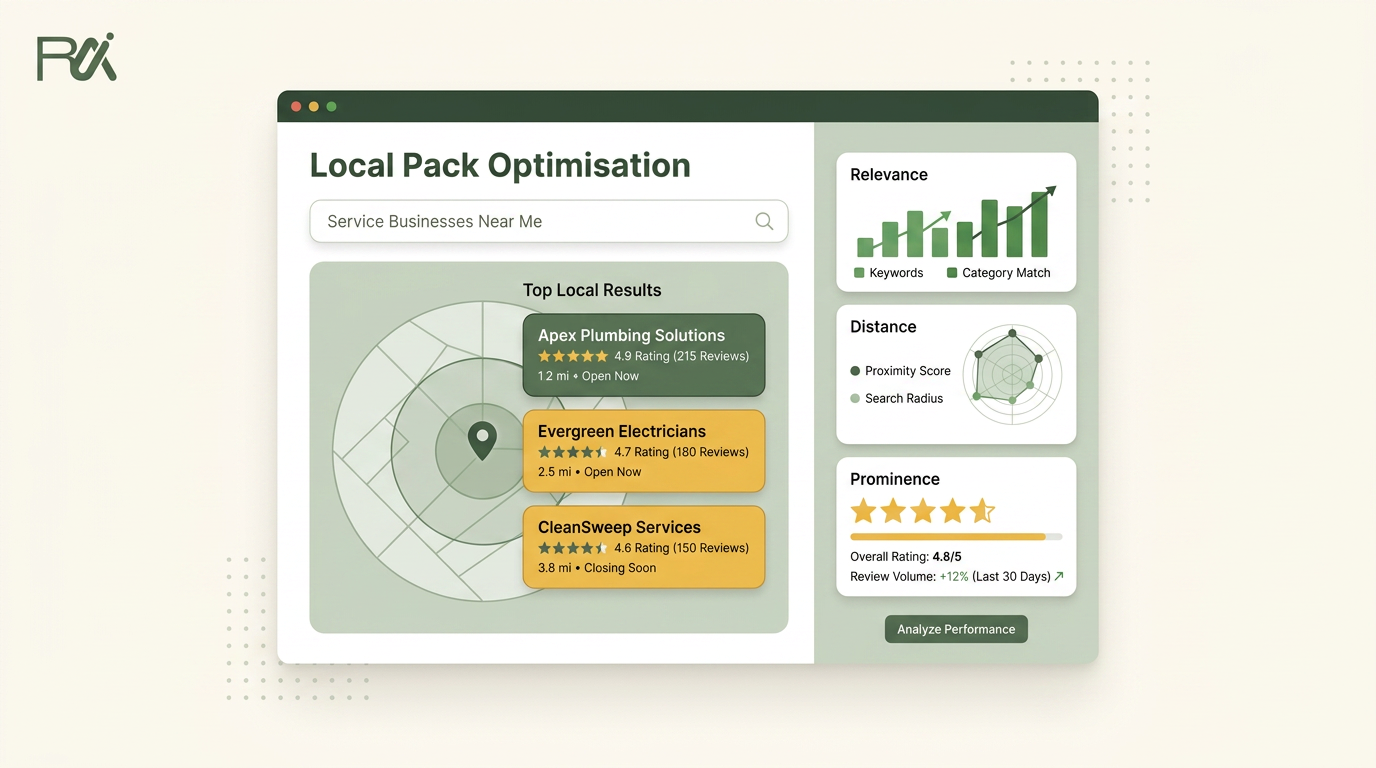
Table of Contents
- 1Introduction
- 2Why the Three Businesses on the Map Get Everything
- 3What Counts as a Service Business in a Near Me Search
- 4How Google Decides Who Makes the Map
- 5Relevance means matching the actual need
- 6Distance is the constraint you can't edit
- 7Prominence is where the long-term work happens
- 8Building a Profile That Actually Stands a Chance
- 9Reviews as a Trust Threshold, Not a Number
- 10Build a review habit without controlling the outcome
- 11The Weekly Maintenance Habit That Beats Setup
- 12A workable weekly rhythm
- 13Your First 90 Days and the One Thing to Do This Week
- 14Days 1 through 30
- 15Days 31 through 60
- 16Days 61 through 90
Introduction
You check Google Maps after a slow morning and see three competitors displayed for “plumber near me.” Your company sits below them, somewhere in the list. The customer who needed a leaking water heater fixed today called the first business. The fourth business never got the chance to answer. That missing call doesn't appear as a line item, but it shows up in the month's revenue.
The same pattern affects a salon competing for “hair salon near me,” a clinic competing for “urgent care near me,” a restaurant competing for “breakfast near me,” and a hotel competing for “hotel near me.” Local search is a filter. It directs high-intent customers toward a small group of businesses, then leaves everyone else fighting for attention after the decision has already started.
Why the Three Businesses on the Map Get Everything
The map results aren't just another list of search links. For a service business, they're the moment when a customer decides who gets the call, visit, booking, or directions request. Google's own guidance explains that local results appear when someone searches for a business or place near their location, and industry research reports that 46% of Google searches have local intent. **Local SEO research from SEOPRofy also reports that around 87% of consumers use Google to find local businesses**.
That makes “near me” searches especially valuable. The person searching “emergency plumber near me” usually isn't browsing for entertainment. They have a blocked drain, burst pipe, or failed water heater. Someone searching “salon near me” may be ready to book. A patient searching “dental clinic near me” may want an appointment soon.

A business in the first position gets the first look, the first tap, and often the first call. A business in position four may still be visible, but it has already lost the advantage of being one of the three choices Google placed directly on the map.
Independent local SEO benchmarking reports that businesses in the Google local 3-pack receive 126% more traffic and 93% more actions than businesses ranked positions 4 through 10. **The benchmarking summary from SHNO also reports that 67% of consumers contact a business directly from local search results, while 28% make a purchase the same day**.
Operator's rule: Treat the local pack as a sales counter, not a visibility trophy. If your listing isn't among the three choices, assume a meaningful share of urgent customers won't reach you.
Getting there isn't a one-time profile setup. Google evaluates whether your business matches the search, where it sits, and how trusted it appears. The practical ranking framework is covered in this guide to Google Business Profile ranking factors, but first you need to know whether your operation belongs in this type of search at all.
What Counts as a Service Business in a Near Me Search
A service business in local search is an operation whose customer needs to visit a location, meet the provider, or receive the service in a defined area. That includes businesses with storefronts, offices, clinics, hotels, restaurants, and service-area operations such as plumbers and HVAC contractors.
A pure brand search is different. Someone searching for “Marriott” already has a business in mind. An ecommerce search for “stainless steel water bottle” usually asks Google to show products, not nearby providers. A local service search includes a place-based need, such as finding a nearby provider, comparing options, or acting quickly.
| Service Category | Sample Near Me Query |
|---|---|
| Restaurant | “Thai restaurant near me” |
| Salon | “Hair salon near me” |
| Clinic | “Urgent care clinic near me” |
| Contractor | “Roof repair near me” |
| Plumbing | “Emergency plumber near me” |
| Auto repair | “Brake repair near me” |
| Attorney | “Personal injury attorney near me” |
| Hotel | “Hotel near me” |
Restaurant
Salon
Clinic
Contractor
Plumbing
Auto repair
Attorney
Hotel
The exact wording changes by category, but the intent stays similar. The searcher wants a real business, in a usable location, with enough information to decide whether to call or visit.
That distinction matters for professional firms too. An attorney, accountant, architect, or consultant can review professional services from Purple for ways to think about location-based customer access and service delivery, then apply the same local principles to their own profile.
Multi-location operators run this race once per market. A franchise brand can have a strong national name and still lose the local pack in one city because a particular location has weak categories, outdated hours, thin reviews, or poor local prominence. Each location needs its own accurate profile and its own operating rhythm.
How Google Decides Who Makes the Map
Google names relevance, distance, and prominence as the three core factors in local ranking. Its official local ranking guidance makes the framework clear, and it also explains an important limit: distance depends on the searcher's location and can't be directly changed.
Relevance means matching the actual need
Relevance asks whether your profile fits the query. A dental clinic with accurate dental services, appointment information, and the right category is a stronger match for “dentist near me” than a general medical office that happens to offer limited dental care.
Your primary category matters most here. Your services, business description, attributes, and website should all describe what customers hire you to do. Don't add unrelated categories just because they sound useful. A plumber shouldn't present itself as an electrician unless it offers electrical work.
Distance is the constraint you can't edit
Google estimates how close the business is to the searcher. That may be based on the searcher's current location or the place Google associates with the query. You can't move a restaurant closer to a hungry customer, and you can't relocate a clinic every time someone searches from another neighborhood.
You can still serve the distance signal by maintaining the correct address, service area, and opening hours. Never create fake locations to appear closer. That creates profile problems and confuses customers.
Prominence is where the long-term work happens
Prominence reflects how well-known and trusted the business appears. Google points to reviews and links as examples of signals that can contribute to prominence, alongside the broader reputation of the business across the web.
You can improve the inputs that support prominence. Earn legitimate local links, keep directory details consistent, build a steady flow of genuine review requests, and make sure customers can understand the business from the profile. You can't manufacture reputation with fake reviews or copied descriptions.

A useful way to think about how to rank higher in Google Maps is simple: make the profile fit the search, accept the location constraint, then build the strongest credible reputation in the cluster around you. Review count and rating are documented local ranking factors. Review replies, review wording, and Google posting activity should be treated as trust and completeness work, not confirmed ranking causes.
Building a Profile That Actually Stands a Chance
Most owners don't need a clever tactic first. They need to finish the information customers and Google already expect to see. Profile completeness is often the least expensive improvement because you control nearly all of it.

Use one workweek to clean up the profile.
Don't use stock images for a clinic, hotel, or contractor. Customers want to see the place and the work they'll receive. Refresh the photo set regularly so a profile doesn't look abandoned.
Google Posts can support profile activity and customer engagement. Use them for a current offer, a seasonal service, a finished project, a new treatment, a menu update, or a temporary schedule change. This isn't a guaranteed ranking lever, but it gives searchers more context before they call.
For trade operators, the discussion of local visibility for trades offers useful category-specific context. You can also use this Google Business Profile optimization checklist to audit the fields your team may have missed.
- Monday, choose the primary category: Pick the category that most closely matches the service customers search for. Add a small number of accurate secondary categories only when they represent real parts of the operation.
- Tuesday, clean the service list: Add every service you perform. A contractor might list leak detection, drain cleaning, water heater replacement, and sewer line repair. Use plain descriptions and prices where they make sense.
- Wednesday, verify hours: Set normal hours and special holiday hours. A customer who sees a closed listing may move on before checking anything else.
- Thursday, add real attributes: Include appointment availability, accessibility, parking, payment options, free estimates, or other attributes that match your operation.
- Friday, replace weak photos: Upload the exterior, interior, team, completed jobs, vehicles, treatment rooms, food, or guest spaces that help customers recognize and trust the business.
Reviews as a Trust Threshold, Not a Number
A high rating helps, but the rating alone doesn't tell the whole story. A profile with 4.9 stars and 20 reviews can look less established than one with 4.6 stars and 400 reviews, even though the first number is higher. Those figures are a practical comparison, not a universal ranking rule. Google considers review signals within the broader local ranking system.
Customers also judge a profile by more than its average. The trust threshold has four parts:
A plumber whose reviews mention emergency response, water heater replacement, and drain cleaning appears easier to evaluate than a plumber whose reviews all say “great service.” A salon benefits when customers describe cuts, color work, booking, and staff experience. A clinic needs feedback that helps patients understand scheduling, communication, and care.
Google review research from BrightLocal reports that 97% of consumers read reviews for local businesses in 2026, 68% won't use a business below 4 stars, 31% require 4.5 stars or higher, and 47% won't use a business with fewer than 20 reviews. The same source reports that 73% consider reviews older than three months irrelevant.

That changes the operating question. You aren't only trying to collect a large archive of reviews. You're trying to maintain a current, believable record of the experience customers receive now.
- Volume: A larger body of feedback can make the business look more established.
- Rating quality: A strong average reduces the obvious concern that customers may have a poor experience.
- Recency: Fresh reviews show that the current team still delivers the service.
- Detail and variety: Reviews that mention emergency response, drain cleaning, water heater work, wait times, treatments, or appointment handling give future customers useful proof.
Build a review habit without controlling the outcome
Send review requests after completed jobs, appointments, stays, meals, or visits. Show every customer a public Google review option and a private feedback option side by side, then let the customer choose. Don't intercept negative experiences, hide unhappy customers from Google, or offer incentives for positive reviews.
Respond to positive and negative reviews in a calm, specific voice. Replies don't replace service recovery, and they aren't a confirmed ranking factor. They do show future customers how you handle praise, confusion, and complaints.
If a review looks suspicious, don't remove it because you dislike it. Google says only reviews that violate its content policies are eligible for removal. In the Business Profile, open the review, select Report, choose the reason, such as spam or fake content, and submit it through the official process described in Google's review reporting guidance.
The Weekly Maintenance Habit That Beats Setup
A complete profile decays when nobody maintains it. Hours change, employees leave, services expand, competitors collect new reviews, and photos stop reflecting the customer experience. A profile that was accurate in January can be misleading by spring.
Run local visibility like an operating routine, not a launch task.
A workable weekly rhythm
Practical rule: Assign one owner to each location. If everyone owns the profile, nobody owns it.
Multi-location businesses should keep a central standard and local responsibility. The brand can provide response guidelines, approved service descriptions, and photo requirements. Each store manager, clinic lead, or franchise operator should still verify what customers see for that location.
Don't promise yourself that the team will “get to it later.” Put the review requests, review replies, profile checks, and photo uploads into the same weekly schedule as payroll and inventory. The businesses that remain competitive are usually the ones that keep doing ordinary work after the initial cleanup is finished.
- Monday, publish a current update: Share a completed project, seasonal service, appointment opening, menu item, offer, or useful customer notice.
- Tuesday and Wednesday, send review requests: Contact customers from completed work or visits during the previous week. Ask every eligible customer, without steering the response.
- Thursday, answer reviews: Respond to every unanswered review. Aim to handle positive and negative feedback within 48 hours as an internal service standard, not a Google ranking guarantee.
- Friday, add fresh photos: Upload a small set of genuine images from the week. A contractor can show a completed installation. A hotel can show a refreshed room. A restaurant can show a current dish.
- Monthly, audit the profile: Compare categories, services, hours, attributes, photos, and competitor listings. Check that the business name, address, and phone number match across directories.
Your First 90 Days and the One Thing to Do This Week
You don't need to rebuild every marketing channel before improving your position in map results. Start with the profile, then create a repeatable trust and visibility process.
Days 1 through 30
Audit every location. Confirm the primary category, remove inaccurate secondary categories, clean the service list, verify normal and special hours, review attributes, and replace outdated photos. For service-area businesses, confirm that the service area reflects where you work. For storefronts, check that the address, entrance, phone number, and customer instructions are correct.
Create a simple location worksheet. Record the current profile fields, missing information, competitor categories, unanswered reviews, and customer questions that appear repeatedly.
Days 31 through 60
Build the review generation system. Decide when staff sends review requests after a completed job, appointment, meal, or stay. Write response templates for common situations, but personalize every reply. Clean up directory listings and begin a consistent weekly Google Post cadence.
If several people handle locations, give each person a clear responsibility. A review management platform such as RecensioAI can support automated review requests, customer-selected public or private feedback options, review replies, suspected fake-review reporting workflows, profile audits, and multi-location reporting. It still needs your policies, oversight, and real customer experiences.
Days 61 through 90
Add customer-generated content with permission, earn relevant local links, and create a monthly reporting snapshot. Track profile completeness, review volume, rating, recent activity, calls, direction requests, website actions, and booking or lead outcomes. Don't confuse activity with guaranteed rankings. Use the numbers to find operational problems, such as slow replies, inaccurate hours, or a location that stopped requesting feedback.
Your one action this week is specific: open the Google Business Profile dashboard, confirm that the primary category matches what customers search for, and correct one field that is wrong today. Do it for your busiest location first, then repeat the check across the rest of the portfolio.
---
RecensioAI B.V. helps service businesses manage review requests, replies, profile audits, Google Business Posts, and multi-location reporting from one workflow. If your team needs a consistent way to maintain trust signals for RecensioAI B.V., visit the site and review whether its tools fit your weekly operating rhythm.
You might also like
Handpicked articles for you
Hotel Review Management: Automate Post-Stay Requests with Apaleo, Mews and Your PMS
A practical guide to turning hotel checkouts into timely review requests, with Apaleo live, Mews early access and flexible PMS alternatives.
Why the Business Around the Corner Beats You on Google: What 21,373 Profiles Reveal
We compared 21,373 Google Business Profiles with their three strongest nearby competitors. The gap is smaller than most owners think, but it has two sides: rating and volume.
Treatwell Review Management for Salons: One Reputation View Alongside Google
Bring your public Treatwell rating and recent reviews into RecensioAI, then combine salon signals with Google for faster, better decisions.