
How to Set Up a Google Business Profile in 2026
Learn how to set up a Google Business Profile step by step. Covers verification, categories, hours, photos, and a 90-day checklist for local visibility.
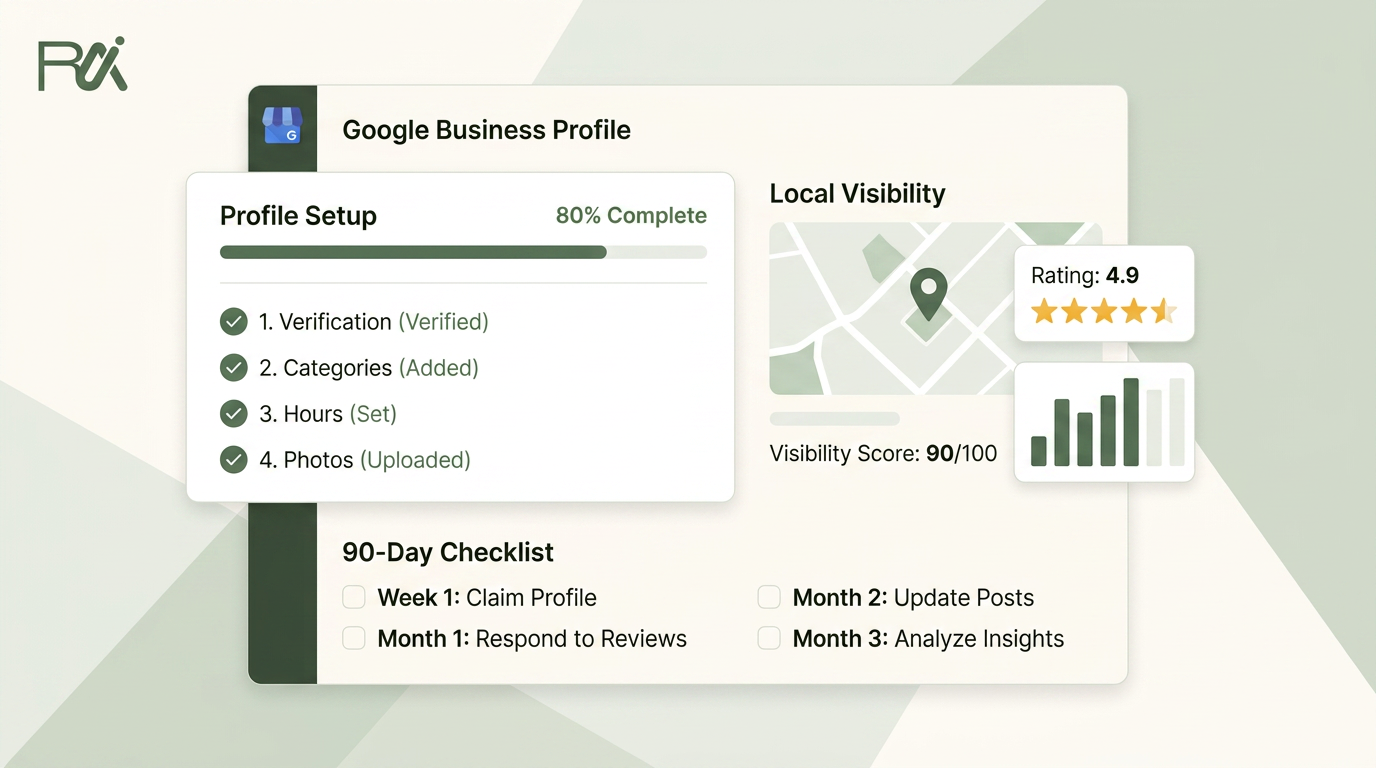
Table of Contents
- 1Introduction
- 2Why Most Google Business Profiles Get Ignored
- 3What completion changes
- 4Creating and Claiming Your Listing
- 5Start at the official profile manager
- 6Make the basic decisions correctly
- 7Getting Verified Without the Postcard Wait
- 8Match the method to the business
- 9Fix verification problems methodically
- 10Filling Out the Fields That Actually Matter
- 11Start with category relevance
- 12Complete the operating information
- 13Use real visual proof
- 14What to Do in the First 90 Days After Verification
- 15Use a manageable operating rhythm
- 16Build genuine review activity
- 17Policy Boundaries That Catch Owners Off Guard
- 18Never trade trust for review volume
- 19Audit the profile for basic misrepresentation
- 20Your 90-Day Setup Checklist and Next Step
- 21Setup
- 22Populate
- 23Run
Introduction
You claimed your restaurant, salon, clinic, or contracting business on Google months ago. The phone still doesn't ring as often as it should. When you search Google Maps, three competitors appear first, while your profile has old photos, incomplete services, or hours that stopped matching reality weeks ago.
That profile isn't a digital sign you install once and forget. It's the Google-managed local entity customers use to call, request directions, compare services, and decide whether to visit. The modern setup flow has grown from Google's earlier local-listing products into one create-or-claim process at business.google.com, with Search, Maps, categories, hours, attributes, and performance information managed together.
Why Most Google Business Profiles Get Ignored
A restaurant owner can have a real address, a working phone number, and a profile that technically exists, yet still lose dinner reservations to a nearby restaurant with clearer information. The other restaurant has current opening hours, useful photos, accurate services, and reviews that help a searcher feel confident. Google has more information to match against the customer's search, and the customer has fewer reasons to hesitate.
Google's local results are shaped by relevance, distance, and prominence. You can't move your building closer to every searcher, but you can make the profile accurately describe what you offer and give customers enough information to act. Google identifies the three businesses shown in the local pack by weighing those local signals, not by checking whether a business created a listing.
Practical rule: A profile that exists but doesn't answer basic customer questions is unfinished.
Consider a dental clinic with Saturday appointments but incorrect Saturday hours on Google. A patient searching for a clinic near me may assume the practice is closed and call another office. A plumber may serve several nearby towns, yet leave the services area vague and fail to show recent work photos. The profile doesn't communicate the jobs the plumber handles or give the customer a reason to choose that listing.
What completion changes
The difference between a half-built profile and a maintained one is visible in the customer journey:
The available data shows why this isn't cosmetic. One 2026 industry compilation reports that fully completed profiles receive 7x more clicks than incomplete profiles, while profiles with updated hours receive 2x more visits than profiles with missing or outdated hours. The same compilation reports that fully completed profiles receive 70% more in-store visits. These figures come from Biziq's Google Business Profile statistics, and they point to a simple operating lesson: complete the profile before you judge its value.
Google also reports that complete profiles can receive 7x more clicks, regularly updated profiles can receive 5x more views, and 29% of customers are more likely to consider purchasing from businesses with a detailed profile in its 2026 best-practices playbook. Setup is the foundation. Maintenance keeps the information reliable after the initial work is done.
- Discovery: Accurate categories and services help Google understand which searches match the business.
- Decision-making: Photos, attributes, descriptions, and reviews help a searcher judge whether the business fits.
- Action: Correct hours, phone numbers, booking details, and directions reduce friction.
- Confidence: Recent activity and thoughtful review responses show that someone is paying attention.
Creating and Claiming Your Listing
Start with the Google account that should own the business profile. Use a dedicated business account when possible, rather than an employee's personal account. Ownership becomes difficult when the person who created the profile leaves, loses access, or keeps the login separate from the business.
Start at the official profile manager
Follow this path:
A restaurant owner may find an existing profile with an old phone number, outdated menu details, or a former address. Don't create a duplicate just because the existing listing is inaccurate. Claim the existing profile, request ownership if another account controls it, and correct the information after access is granted.
Claiming and verifying are different actions. Claiming establishes that you want control of an existing profile. Verification confirms to Google that the business is legitimate and eligible to manage it. A claimed profile can still be waiting for verification, and an unverified profile may have limited management access.
- Sign in to the appropriate Google account.
- Open business.google.com.
- Choose the option to add or manage a business.
- Search for the business name and location.
- If no listing exists, choose the option to create a new profile.
- If a listing already exists, select it and request access or ownership.
- Enter the business details exactly as they appear in the world.
- Save the profile and continue to the verification prompt.
Make the basic decisions correctly
Use the business name customers see on signage, invoices, and official materials. Don't add phrases such as “best emergency plumber” or “affordable salon near me” to manipulate search relevance. Those phrases belong in the services and description where they accurately describe the business.
Choose whether customers visit your address or whether you operate as a service-area business. A hotel, clinic, salon, or restaurant normally displays a customer-facing location. A mobile stylist, plumber, electrician, or contractor may need to show service areas instead of publishing a home address.
Select an initial category that accurately represents the business. You can refine categories later, but a misleading starting category creates confusion for both Google and customers. For additional background on the profile setup process, the Google Business Profile knowledge base provides another practical reference.
If Google interrupts the setup with a verification request, don't abandon the process. Record the method offered, prepare the supporting details, and complete the verification steps before making major changes to the name or address.
Getting Verified Without the Postcard Wait
Google doesn't show every business the same verification options. Its official verification guidance says the available methods depend on eligibility, so the screen you see may differ from the one shown to another owner.
The supported methods include phone or text, email, live video call, and mail. Choose the quickest method you can complete accurately, but don't select an option because it sounds familiar.

| Method | Best for | Typical turnaround |
|---|---|---|
| Phone or text | Businesses with an accessible business number | Depends on Google's eligibility flow |
| Businesses with an eligible business email address | Depends on Google's eligibility flow | |
| Live video call | Businesses that can show the location or operating setup | Depends on Google's eligibility flow |
| Businesses without another available option | Depends on delivery and Google's process |
Phone or text
Live video call
Match the method to the business
Phone or text is practical for a restaurant manager who can access the listed number during operating hours. Email works when the eligible inbox is monitored and the person completing verification can open it immediately. A live video call can suit a clinic, hotel, or storefront that needs to demonstrate signage, equipment, workspace, or access to the premises.
Mail remains useful as a fallback, but it can create avoidable delays. A clinic may wait for a mailed code even though Google offers phone or video verification. A contractor who serves customers at their properties may not fit the old postcard expectation at all. Recent 2026 coverage describes a shift toward phone, text, or WhatsApp verification in some markets and away from postcard-only verification for many service-area businesses, as outlined in Google Business Profile updates for 2026.
Here's the embedded walkthrough for owners who want to see the process before starting:
Fix verification problems methodically
If verification is stuck, check the basics before restarting the profile:
Don't repeatedly change the business name, address, or category while verification is pending. Those changes can create more review work and make it harder to identify what caused the delay.
For operators with 10 or more locations, Google provides a bulk verification route, but the account must first be approved for that program. The Google community guide on bulk verification explains that bulk verification isn't automatically available just because a company has many locations.
- Address format: Use the same legitimate business address format across the profile and supporting business materials.
- Phone access: Confirm the listed number can receive the selected call or text.
- Email access: Open the eligible inbox before requesting the code.
- Video readiness: Prepare signage, equipment, work areas, and proof that the business operates as described.
- Mail delivery: Confirm that the address accepts business mail and that the person responsible knows where to look.
Filling Out the Fields That Actually Matter
Verification doesn't finish the profile. It only gives you control. The next job is to make the listing accurate enough for Google to match it with the right searches and useful enough for a customer to choose it.
Start with category relevance
Google says categories affect local ranking, and the primary category is the main relevance signal. Choose the most specific primary category that matches the business. Use a general category only when the exact option isn't available, and add secondary categories only for real services or business types.
Google's recommended editor path is Edit profile → Business category → Primary category → Add another category → Save, documented in its category guidance.
A hotel that chooses only “hotel” may miss the opportunity to describe a more specific offering when a suitable category exists. A contractor offering emergency plumbing should add that service if it provides it. The category, service list, description, website language, and attributes should all support the same business identity. Don't add a category because a competitor uses it or because you want to appear for an unrelated query.
Complete the operating information
Enter every service customers can buy. A salon might list cuts, color, bridal styling, and consultations. A clinic may need separate services for examinations, follow-up visits, and specific treatments. A contractor should describe the work handled, not a long list of jobs subcontracted to someone else.
Set regular hours and special hours. Holiday changes, temporary closures, appointment-only periods, and seasonal schedules should be reflected before customers rely on them. A wrong hour is not a minor profile defect. It can send someone to a locked door or make a caller choose a competitor.
Write a plain description that tells customers what the business does, who it serves, and where it operates. Avoid keyword repetition and empty claims. “Family dental clinic providing preventive, restorative, and emergency appointments in downtown Austin” gives a customer more usable information than “the best dentist for all your dental needs.”
Use real visual proof
Upload a current logo, a clear cover image, and photos that help a first-time visitor recognize the business. Prioritize the exterior, reception or interior, team, rooms, products, and completed work. A contractor's recent project photos can answer questions that a paragraph can't. A hotel needs accurate room and common-area images, not generic travel photography.
Use photos of the actual business and obtain permission for people shown. Don't use stock images, misleading old photos, or copyrighted material you don't have rights to publish. For a more detailed photo planning guide, see which photos to upload to your Google Business Profile.
Attributes such as women-owned or wheelchair accessible can help customers using filtered searches, but only add attributes that are accurate. You can also review your wider website structure and audit site crawl directives when checking whether search engines can access the pages that support your local profile.
What to Do in the First 90 Days After Verification
Many owners treat verification as the finish line. It isn't. Verification gives you access, but the profile still needs accurate information, current evidence, and visible signs that the business is operating.
A multi-location salon chain shows the difference clearly. One location updates its hours, adds current photos, publishes useful posts, and answers reviews. Sister locations verify their profiles and then leave them untouched. Customers comparing the locations see different levels of detail, even though the brand is the same.
Use a manageable operating rhythm
For the first three months, assign the work to a named person. Don't leave it as “someone should update Google.” A manager can handle the routine, while a central team prepares brand-approved assets for multiple locations.
These actions support trust, engagement, and profile completeness. They aren't confirmed ranking factors on their own, so don't treat a post or review reply as a ranking trick. Their practical value is that customers see a business that communicates and maintains its public information.

- Each week: Publish a useful Google Business Post, check new reviews, answer customer questions, and confirm that contact details still work.
- Each month: Add current photos that reflect the season, recent work, new menu items, rooms, services, or team activity.
- Before holidays: Update special hours as soon as the schedule is known.
- After service changes: Edit services, booking links, messaging availability, and descriptions so customers don't receive outdated information.
Build genuine review activity
Ask real customers for reviews after a normal interaction, without scripting what they must say. A restaurant can include a review request in its post-visit message. A clinic can ask after an appointment. A contractor can send the request when the work is complete and the customer has had a reasonable opportunity to assess it.
Respond to positive and negative reviews professionally. Thank the customer, address the substance where appropriate, and never reveal private medical, financial, or personal information. Review volume and rating are documented Google local ranking factors, but review replies themselves should be managed as customer service and trust work, not as a guaranteed ranking lever.
The weekly time requirement depends on the number of locations and customer activity. For one local business, a manager can assign a short recurring block. For a franchise, centralize templates and reporting, but let each location verify that hours, services, and local responses are accurate.
Policy Boundaries That Catch Owners Off Guard
A complete profile can still create problems if its review process breaks Google's rules. Avoid review gating, staff-name requests, review incentives, onsite review kiosks, and other practices that distort customer feedback. These tactics can make feedback look better temporarily while increasing the risk of restrictions or suspension.
Give every customer the same two choices: a public Google review option and a private feedback option. Let the customer decide which one to use. Do not send only satisfied customers to Google or hold negative feedback in a separate channel. RecensioAI can support this two-option flow, but the customer must remain in control.
Never trade trust for review volume
Do not offer a discount, gift, upgrade, or other incentive in exchange for a review. Employees should not create reviews, and customers should not be required to mention a staff member by name. Avoid placing a review kiosk onsite where staff can pressure customers to respond immediately.
A hotel that filters review requests may produce a polished rating for a short period, but the practice creates compliance risk for the entire profile. Genuine mixed feedback is safer and gives the business information it can act on.
Audit the profile for basic misrepresentation
Complete this audit before requesting additional reviews:
Treat policy checks as recurring operations, not a one-time setup task. Recheck the profile after a move, service change, staffing change, or new review campaign.
If Google suspends the listing, do not create a replacement profile immediately. Follow these steps to take after a Google Business Profile suspension, correct the underlying issue, and use Google's reinstatement process.

- Business name: Use the actual business name, without added search terms.
- Address: Use a legitimate location. Do not present a virtual office as a customer-facing premises.
- Hours: List hours customers can rely on, including special closures.
- Reviews: Request feedback from genuine customers without incentives, filtering, or staff participation.
- Photos: Publish actual business images that the business owns or has permission to use.
Your 90-Day Setup Checklist and Next Step
Treat the profile as an operating record, not a setup form you complete once. Give this handoff list to a manager, assistant, or location lead, and assign an owner for each task.
Setup
- Create: Open the profile through the business Google account.
- Claim: Search for an existing listing and request ownership rather than creating a duplicate.
- Verify: Choose the phone, text, email, video, or mail option Google makes available, then record the status and any follow-up required.
Populate
- Categorize: Select the most specific honest primary category, then add relevant secondary categories.
- Describe: Enter services, a plain business description, accurate attributes, complete hours, and special hours.
- Visualize: Upload current images of the logo, cover, exterior, interior, team, products, or completed work.
- Review: Test the phone number, address, website, booking path, map pin, and customer-facing hours.
Run

For practical ideas on automation and business content, review the Expressify AI blog. Tools can help schedule review requests, draft AI-assisted replies, and keep profile activity moving. Keep human judgment in the process, especially around policy and customer information.
Choose the available verification method, block 90 minutes this week, and move the profile from pending or incomplete to verified. Keep the first month focused on accurate fields, useful updates, and a repeatable maintenance routine.
RecensioAI B.V. helps local businesses manage review requests, AI replies, profile audits, and Google Business Posts from one workflow, without filtering customers away from public reviews. Visit RecensioAI B.V. to see how it supports the recurring work behind a complete Google Business Profile.
- Post weekly: Publish an update tied to something customers can use or act on.
- Refresh monthly: Add current photos and remove details that no longer match the business.
- Request reviews: Ask genuine customers for feedback without incentives, filtering, or review gating.
- Reply consistently: Respond professionally while protecting customer privacy.
- Inspect performance: Review profile interactions and correct weak or outdated fields.
You might also like
Handpicked articles for you
Hotel Review Management: Automate Post-Stay Requests with Apaleo, Mews and Your PMS
A practical guide to turning hotel checkouts into timely review requests, with Apaleo live, Mews early access and flexible PMS alternatives.
Why the Business Around the Corner Beats You on Google: What 21,373 Profiles Reveal
We compared 21,373 Google Business Profiles with their three strongest nearby competitors. The gap is smaller than most owners think, but it has two sides: rating and volume.
Treatwell Review Management for Salons: One Reputation View Alongside Google
Bring your public Treatwell rating and recent reviews into RecensioAI, then combine salon signals with Google for faster, better decisions.