
8 Google Business Profile Tips for Local Businesses
Use these 8 practical Google Business Profile tips to improve your visibility in 'near me' searches. Get found by more customers on Google Maps today.
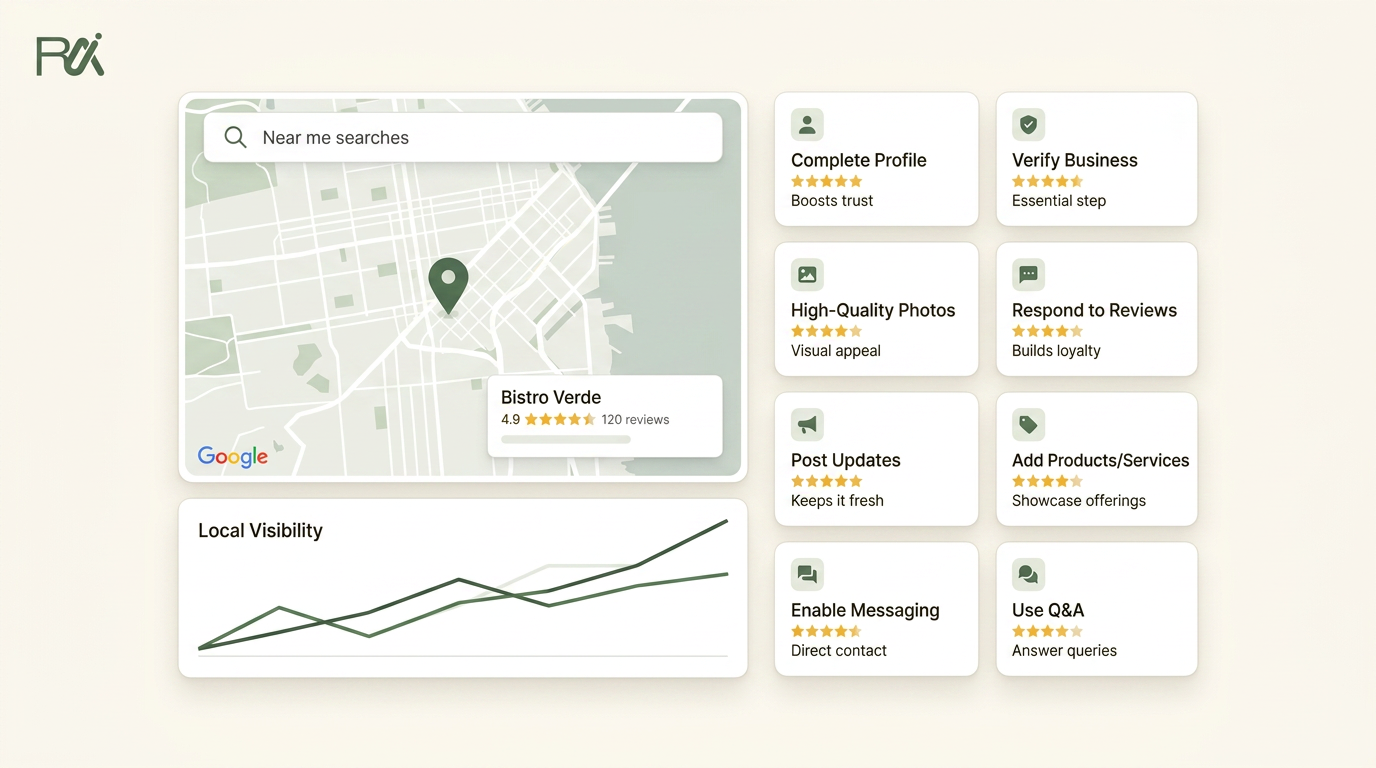
Table of Contents
- 1Introduction
- 21. Complete Every Profile Field to Show Up in More Searches
- 32. Ask for Reviews Consistently After Every Transaction
- 4Make the ask part of the process
- 53. Respond to Every Review, Positive and Negative
- 6Keep replies short and useful
- 74. Fix Your Hours to Prevent Lost Customers
- 8Treat hours like live information
- 95. Post Regularly to Keep Your Profile Active
- 10Keep posts tied to real activity
- 116. Add High-Quality Photos to Your Listing
- 12Show the real business, not a stock version
- 137. Monitor Your Competitors' Profiles to Stay Competitive
- 14Benchmark the top few, not everybody
- 158. Audit Your Categories to Match How Customers Search
- 16Choose the main category around your main revenue
- 178-Point Google Business Profile Tips Comparison
- 18Your Next Step for a Better Profile
Introduction
You can run a solid business and still lose the map results. A customer searches near me, sees three competitors first, and calls them instead. The fix is usually not a bigger budget. It's a cleaner, more active Google Business Profile that tells Google and customers exactly who you are, when you're open, and why you're the safer choice.
The fastest wins are usually the basics, not clever tricks. Fill the profile completely. Keep the hours accurate. Ask for reviews without making it awkward. Respond to what people leave behind. Add fresh photos. Then keep the whole thing active enough that it doesn't look abandoned.
That matters because Google says local ranking in Search and Maps is driven by relevance, distance, and prominence, and it also says complete and accurate profile information helps you appear in local results (Google Business Profile help). You can't move your building closer to the searcher, but you can make the rest of the profile easier to trust. For restaurants, salons, clinics, hotels, contractors, and franchises, that's often the difference between getting the call and getting skipped.
1. Complete Every Profile Field to Show Up in More Searches
A half-filled profile looks unfinished because it is unfinished. Google's own guidance ties local visibility to relevance, distance, and prominence, and it says complete and accurate profile information helps you appear in local results (Google Business Profile help). That means the profile basics are not admin work, they are part of how customers find you.

A salon with service categories, real photos, and clear hours gives Google more to work with than a profile that only has a name and address. A clinic that lists appointment types and accepted insurance plans makes it easier for patients to decide whether to call. A contractor that adds service areas and project photos looks real, local, and available.
Busy owners should treat this like a short weekly job, not a one-time setup. Start with the fields that answer the questions people ask before they visit. What do you do. When are you open. Where do you serve. What should they expect when they arrive. If you run multiple locations, each one needs its own correct profile with its own hours and details, not a copied version from another branch.
Use your own business language in the description. A restaurant should sound like a restaurant. A clinic should sound like a clinic. BrightLocal notes that the description field is limited to 750 characters, so use that space for useful service facts, not hype or sales language (BrightLocal description guide). For a full walkthrough, see our guide on how to optimise your Google Business Profile in 2026, the complete checklist. For more on this, the Opttab local listings guide provides further detail.
Practical rule: If a customer would ask it before visiting, it belongs on the profile.
A good weekly habit is to review the profile the same way a customer does. Search it on your phone. Check the hours. Check the photos. Check the services. If something feels vague or outdated, fix it before the next busy week starts.
For restaurants, that often means updating holiday hours, menu links, and takeout details before the dinner rush. For salons, it may mean adding service categories like balayage or beard trim so people see the right fit fast. For clinics, it can be the difference between listing telehealth options or leaving patients unsure whether to call. Contractors should keep service areas, payment options, and project photos current so the profile matches the jobs they want.
2. Ask for Reviews Consistently After Every Transaction
Reviews shape trust before anyone calls, books, or walks in. The practical rule is simple. Ask every time the experience is fresh, then make the request part of the normal workflow.
A busy restaurant can place a QR code on the receipt and ask guests to review after the meal, while the table still feels the service. A salon can send a short text after checkout, when the haircut or color is still top of mind. A clinic can include the request in the follow-up message after the appointment, and a contractor can hand over a review card as soon as the job is signed off. The point is to match the ask to the moment.
Make the ask part of the process
The biggest problem is inconsistency. Staff get busy, the request gets skipped, and the profile goes quiet. That is why the ask needs a fixed place in the process, or it needs to run automatically so it does not depend on whoever happens to be working that day.
Use the point when the customer is most satisfied. Right after service. Right after pickup. Right at checkout. QR codes usually work better than asking someone to type a link, because they are faster and easier to use at the counter, in the receipt folder, or on a printed handout. The goal is not pressure. It is making the next step easy for people who already had a good experience.
Automated follow-up helps keep that habit from slipping when the week gets busy, and a useful overview of that approach is in how to automate review requests without missing customers. For more ideas, you can find several review request strategies from YipSMS Inc. in their guide.
Keep the ask simple, then stop talking. The easier you make it, the more often customers follow through.
3. Respond to Every Review, Positive and Negative
A profile with reviews and no replies feels ignored. A profile with steady, thoughtful responses looks like someone is paying attention. Responses do not change your ranking by themselves, but they shape how people read your business once they open the profile. That matters for restaurants, clinics, salons, and contractors, where trust often decides whether someone calls, books, or walks away.
A one-star review about slow service looks different when the manager answers calmly and explains the next step. A five-star review feels stronger when you acknowledge it instead of leaving it sitting there. A competitor with fewer reviews but active replies can look more reliable than a business with a larger count and silence underneath.

Keep replies short and useful
You do not need long paragraphs. For positive reviews, a short thank-you is enough. For negative reviews, stay professional and move the fix offline. Never argue in public. Even when a reviewer is unfair, the reply still shows future customers how you handle pressure.
A restaurant can answer a complaint about slow seating by acknowledging the wait and inviting the guest to contact the manager. A salon can thank a happy customer by name and mention the stylist. A clinic can address a wait-time complaint by acknowledging the delay and asking the patient to speak with the front desk. A contractor can reply to a concern about cleanup by saying the issue matters and that the office wants to hear more. Those replies show a real team is watching.
For specific examples, see our guide on how to respond to a negative Google review with examples.
A quiet profile says you are busy. A responsive profile says you are paying attention.
Set one weekly reminder and keep it. Scan new reviews, reply to the ones that need attention, and look for patterns. If the same complaint keeps appearing, that is not a Google issue. That is operational feedback.
4. Fix Your Hours to Prevent Lost Customers
Wrong hours are one of the quickest ways to lose a customer before you ever hear from them. They search, they see you're open, they drive over, and the door is locked. That usually leads to frustration, a missed sale, and sometimes a bad review that didn't need to happen.
A salon that forgets to mark Monday closures will keep disappointing Monday walk-ins. A restaurant with weekend hours that never get updated will confuse people trying to book Friday night. A contractor whose office is closed for August but still shows normal hours will waste time with calls from people who need scheduling help now.
Treat hours like live information
Google tries to keep up with changes, but it doesn't catch everything. Seasonal shifts, holidays, emergency closures, and simple data entry errors all create problems. That's why hours should be checked on a schedule, not only when somebody remembers.
Update seasonal hours before customers start showing up. Mark holidays in advance. If your schedule is irregular, use the notes area to make the pattern clear. For multi-location businesses, don't assume one branch matches another. Each location needs its own accurate setup.
This is one of those profile details that seems small until it causes a problem. A customer who sees the wrong hours often doesn't call to ask. They just leave.
5. Post Regularly to Keep Your Profile Active
A profile that hasn't been updated in months looks stale, even when the business is healthy. Google Business Profile posts are short updates that appear on the profile and in search results, and they give people a reason to believe you're still active. They also help your listing look current when customers compare you with nearby competitors.
A restaurant can post weekly specials every Monday. A salon can post photos of new services or training. A clinic can post flu shot availability or updated office hours. Those aren't marketing stunts. They're proof that the business is still open, still serving, and still paying attention.
Keep posts tied to real activity
Do not post just to fill space. Post what actually changed. New menu items. Seasonal offers. Team updates. Temporary hour changes. If you run multiple locations, each one should post for itself so the profile activity reflects that branch, not the whole company.
Third-party guidance that summarizes Google's posting rules says posts should be accurate, truthful, and free of spam or misleading claims. It also says posts should use normal sentence case and follow the same content rules as the rest of the profile (Google Business Profile posts best practices). The safe approach is to keep them simple and real.
A good posting habit is one or two short updates each month, then more when something changes. Use a photo when you can. Add a plain call to action. Keep it honest.
6. Add High-Quality Photos to Your Listing
Photos are often the first proof people see. Before they read your description, they scan the images. Before they call, they decide whether your place looks real, current, and worth the trip. That's true for a hotel lobby, a salon chair, a clinic waiting room, a restaurant plate, and a contractor's finished job site.
One source in the local business space notes that businesses with photos get 30%–50% more profile views (GBP statistics overview). Even if you ignore the exact lift and just look at customer behavior, the pattern is clear. Visuals change whether people keep scrolling or move on.
Show the real business, not a stock version
Use photos of your actual space, your team, and your work. A restaurant should show dishes, seating, and the exterior so people can recognize the place. A salon should show real cuts, color work, and clean stations. A contractor should show completed jobs, not logos on a truck. A hotel should show rooms, lobby, and amenities, not only the building front.

Take the photos in good light. Update them when the season changes or the space changes. Remove anything that no longer reflects the current business. Old photos make a place feel neglected, and blurry photos make it look less trustworthy.
If you need help making images look more polished before they go up, this photo improvement guide is a useful reference. The main point is simple. Real beats perfect, but clear beats both.
7. Monitor Your Competitors' Profiles to Stay Competitive
You are not competing against every business in your category. You're competing against the few that keep showing up for the same local searches. When someone types “dentist near me” or “restaurant near me,” Google shows a short map results group, and that group is where most attention goes.
If the competitor across town has more reviews, better photos, and more complete information, that's not trivia. It's a map of where your profile is falling behind. If another salon in your area posts weekly while yours has been quiet for months, that tells you the market expects activity. If a contractor next door has a full service menu and yours says almost nothing, you've found a gap.
Benchmark the top few, not everybody
Pick three to five real competitors and check them once a month. Look at review count, review recency, photo count, post activity, categories, and whether the profile feels complete. You're not trying to copy their strategy. You're trying to understand the standard in your market.
If your top competitor looks more complete than you, assume customers notice it too.
Use the comparison to decide what to fix next. Maybe you need more photos. Maybe your categories are too vague. Maybe your hours are wrong. Maybe you have a service listed that your competitors surface more clearly. That's the kind of market signal a busy owner can use.
8. Audit Your Categories to Match How Customers Search
Your category tells Google what your business is. If that category is too broad or just plain wrong, you'll miss searches from people who are ready to buy. A salon can be a hair salon, a beauty salon, or a barber shop. A clinic can be family practice or urgent care. A contractor can be general contractor or something much narrower. The category shapes who finds you.
This is one of the easiest mistakes to make and one of the hardest to notice. Owners often choose a label once, then forget it. The business grows, the service mix changes, but the category stays frozen. By then, you've spent months missing the searches you wanted.
Choose the main category around your main revenue
Pick the category that matches what you do most, not the side service you offer once in a while. Then use secondary categories only where they fit. If Google doesn't have the exact label you want, choose the closest real one rather than settling for something vague.
Google also says your profile should match how your business is consistently represented, with the fewest categories needed to describe your core business and only one profile per business (Google Business Profile help). That's a reminder to keep categories clean, not crowded.
Search Google for the kind of business you run and see which categories appear for others in your market. Then compare that with what's on your profile. If you accept credit cards, offer parking, or support online booking, turn on the relevant attributes too. Those details help customers decide faster.
8-Point Google Business Profile Tips Comparison
| Strategy | 🔄 Implementation Complexity | ⚡ Resource & Time | 📊 Expected Outcomes (⭐) | Ideal Use Cases | 💡 Key Advantages / Tips |
|---|---|---|---|---|---|
| Complete Every Profile Field to Show Up in More Searches | Medium, one‑time detailed setup | Initial: a few hours; maintenance: low | ⭐⭐⭐⭐, broader local visibility & higher conversion | Any local business, multi‑location brands | Free, comprehensive ranking signal; update quarterly; use real photos |
| Ask for Reviews Consistently After Every Transaction | Medium, process + automation recommended | Ongoing (automate email/SMS/QR); staff time otherwise | ⭐⭐⭐⭐, steady review growth & improved trust | High‑transaction businesses (retail, restaurants, hotels) | Automate requests, time them immediately after purchase, test channels |
| Respond to Every Review, Positive and Negative | Low, repeatable routine | Ongoing (≈10 minutes/day if batched) | ⭐⭐⭐, stronger customer perception & credibility | Any business receiving reviews, service providers | Reply within 48h, stay professional, offer offline resolution for negatives |
| Fix Your Hours to Prevent Lost Customers | Low, simple data entry | Minimal (≈5 minutes); update for holidays/seasonal changes | ⭐⭐⭐, prevents lost visits; reduces frustration | Businesses with variable or seasonal hours | Set holiday/special hours in advance; review quarterly |
| Post Regularly to Keep Your Profile Active | Low–Medium, requires content cadence | Small recurring effort (minutes weekly/monthly) | ⭐⭐, signals activity; modest ranking/engagement boost | Promotions, events, restaurants, retail | Post 2×/month min; use images and CTAs; schedule ahead |
| Add High-Quality Photos to Your Listing | Low–Medium, need quality assets | Initial batch (10–15 photos) then monthly updates | ⭐⭐⭐⭐, higher click‑through & conversion from searches | Visual businesses (restaurants, hotels, salons, contractors) | Use real, recent photos; vary types; update seasonally |
| Monitor Your Competitors' Profiles to Stay Competitive | Medium, manual or tool‑based tracking | Ongoing (monthly checks or automated alerts) | ⭐⭐⭐, strategic insights to prioritize improvements | Competitive local markets | Track top 3–5 competitors monthly; benchmark reviews, posts, photos |
| Audit Your Categories to Match How Customers Search | Low, one‑time decision, occasional review | Minimal (one‑time, effects may take weeks) | ⭐⭐⭐⭐, unlocks relevant search queries | Businesses with ambiguous or changing service mixes | Choose primary by main revenue stream; add relevant attributes; review annually |
Complete Every Profile Field to Show Up in More Searches
Ask for Reviews Consistently After Every Transaction
Respond to Every Review, Positive and Negative
Fix Your Hours to Prevent Lost Customers
Post Regularly to Keep Your Profile Active
Add High-Quality Photos to Your Listing
Monitor Your Competitors' Profiles to Stay Competitive
Audit Your Categories to Match How Customers Search
Your Next Step for a Better Profile
The best google business profile tips are the boring ones you keep doing. The profile needs accurate hours, real photos, current posts, review activity, and responses that show a real person is behind the listing. If you fix everything once and then leave it alone, it will drift. That's what happens in busy businesses. The owner gets pulled into operations, and the profile slowly goes stale.
Start with one task this week. If reviews are piling up unanswered, handle those first. If your hours are wrong, fix those today. If the profile looks empty, add the missing photos and services before you touch anything else. Small, steady updates matter more than a one-time rewrite.
For multi-location businesses or owners who don't have time to keep up with every request and reply, RecensioAI B.V. is one option that handles review requests, responses, profile audits, and post activity in one place. It's useful when the profile work keeps getting pushed aside, and you still need the listing to stay active enough for people searching on Google Maps.
---
If you want a cleaner way to keep your Google Business Profile active without chasing staff for every review request and reply, visit RecensioAI B.V.. It's built to help local businesses keep profile activity moving, which is exactly what busy owners need when near me searches are sending customers to competitors first.
You might also like
Handpicked articles for you
Hotel Review Management: Automate Post-Stay Requests with Apaleo, Mews and Your PMS
A practical guide to turning hotel checkouts into timely review requests, with Apaleo live, Mews early access and flexible PMS alternatives.
Why the Business Around the Corner Beats You on Google: What 21,373 Profiles Reveal
We compared 21,373 Google Business Profiles with their three strongest nearby competitors. The gap is smaller than most owners think, but it has two sides: rating and volume.
Treatwell Review Management for Salons: One Reputation View Alongside Google
Bring your public Treatwell rating and recent reviews into RecensioAI, then combine salon signals with Google for faster, better decisions.