
How to Read Google Business Profile Insights
Learn what Google Business Profile insights actually measure, how to interpret the numbers, and how to turn them into real decisions for your local business.
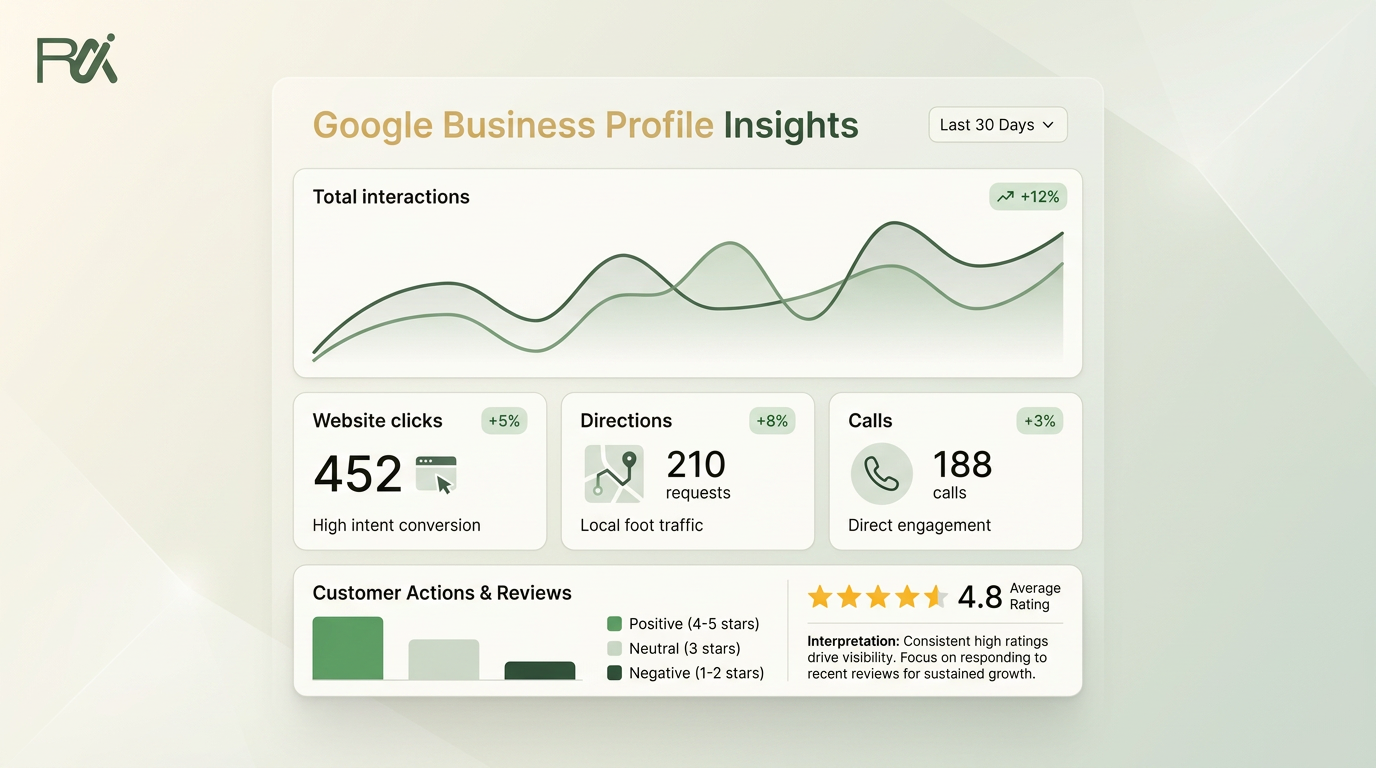
Table of Contents
- 1Introduction
- 2The Numbers on Your Dashboard and Why They Change
- 3Treat the dashboard as a set of instruments
- 4What Each Metric Actually Measures
- 5Views and searches
- 6Directions, website clicks, and bookings
- 7Reading the Search Breakdown
- 8Use the split as a channel report
- 9Turning Calls, Directions, and Clicks into Decisions
- 10Read each action as an operating signal
- 11Five questions for this week
- 12How Insights Connect to Local Search Visibility
- 13Separate ranking factors from trust signals
- 14A Weekly Rhythm for Acting on the Numbers
- 15Follow the same five checks
- 16Reading Insights Across Multiple Locations
- 17Build a useful location view
- 18Common Traps and Your Next Move
- 19Check the quiet failures
Introduction
You open your Google Business Profile because the restaurant feels quiet, the salon has fewer bookings, or the clinic phone stopped ringing as often. The dashboard shows numbers, but it doesn't tell you what to do next. You see views, searches, calls, and clicks, then close the tab and return to the day's work.
I used to read it that way. After months of watching the numbers move without understanding why, I started treating the profile like a front door. Views tell you how many people looked toward the door. Searches tell you how they found it. Calls, directions, messages, bookings, and website clicks show what they did next. That simple shift makes Google Business Profile insights much easier to use.
The Numbers on Your Dashboard and Why They Change
A restaurant owner might see more discovery searches after adding a new cuisine category, then more direction requests when the weather improves. A dental clinic may receive more direct searches because existing patients already know its name. A salon might see website clicks rise after updating its service list, while bookings stay flat because the booking link is outdated.
None of these patterns means the dashboard is broken. The numbers reflect changes in demand, season, customer habits, profile setup, and the work your team did before the reporting period. Google officially expanded Business Profile insights on 9 August 2016, when it announced that businesses could see where and how people found them on Google. The feature has since developed into the Performance view, which includes views, searches, and actions from organic results and Google Ads. Google's original announcement explains that early development.
Treat the dashboard as a set of instruments
The Performance view isn't a grade. A lower number isn't automatically bad, and a higher number isn't automatically useful. A thousand profile views don't help much if customers can't call, book, find your entrance, or understand what you offer.
Google's current support documentation calls the feature Performance. You can access it from Search or Maps, and the interface or bulk download lets you review up to 6 months of data. That window is long enough to spot recurring patterns, but you should still review the profile regularly so small problems don't remain hidden.
Practical rule: Don't ask whether the number is “good” before asking what changed around it.
Write down what happened in the business. Did you change opening hours? Add a treatment? Upload photos of the dining room? Hire a new receptionist? Run a local promotion? When the dashboard moves, those details help explain the movement. Your job isn't to admire the graph. It's to connect the graph to a decision on the floor.
What Each Metric Actually Measures
Start with the tiles in the order Google presents the customer journey. Each metric has a simple meaning and a more precise working meaning.

Views and searches
A clinic with the wrong phone number can lose useful call data and real patients. A salon that hasn't enabled or connected messaging may have no message activity because the path isn't available, not because customers have no questions.
- Views: The number of times people viewed your profile or listing. A view doesn't prove that someone read every field or visited your business.
- Searches: The queries connected with your profile appearing in Google Search or Maps. Search terms can reveal whether people know your name or are looking for a category.
- Calls: A call is counted after someone taps the call button on your profile. It won't include a customer who sees your phone number and dials it manually.
- Messages: This records customers who use the message option on the profile. If your team doesn't monitor the connected channel, a high message count can still produce poor customer service.
Directions, website clicks, and bookings
Google's operational guidance explains that calls, directions, and website clicks are tracked as specific events, not as vague engagement. The Google Business Profile help page on performance metrics also makes clear why setup matters. Your phone number, website URL, booking provider, and profile buttons must point to working destinations.
- Direction requests: One direction request represents a tap for directions. It doesn't confirm that the customer reached the location or walked through the door.
- Website clicks: This counts taps on the website button, separately from total profile views or other interactions. A restaurant customer may click to compare the menu without requesting directions.
- Bookings: These depend on a booking provider being configured correctly. A clinic without a connected provider may receive booking requests by phone, but those won't appear as profile bookings.
Reading the Search Breakdown
The search breakdown answers a basic question: did people already know you, or did Google introduce you to them?
A direct search usually means someone typed your business name or a close version of it. For a dental clinic with many returning patients, direct searches can be a healthy sign of recognition. A branded search is also connected to a known brand, such as a hotel group or salon chain. Discovery searches happen when someone searches for a category, service, or phrase such as “dentist near me” and your profile appears.
Google Business Profile reporting exposes search queries and profile views, while the related support guidance describes how businesses can see which queries triggered impressions. Google's insights documentation is the right place to check the terminology and available reporting.
Use the split as a channel report
Don't treat all searches as one bucket. Read them like sales channels.
| Industry | Typical Discovery | Typical Direct | What it tells you |
|---|---|---|---|
| Restaurant | Often heavy | Often mixed | New diners may find the restaurant through cuisine, meal, or “near me” searches. |
| Dental clinic | Often mixed | Often stronger with returning patients | Direct activity may reflect patient familiarity, while discovery shows reach beyond the existing base. |
| Salon | Often mixed | Often mixed | Service searches can bring new clients, while direct searches show repeat recognition. |
| Hotel | Often discovery-led | Often mixed | Travelers may search by location or accommodation type before knowing the property name. |
| Contractor | Often discovery-led | Often mixed | Customers may search for a service and location before comparing providers. |
Restaurant
Dental clinic
Salon
Hotel
Contractor
These are qualitative operating patterns, not targets. A restaurant with mostly direct searches may have strong local loyalty, but it may also be missing people searching for its food category. A clinic with heavy discovery searches may be reaching new patients, while a sudden fall in direct searches could reflect a name, address, or brand-visibility problem.
Look at the actual phrases. If a salon sees searches for “hair color near me” but the profile's services barely mention color work, that gap gives you a practical listing task. If a contractor appears for services it doesn't offer, the profile may need clearer categories and service descriptions.
Turning Calls, Directions, and Clicks into Decisions
The action tiles become useful when you pair each one with a question. Don't ask only, “Did calls go up?” Ask what the customer was trying to do and whether your business made that action easy.

Read each action as an operating signal
Calls can expose staffing pressure. If calls rise on the days your receptionist is already busy, review whether someone else should answer during that period. For a contractor, missed calls may mean the owner needs a clear callback routine.
Directions show interest in visiting, but not arrival. If direction requests rise while calls remain quiet, customers may already have enough information and want to confirm the location. Check the map pin, entrance instructions, parking details, and address formatting.
Website clicks often indicate research. A restaurant visitor may be checking the menu. A salon visitor may be comparing services. Make sure the linked page opens quickly, reflects the current offer, and shows the next action clearly.
Messages need an owner. If nobody checks the connected inbox, switch the channel to a monitored workflow or make sure a responsible team member handles it during opening hours.
Bookings are only meaningful when the booking provider works. Test the button yourself. A broken booking path can make the tile appear quiet even when customers are ready to schedule.
Five questions for this week
Don't invent a “healthy” action threshold from someone else's business. A restaurant, hotel, salon, clinic, and contractor have different customer journeys. Compare your current pattern with your own earlier periods, then check whether the action leads to a real operational outcome.
- Are calls arriving when someone can answer?
- Do direction requests lead to a clear entrance and accurate map pin?
- Does the website button open the right page?
- Are messages reaching a real person?
- Does the booking button complete a real appointment?
How Insights Connect to Local Search Visibility
Google Business Profile insights measure visibility and customer behavior, not ranking by themselves. More profile views don't guarantee a better position in map results, and a change in one tile doesn't prove that a single profile edit caused the change.
Google's documented local ranking factors include relevance, distance, and prominence. Review count and review rating are documented factors within local search prominence. That doesn't mean you should chase reviews at the expense of service, and it doesn't mean a review tool can guarantee placement in the local pack.
Separate ranking factors from trust signals
Responding to reviews, writing useful review replies, and publishing posts can support trust, engagement, and profile completeness. They aren't confirmed ranking factors, so don't promise yourself that posting alone will move your business into the map results.
The same applies to profile details. Accurate hours, categories, services, attributes, photos, and contact information make it easier for customers to understand the business they see. They also help explain the performance data. If views are present but calls are absent, the problem may be the offer, the phone setup, or customer confidence, not merely visibility.
For a broader explanation of how local visibility connects with profile management, read this guide on getting your local business onto the first page of Google. If you need to combine profile data with other reporting sources, marketing agency Google Business Profile reporting provides useful context for organizing the information.
Keep the model simple: Insights tell you what customers did. Profile management affects what they can understand and choose. Ranking depends on several signals, not one dashboard number.
A Weekly Rhythm for Acting on the Numbers
Set aside 20 minutes at the start of the week. Monday morning works well for many businesses, before the restaurant opens, the salon fills, or the clinic starts appointments.

Follow the same five checks
Suppose a restaurant's calls fell while its website clicks stayed steady. The manager checks the profile and finds that the phone number changed on the website but not on the Business Profile. The weekly action is clear: correct the number, test the call button, and record the date. The next review can then show whether the tile recovered, without pretending the edit guarantees a result.
A salon may see discovery searches for a service it recently added, but no bookings. That points to the booking path, pricing clarity, or appointment availability. A clinic may see direction requests fall after moving reception to a side entrance. Add entrance guidance and update the photos so visitors know where to go.
For ideas on turning recurring measurement into operational changes, see this resource on improving key metrics with Voicedial.ai. You can also use this local SEO audit checklist for your Google Business Profile to inspect the fields that shape what customers see.
- Open the Performance tab. Record views, searches, calls, messages, directions, website clicks, and bookings for the selected period.
- Compare with an earlier period. Google lets you filter the report by date range. Compare a recent period with a comparable earlier period, not automatically with a holiday or unusually quiet week.
- Note what changed. Write down new hours, photos, services, categories, posts, menu changes, staffing changes, weather, and local events.
- Review search terms. Separate known-name searches from service and category searches. Look for useful phrases customers use that your profile doesn't clearly support.
- Draft one action. Pick one fix that a staff member can complete. Don't create a long list that nobody owns.
Reading Insights Across Multiple Locations
A five-location salon chain can't compare stores fairly by raw totals. A busy downtown branch has different demand from a suburban branch, and a hotel near a convention center has a different search pattern from one serving highway travelers.
Google supports bulk performance downloads and date-range filtering, but its native reporting remains centered on individual locations. There isn't a standard consolidated benchmark that tells you what one store should achieve compared with every other store. Build your own roll-up without losing the details that explain each result.

Build a useful location view
Export the same date range for every location. Put each store on its own row, then include columns for views, searches, discovery searches, direct searches, calls, messages, directions, website clicks, and bookings. Add notes for local conditions, profile changes, and operational issues.
Read the sheet in two directions:
A franchise manager might find that three salons have similar discovery patterns, while two have fewer direction requests. The next check isn't “which manager is failing?” It's whether those two profiles have accurate pins, parking information, and current exterior photos. Look for shared causes before blaming individual stores.
Google's support guidance covers bulk downloads and filters in its Business Profile performance reporting documentation. For a practical framework for comparing locations, use this Google Business Profile benchmark guide.
- Across the network: Look for a shared fall in discovery searches that may point to a category, service, or brand-wide profile issue.
- Within one location: Look for an unusual gap between visibility and action, such as views without calls or website clicks without bookings.
- Against local context: Compare stores serving similar areas and customer types. Don't punish a low-volume location because another branch sits in a busier market.
Common Traps and Your Next Move
The first trap is chasing raw views. Views matter only when they connect with the actions your business needs. A contractor may prefer fewer, highly relevant calls to many casual profile visits. A hotel may care more about booking activity than a large impression count.
The second trap is treating insights as a score. The dashboard can't tell you whether a quiet week came from bad profile setup, weak demand, weather, staffing, or a local event. It gives you clues, not a verdict.
Check the quiet failures
This week, choose a baseline period, record the main tiles, fix one missing field or setup error, and write down exactly what changed. Review the same type of period later and ask whether the change affected a business decision. If the numbers never change what you do, they're decoration.
---
RecensioAI B.V. offers review requests, review monitoring, profile audits, post support, competitor tracking, and multi-location reporting in one workflow, while keeping public Google review and private feedback options side by side for the customer to choose. Visit RecensioAI B.V. to review your profile and turn this week's dashboard findings into an action list.
- Wrong phone number: Calls may be missing because customers can't reach the right line.
- Broken booking link: Bookings can stay empty when the provider isn't connected or the button fails.
- Bad map pin: Direction requests can suffer when the entrance or location marker is confusing.
- Thin service details: Discovery searches may not reflect the services customers are seeking.
- Posting without follow-through: Posts can keep the profile current, but they won't replace accurate hours, useful photos, or a working contact path. Google also archives posts older than 6 months unless a date range is specified, so regular activity matters for profile freshness. Google explains the post archive rule in its support documentation.
You might also like
Handpicked articles for you
Hotel Review Management: Automate Post-Stay Requests with Apaleo, Mews and Your PMS
A practical guide to turning hotel checkouts into timely review requests, with Apaleo live, Mews early access and flexible PMS alternatives.
Why the Business Around the Corner Beats You on Google: What 21,373 Profiles Reveal
We compared 21,373 Google Business Profiles with their three strongest nearby competitors. The gap is smaller than most owners think, but it has two sides: rating and volume.
Treatwell Review Management for Salons: One Reputation View Alongside Google
Bring your public Treatwell rating and recent reviews into RecensioAI, then combine salon signals with Google for faster, better decisions.