
Connect Your CRM with RecensioAI
Automate review requests by connecting your CRM. New clients automatically receive requests via SMS, WhatsApp & email.
Table of Contents
- 1How It Works — Set Up in 2 Minutes
- 2Step 1 — Go to Automation in Your Dashboard
- 3Step 2 — Create a Zap
- 4Step 3 — Create a Template
- 5Example: Review Template
- 6Step 4 — Turn On Auto-Send
- 7Popular Triggers
- 8Smart Review Filter
- 9Campaigns for Existing Customers
- 10Supported CRM Systems
- 11Need Help? We'll Set It Up for You
How It Works — Set Up in 2 Minutes
Connect your CRM to RecensioAI and every new client automatically receives a review request via SMS, WhatsApp and email — including reminders. No manual work required.
The integration works via Zapier (no code needed) or our REST API for custom setups.
Step 1 — Go to Automation in Your Dashboard
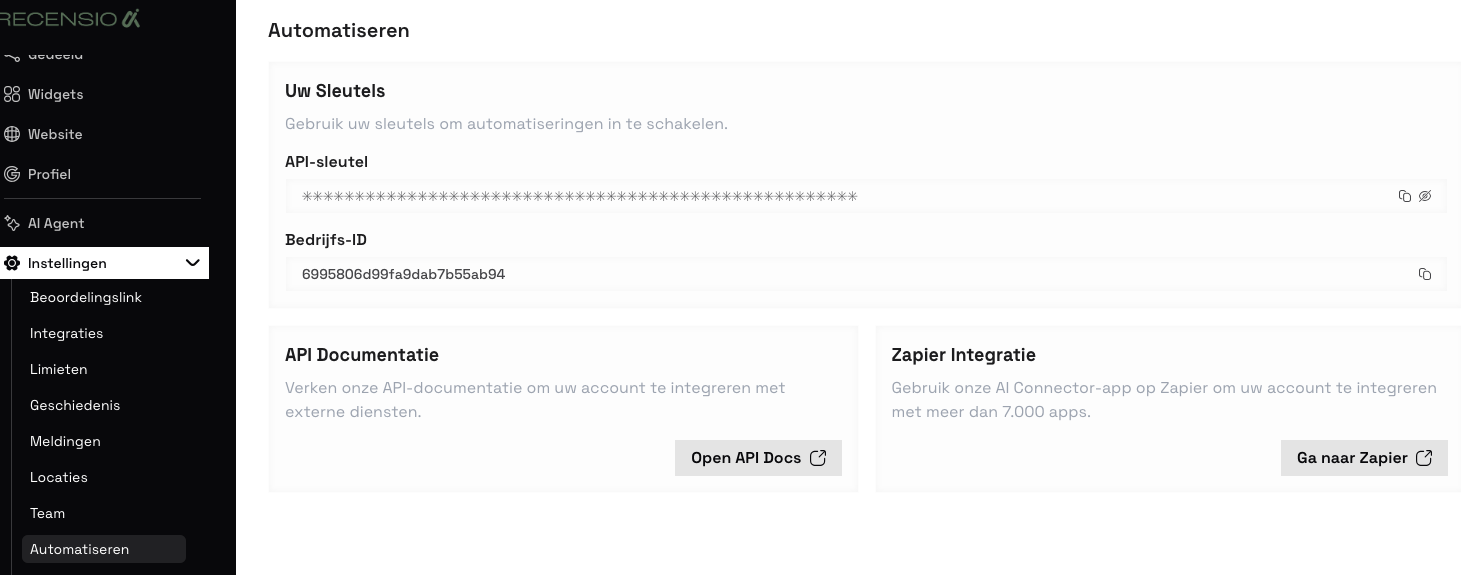
Log in to your RecensioAI dashboard and navigate to Settings → Automation. Here you'll find your API key, Business ID, and direct links to the API documentation and Zapier.
Step 2 — Create a Zap
Click 'Go to Zapier' and create an account if you haven't already. Create a new Zap:
• Trigger → Choose your CRM (e.g. Teamleader, Odoo, HubSpot) • Event → 'Invoice Sent', 'Deal Won' or 'New Contact' • Action → RecensioAI (search for our app on Zapier) • Map the fields → name, email, phone number • Test and publish the Zap
Step 3 — Create a Template
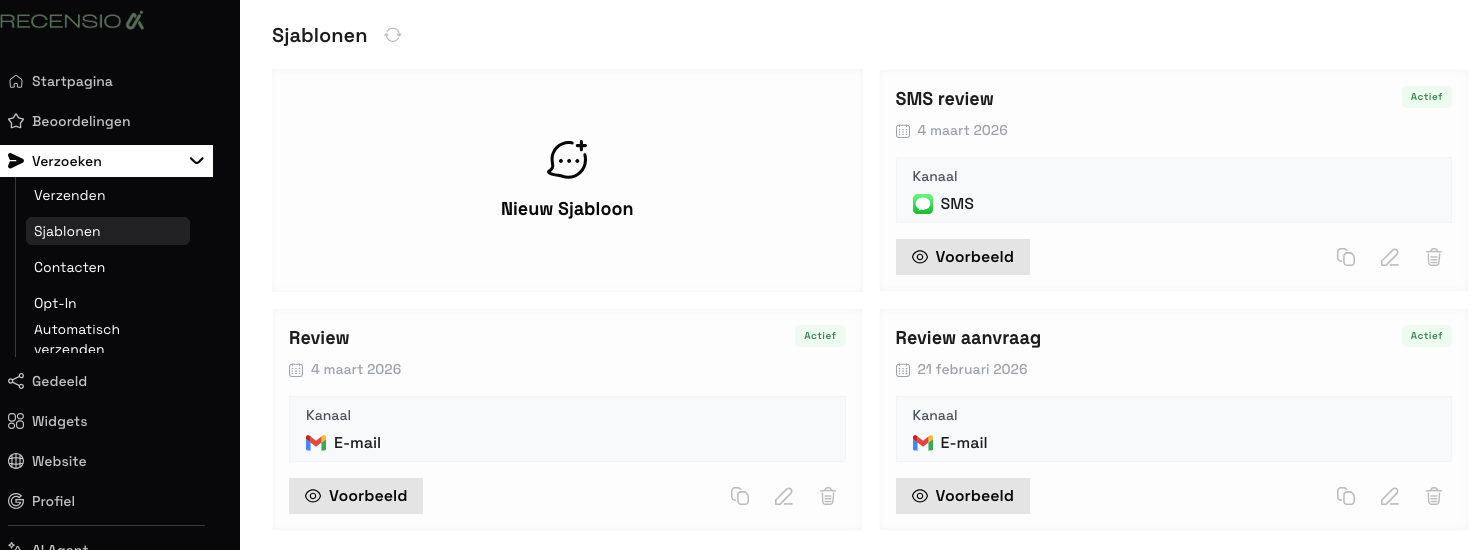
In your dashboard, go to Requests → Templates. Create a new template for SMS, WhatsApp or email. Personalise the text with your business name, a short message and a call-to-action.
Example: Review Template
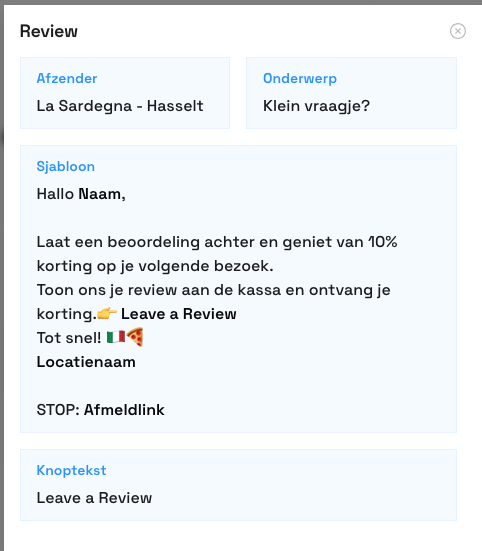
Below you can see an example of a review template. The client receives a personal message with your business name and a direct link to leave a review. You can create multiple templates for different channels and audiences.
Step 4 — Turn On Auto-Send
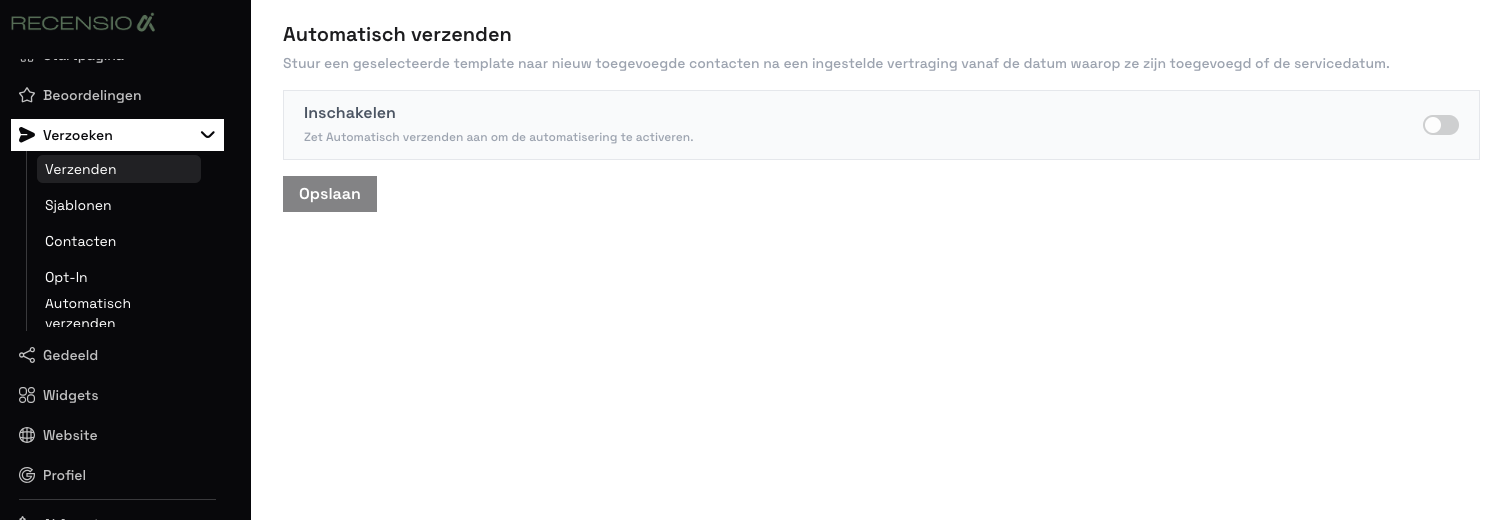
Go to Requests → Auto-Send and toggle it on. Choose your template and set a delay (e.g. 2 days after invoicing). Done! Every new client now automatically receives a review request with reminders.
Popular Triggers
• Invoice sent → Ideal for service providers and freelancers • Deal won → Perfect for sales teams • Project completed → For project-based businesses • New contact → For existing client databases
You can set delays so the client experiences the service first.
Smart Review Filter
Clients who give 4 or 5 stars are redirected to Google to post their review. Clients who give 1–3 stars land on an internal feedback form.
Negative feedback goes directly to you — not online. You set the threshold yourself.
Campaigns for Existing Customers
Besides automatic triggers, you can set up campaigns for your existing customer base:
• All clients from the past year • VIP clients for the most valuable reviews • Segment by service or product • Reactivate old clients
Upload a CSV or use your CRM integration. You see real-time statistics.
Supported CRM Systems
RecensioAI works with any CRM that supports Zapier — including:
• Teamleader — Market leader in the Benelux • Odoo — Open-source ERP, popular in Belgium • HubSpot — Free basic version, great for sales • Salesforce — Enterprise CRM • Pipedrive — Visual sales CRM • Exact Online — Popular in the Netherlands • Gripp — Dutch PSA/CRM • Simplicate — Dutch CRM for SMBs • Yuki — Accounting with CRM • AFAS — ERP, HRM and CRM
No Zapier integration? Use our REST API.
Need Help? We'll Set It Up for You
Pro and Multi customers get free help setting up the CRM integration. Our team has experience with all popular systems and will fully configure the integration for you.
Reach out via the contact page and we'll take care of it. Even for less common CRM systems — no extra costs.
We use cookies to improve your experience. Read our cookie policy for more information.